

kalam
Version:3.0.0
Published:2026-10-14
Introduction
kalam is a versatile note-taking and writing app designed to streamline how you capture ideas, draft content, and organize research across devices. It blends a clean interface with powerful tools for formatting, tagging, and syncing so users can focus on writing without distraction.
What kalam Brings to Your Workflow
Built for people who write regularly, kalam focuses on clarity, speed, and organization. It offers a distraction-free editor, flexible document organization, and fast search so your notes and drafts remain accessible. The app supports multiple formats and has built-in export options to save or share content quickly.
Core Features and Tools
- Rich text editor: Formatting controls, lists, headings, and inline styles make drafting comprehensive documents easy without switching tools.
- Tagging and folders: Combine tags with folders to build a personal taxonomy that scales with your projects.
- Sync and backup: Automatic syncing ensures notes are available across devices and safe in cloud backup.
- Templates and snippets: Save recurring structures such as meeting notes, outlines, or email drafts to speed up repetitive tasks.
- Export options: Export to common formats for sharing or archival: PDF, plain text, and Markdown-ready files.
Interface and Navigation
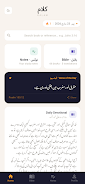
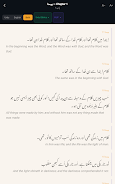
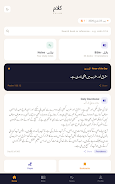
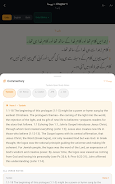
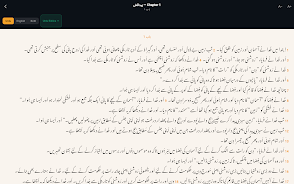
kalam presents a minimal layout that keeps your document at the center of attention. A collapsible sidebar gives quick access to recent notes, tags, and folders while a persistent search bar helps you find content by keyword, tag, or date. Controls are positioned for easy thumb reach, and customization allows hiding elements when you need full-screen focus.
How it Fits into Daily Routines
Whether you're taking quick meeting notes, drafting longer articles, or compiling research, kalam adapts to different writing tasks. Use it as a scratchpad for ideas, a repository for curated resources, or a place to assemble final drafts. Cross-document linking and internal references make it straightforward to connect related notes.
Performance and Compatibility
Optimized for responsiveness, kalam performs smoothly even with large note collections. It supports current Android versions and is built to run efficiently on mid-range devices without excessive battery drain. Background sync is configurable so it won’t interrupt your data plan or slow down other tasks.
Advanced Productivity Features
- Smart search: Filter by tags, dates, and content type. Search results highlight matching phrases inside notes for quick scanning.
- Version history: Review changes or revert to earlier drafts when you need to restore content.
- Keyboard shortcuts: External keyboard users benefit from shortcuts for formatting, navigation, and quick actions.
- Offline access: Work without an internet connection and let kalam sync updates when you go online.
Security and Privacy
kalam includes options for local passcodes and biometric locks, along with encrypted cloud backups to protect sensitive notes. Privacy controls let you decide which notebooks sync and which remain local, giving you confidence when storing personal or work-related information.
Customization and Personalization
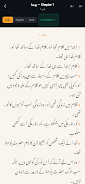
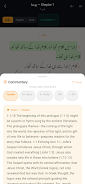
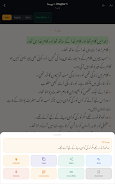
Adjust the reading and editing experience with multiple themes, adjustable font sizes, and line spacing options. Create custom templates and snippet libraries tailored to recurring workflows. These personalization features make kalam flexible for writers, students, and professionals.
Getting Started Quickly
Begin by creating a new notebook, adding a few tags, and importing any existing notes you want to keep. Use a template to structure your first document, then explore search and linking to organize content. Built-in tutorials guide initial setup, and contextual hints help you discover features as you use the app.
Who Benefits Most
kalam is a solid choice for anyone who needs an uncluttered writing environment with robust organization tools. It suits journalists, students, researchers, and professionals who value quick access to notes, reliable syncing, and straightforward export options. The app’s balance of simplicity and depth lets you scale from short reminders to large research projects without changing platforms.
Final Notes on Using kalam
With thoughtful design and practical features, kalam aims to reduce friction in everyday writing tasks. Its combination of speed, organization, and security makes it a dependable tool for managing ideas and producing polished content on Android devices.
Show More
Information
Screenshots

Latest Update












Hot Tags
Latest News
-
![Revealing the Launch Playlists and Cross-Progression for COD Warzone Mobile News]()
-
![March 2024 Free Redemption Codes for Honkai: Star Rail News]()
-
PUBG Mobile Teams Up with Bentley Motors: Luxury Cars, Exclusive Collectibles, and Beyond 2024-04-18
![PUBG Mobile Teams Up with Bentley Motors: Luxury Cars, Exclusive Collectibles, and Beyond News]()
-
![Monster Never Cry is now accessible on both Android and iOS mobile devices. News]()
-
V2.2 of the Farlight 84 update introduces an overhauled Season structure, fresh in-game currency, an 2024-04-16
![V2.2 of the Farlight 84 update introduces an overhauled Season structure, fresh in-game currency, an News]()
-
![Arrival of Genshin Impact 4.6 Update: 'Embers of Two Realms, Twilight of Crimson' News]()
-
April 2024 Clash of Clans Update: Unveiling a Fresh Companion, Enhanced Levels, Chat Tagging, and Be 2024-04-16
![April 2024 Clash of Clans Update: Unveiling a Fresh Companion, Enhanced Levels, Chat Tagging, and Be News]()






