

Photo Critic
Version:1.8.0
Published:2026-10-15
Introduction
Photo Critic is an AI-powered photo evaluation tool that reviews a single image and offers professional-style feedback to help you improve composition, lighting, color balance and subject separation in seconds. Designed for photographers who work with DSLRs, mirrorless cameras or smartphones, Photo Critic provides clear, actionable suggestions—such as adjusting framing, changing distance to a subject, or using directional light—so you can make better images without getting lost in technical jargon.
Key features and analysis
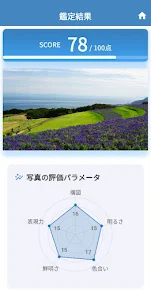
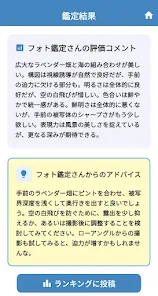
Photo Critic delivers an instant score and a breakdown of strengths and weaknesses for a single photo, highlighting elements like rule of thirds alignment, leading lines, exposure balance and subject prominence. The analysis is presented in layers so you can view a quick summary or drill down into detailed notes about color rendering, contrast, and background separation. A built-in review history stores past evaluations so you can compare earlier shots with current results and track your technical progress over time.
Controls and interaction
The interface focuses on simple, familiar controls: choose or capture a photo, tap areas of interest to see focused comments, and use sliders to simulate suggested adjustments such as exposure, crop, or color temperature. Navigation is deliberately lightweight so you can run an evaluation in a few taps. Tooltips and contextual help explain terms like dynamic range and subject isolation, making the controls approachable for beginners while remaining efficient for experienced users.
Progression and improvement tracking
Rather than gamified rewards, progression in Photo Critic is based on measurable improvement: the app records scores, stores timestamps for each review, and visualizes trends so you can see which compositional choices consistently raise or lower your ratings. Milestones are presented as personal benchmarks rather than public trophies, helping you set realistic goals such as improving lighting scores or achieving better subject separation across a series of shoots.
Visual style and user experience
The app uses a clean, minimal visual design that emphasizes readability and contrast between analysis panels and the image area. Visual overlays show suggested crops, horizon lines and focal points without permanently altering the original image. Colors in the UI are chosen to remain unobtrusive so your photos remain the primary focus, and the layout adapts to both phones and tablets to make the critique experience comfortable on any device.
Customization and depth of feedback
Photo Critic lets you tailor the depth of feedback to your needs. Choose a quick evaluation for a fast score and essential tips, or select an in-depth pass that highlights multiple technical and compositional factors. You can also prioritize areas of interest—composition, color, or lighting—so the critique emphasizes what matters most to your current goals. These customization options keep the feedback relevant and reduce repetitive suggestions as you improve.
Replay value and practical use
The app encourages iterative practice: apply a suggestion, retake or re-edit the photo, and re-evaluate to see how the score changes. Because evaluations focus on single-image improvements, Photo Critic is useful for on-location checks, studio tests, and quick learning sessions. The combination of instant feedback and stored history creates natural replay value for photographers who want to refine a consistent style or quickly test lighting setups.
Accessibility, offline behavior and reliability
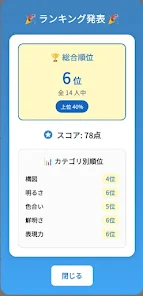
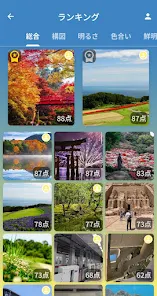
Accessibility features include clear text labels, adjustable font sizes, and high-contrast display options to support users with visual needs. Basic single-photo analysis is designed to work reliably on-device for quick checks; certain network features, such as score synchronization and community discovery, require an internet connection. The app handles intermittent connectivity gracefully so you can continue local reviews and sync results later when online.
Limitations and realistic expectations
Automated analysis cannot always capture subtle artistic intent, narrative context, or highly experimental aesthetics, so Photo Critic frames its recommendations as technical guidance rather than definitive judgments. Scoring emphasizes measurable image qualities, which may feel more analytical than conversational critique. Use the suggestions as practical starting points and combine them with your creative intent for the best results.
Who benefits from Photo Critic
Photographers at every level will find value: beginners get simple, actionable tips to accelerate learning, hobbyists gain a consistent way to measure progress, and experienced shooters obtain quick technical checks before sharing or printing work. If you want a focused tool that helps you see what to change next and track how your images improve, Photo Critic offers a straightforward, non-intimidating critique workflow that fits into real shooting routines.
Show More
Information
Screenshots



Latest Update












Hot Tags
Latest News
-
![Revealing the Launch Playlists and Cross-Progression for COD Warzone Mobile News]()
-
![March 2024 Free Redemption Codes for Honkai: Star Rail News]()
-
PUBG Mobile Teams Up with Bentley Motors: Luxury Cars, Exclusive Collectibles, and Beyond 2024-04-18
![PUBG Mobile Teams Up with Bentley Motors: Luxury Cars, Exclusive Collectibles, and Beyond News]()
-
![Monster Never Cry is now accessible on both Android and iOS mobile devices. News]()
-
V2.2 of the Farlight 84 update introduces an overhauled Season structure, fresh in-game currency, an 2024-04-16
![V2.2 of the Farlight 84 update introduces an overhauled Season structure, fresh in-game currency, an News]()
-
![Arrival of Genshin Impact 4.6 Update: 'Embers of Two Realms, Twilight of Crimson' News]()
-
April 2024 Clash of Clans Update: Unveiling a Fresh Companion, Enhanced Levels, Chat Tagging, and Be 2024-04-16
![April 2024 Clash of Clans Update: Unveiling a Fresh Companion, Enhanced Levels, Chat Tagging, and Be News]()






