

Sun Locator - Position Seeker
Version:2.60
Published:2026-10-15
Introduction
Sun Locator - Position Seeker is a compact utility that maps the sun's path, calculates solar times and visualizes solar angles for any location. It blends live tracking, augmented overlays, and precise azimuth/altitude data to help photographers, architects, and outdoor enthusiasts plan around daylight effectively.
What Sun Locator - Position Seeker Does
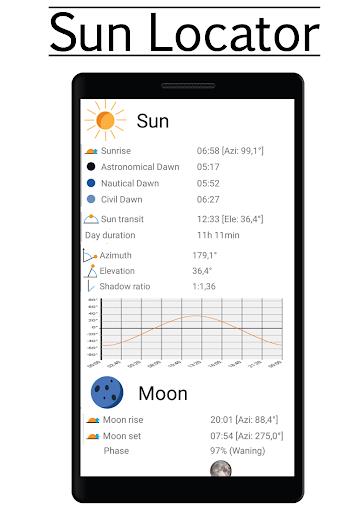
At its core, Sun Locator - Position Seeker converts astronomical calculations into an easy, visual interface. It computes sunrise, sunset, golden hour, blue hour and solar noon for your chosen spot. A dynamic compass and timeline show the sun’s current position and projected path so you can make decisions on composition, shading, or energy placement quickly.
Key tools included
- Live sun-tracking with azimuth and elevation readouts updated in real time.
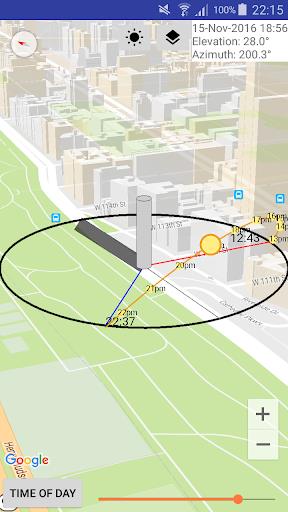
- Map overlays that display sun paths and shadow lines on satellite or street maps.
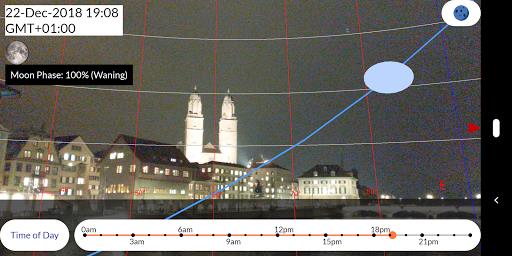
- Augmented reality view that projects the sun’s trajectory over a camera feed for on-site planning.
- Time-lapse and timeline slider to review sun movement across hours and seasons.
- Location presets and search to save favorite spots or pull coordinates with a tap.
How it works for daily use
Using the app is straightforward. Pick your location with GPS or manual coordinates, then swipe the timeline to see the sun’s projected position at any hour. The interface overlays the sun’s path on maps or live camera, making it immediate to judge shadows and light direction. The data points—azimuth, altitude, and duration—are presented numerically and visually for clarity.
Practical scenarios
Photographers rely on it for planning shoots during golden hour. Architects and landscapers test sun exposure for façades and gardens. Solar installers use the azimuth and tilt information to optimize panel orientation. Hikers and event planners check daylight window lengths before setting schedules. Sun Locator - Position Seeker targets all of these real-world needs with a single toolset.
Interface and performance
The app presents a clean, minimal interface that prioritizes map and AR views. Controls are reachable and labels are concise. Rendering of overlays is smooth on modern devices, and computations run instantly even when switching dates or locations. Battery impact is modest when using AR or continuous GPS tracking; a suggested power-saving mode reduces refresh frequency for longer field sessions.
Customization options
- Map types: satellite, terrain, hybrid, and plain map layers.
- Overlay colors: change path and shadow hues for visibility in different lighting.
- Units and formats: switch between degrees/meters and 12/24-hour time.
- Notifications: set alerts for golden hour start/end or sunrise/sunset.
User tips and best practices
For accurate planning, calibrate your device compass before using AR overlays. When scouting, save multiple location presets to compare light at different spots quickly. Use the timeline slider to preview seasonal differences when planning long-term projects. If you depend on continuous updates, enable battery-friendly settings at night to prevent drain.
Who benefits most
Sun Locator - Position Seeker suits anyone who needs precise solar information: photographers, filmmakers, urban planners, gardeners, solar technicians and outdoor event coordinators. The mix of map visualization and AR makes it accessible to beginners while offering depth for professional workflows.
Getting started
Download and grant location permission to let the app auto-locate your position. Explore the sample locations and try the AR view to get familiar with overlays. Save a few presets and create notifications for times you check daily. With a short setup, Sun Locator - Position Seeker becomes a reliable scheduling and planning companion.
Final notes on reliability
The calculations rely on standard astronomical models and local timezone data; accuracy is high for most civilian applications. Keep the app updated and verify permissions if live tracking appears off. Regular calibration of sensors will preserve AR precision, ensuring the visual guides align with the real sky.
Show More
Information
Screenshots
Latest Update












Hot Tags
Latest News
-
![Revealing the Launch Playlists and Cross-Progression for COD Warzone Mobile News]()
-
![March 2024 Free Redemption Codes for Honkai: Star Rail News]()
-
PUBG Mobile Teams Up with Bentley Motors: Luxury Cars, Exclusive Collectibles, and Beyond 2024-04-18
![PUBG Mobile Teams Up with Bentley Motors: Luxury Cars, Exclusive Collectibles, and Beyond News]()
-
![Monster Never Cry is now accessible on both Android and iOS mobile devices. News]()
-
V2.2 of the Farlight 84 update introduces an overhauled Season structure, fresh in-game currency, an 2024-04-16
![V2.2 of the Farlight 84 update introduces an overhauled Season structure, fresh in-game currency, an News]()
-
![Arrival of Genshin Impact 4.6 Update: 'Embers of Two Realms, Twilight of Crimson' News]()
-
April 2024 Clash of Clans Update: Unveiling a Fresh Companion, Enhanced Levels, Chat Tagging, and Be 2024-04-16
![April 2024 Clash of Clans Update: Unveiling a Fresh Companion, Enhanced Levels, Chat Tagging, and Be News]()






