
MP3 Music Downloader
Version:1.4
Published:2026-10-15
Introduction
MP3 Music Downloader makes finding and saving audio files on Android quick and simple. The app provides a searchable catalog, fast downloads, and an integrated player so you can collect tracks for offline listening. It's designed for convenient file management while respecting copyrights and local storage settings.
What the app offers
MP3 Music Downloader focuses on giving users a compact toolkit to search, preview, and save audio files in MP3 format. It bundles a fast search engine, basic audio editing tags, and a player that supports playlists and background playback. The app emphasizes speed and straightforward navigation so users spend less time managing files and more time listening.
Key features and tools
- Smart search: Quickly locate tracks by title, artist, or album with filtering options to narrow results.
- Multiple quality options: Choose download quality where available to balance file size and audio fidelity.
- Batch downloads: Queue multiple tracks to download sequentially or in parallel, saving time on large collections.
- Built-in player: Play, pause, skip, and create playlists without switching apps; supports background playback.
- Tag editor: Edit artist, album, and track information before saving files for better library organization.
- Storage management: Save to internal storage or SD card and view how much space downloads require.
How the download flow works
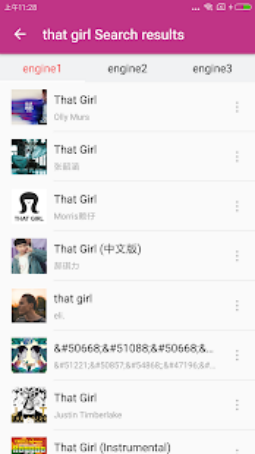
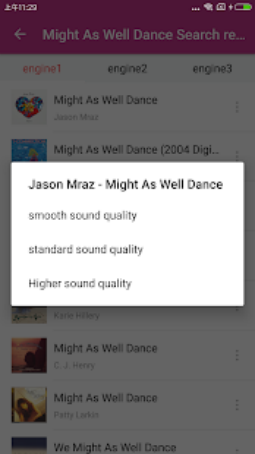
Search results display preview options so you can listen before saving. When you select a file, MP3 Music Downloader shows available bitrates and estimated file size. Choose the version you want, set the destination folder, and start the download. Downloads can be paused, resumed, or canceled; completed files appear immediately in the app’s library and can be opened in other media players.
Interface and usability
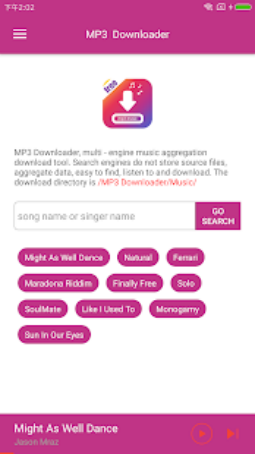
The interface is laid out for one-handed navigation: a top search bar, results list, and a bottom playback control. Icons and labels are concise to reduce clutter. Dark and light themes support different viewing preferences, and touch targets are sized for easy operation on both phones and tablets. Menus group related actions—playlists, downloads, and settings—so you won’t hunt through nested screens.
Performance, reliability, and safety
MP3 Music Downloader uses an efficient download manager that limits simultaneous connections to preserve battery life and network stability. Background downloads continue while the device sleeps, and the app can automatically retry failed transfers. The app requests only necessary permissions such as storage access and internet. It encourages users to respect intellectual property and to download only content that is legally permitted for offline use.
Compatibility and system requirements
The app supports a wide range of Android versions and adapts to both low-end and high-performance devices. Small footprint and optimized memory usage keep it responsive on older phones, while modern devices benefit from faster bandwidth handling and improved multitasking. SD card support is available where the operating system allows it, and file formats are compatible with standard music players.
Organizing your collection
MP3 Music Downloader includes tools for sorting and cleaning up your library. Create playlists, batch-rename files, and remove duplicates with a few taps. The tag editor helps ensure metadata is consistent so tracks sort correctly in other media apps. You can also export or share completed downloads using Android’s native share menu.
Tips for effective use
- Preview tracks before downloading to save space and time.
- Use batch downloads overnight or while connected to Wi-Fi to avoid mobile data charges.
- Keep metadata updated so playlists and external players display accurate information.
- Monitor storage settings if you frequently move files between internal memory and an SD card.
MP3 Music Downloader is a practical choice for users who want a focused, easy-to-use solution for collecting and managing MP3 files on Android devices. With clear controls, decent customization, and an emphasis on legal usage, the app provides everything needed for offline listening without unnecessary complexity.
Show More
Information
Screenshots
Latest Update












Latest News
-
![Revealing the Launch Playlists and Cross-Progression for COD Warzone Mobile News]()
-
![March 2024 Free Redemption Codes for Honkai: Star Rail News]()
-
PUBG Mobile Teams Up with Bentley Motors: Luxury Cars, Exclusive Collectibles, and Beyond 2024-04-18
![PUBG Mobile Teams Up with Bentley Motors: Luxury Cars, Exclusive Collectibles, and Beyond News]()
-
![Monster Never Cry is now accessible on both Android and iOS mobile devices. News]()
-
V2.2 of the Farlight 84 update introduces an overhauled Season structure, fresh in-game currency, an 2024-04-16
![V2.2 of the Farlight 84 update introduces an overhauled Season structure, fresh in-game currency, an News]()
-
![Arrival of Genshin Impact 4.6 Update: 'Embers of Two Realms, Twilight of Crimson' News]()
-
April 2024 Clash of Clans Update: Unveiling a Fresh Companion, Enhanced Levels, Chat Tagging, and Be 2024-04-16
![April 2024 Clash of Clans Update: Unveiling a Fresh Companion, Enhanced Levels, Chat Tagging, and Be News]()






