

CampusTalk
Version:1.0.2
Published:2026-10-16
Introduction
CampusTalk is a campus-focused communication and organization app that helps students, faculty, and staff share announcements, coordinate study groups, and manage events. It centralizes messages, schedules, and resources into a single interface, streamlining daily campus life for busy users seeking better collaboration and time management.
What CampusTalk does best
CampusTalk positions itself as a lightweight hub for campus communities. Rather than replacing email or learning management systems, it complements them by offering fast messaging channels, a simple events calendar, and group organization tools. The app is geared toward short, actionable interactions: quick announcements, ride-share posts, last-minute room changes, and study session invites.
Core features at a glance
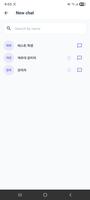
- Real-time messaging: Group chats and broadcast channels let administrators and student groups get information out quickly without long email threads.
- Events and scheduling: Create, share, and RSVP to campus events with calendar integration and reminders.
- Study group tools: Form topic-specific groups, pin materials, and coordinate meeting locations.
- Resource library: Upload files and links to keep syllabi, campus maps, and workshop materials within reach.
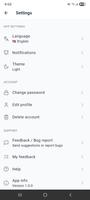
- Notifications control: Fine-grained settings prevent overload by letting users mute channels or set priority alerts.
How the workflow feels
Using CampusTalk begins with joining a campus or department network, then subscribing to channels relevant to your schedule. Conversations are threaded by topic, so it’s easier to track announcements versus ongoing discussion. The event RSVP flow is concise: create the listing, attach a location and optional materials, and watch RSVPs appear. For student leaders, moderation tools and pinned posts simplify message management.
Interface and performance
The interface prioritizes clarity. Menus are minimal, icons are readable, and the main feed surfaces urgent notices first. On mid-range devices the app runs smoothly, with quick load times for messages and cached content for offline viewing. Occasional delays can appear when syncing large file attachments, but overall resource use stays reasonable, preserving battery and data.
Security and privacy considerations
CampusTalk supports account verification through institutional email addresses to limit access to verified community members. Permission settings let admins control who can post in official channels. While end-to-end encryption may not be present for all content, standard transport encryption and role-based access reduce exposure of sensitive information. Users should avoid sharing personally identifiable data in public channels.
Customization and integration
The app provides modest customization: channel naming, pinned messages, and icon selection for groups. It also integrates with common calendar apps so events sync to personal schedules. For campuses with technical teams, API hooks or single sign-on options are often available to streamline onboarding and keep user directories in sync.
Practical tips for new users
- Set notification preferences immediately to avoid being overwhelmed by nonessential channels.
- Join only the channels you need; curate your feed to stay focused during exam periods.
- Use pinned posts for recurring group resources and attach concise agendas to event listings.
- Leverage the search function to find past announcements instead of reposting identical information.
For administrators and student organizers, CampusTalk simplifies the logistics of campus life. Creating templates for recurring events, assigning moderator roles, and scheduling announcements can reduce repetitive tasks and keep everyone informed without manual follow-ups.
User feedback and practical considerations
Users often praise CampusTalk for making campus communication feel immediate and localized. Common requests include richer file previews and tighter calendar syncing. From a practical standpoint, training sessions for student leaders and brief onboarding materials help increase adoption and reduce misuse of official channels.
Getting started
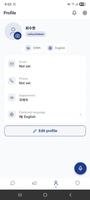
Download the app, verify with your institutional email, and join your campus network. Spend a few minutes customizing notifications and subscribing to a handful of channels to test how information flows. For group leads, set posting guidelines and use pinned messages for critical resources so newcomers can find essentials quickly.
CampusTalk is particularly useful for students and staff who want a focused environment for campus life without the noise of general social platforms. Its straightforward design, targeted features, and administrative controls make it a practical choice for day-to-day coordination, event management, and peer collaboration across campus communities.
Show More
Information
Screenshots





Latest Update












Latest News
-
![Revealing the Launch Playlists and Cross-Progression for COD Warzone Mobile News]()
-
![March 2024 Free Redemption Codes for Honkai: Star Rail News]()
-
PUBG Mobile Teams Up with Bentley Motors: Luxury Cars, Exclusive Collectibles, and Beyond 2024-04-18
![PUBG Mobile Teams Up with Bentley Motors: Luxury Cars, Exclusive Collectibles, and Beyond News]()
-
![Monster Never Cry is now accessible on both Android and iOS mobile devices. News]()
-
V2.2 of the Farlight 84 update introduces an overhauled Season structure, fresh in-game currency, an 2024-04-16
![V2.2 of the Farlight 84 update introduces an overhauled Season structure, fresh in-game currency, an News]()
-
![Arrival of Genshin Impact 4.6 Update: 'Embers of Two Realms, Twilight of Crimson' News]()
-
April 2024 Clash of Clans Update: Unveiling a Fresh Companion, Enhanced Levels, Chat Tagging, and Be 2024-04-16
![April 2024 Clash of Clans Update: Unveiling a Fresh Companion, Enhanced Levels, Chat Tagging, and Be News]()






