

kwi Messenger
Version:1.3.0
Published:2026-10-17
Introduction
kwi Messenger is a lightweight messaging app designed for fast, private conversations across devices. It blends real-time chat, group conversations, and media sharing inside a clean interface while providing privacy controls and efficient data use, making it suitable for daily communication and team coordination.
What is kwi Messenger?
kwi Messenger is a modern chat application built to simplify conversation without sacrificing features. It aims to combine the speed of instant messaging with tools people expect from a full-featured platform: threaded chats, group management, searchable history, and reliable media transfers. The app focuses on usability so people can communicate quickly whether at home, work, or on the move.
Core Features
- Real-time chat: Instant one-to-one messaging with delivery and read indicators.
- Group conversations: Create groups for family, friends, or project teams with admin controls.
- Media and file sharing: Send photos, videos, documents, and voice notes with progress indicators.
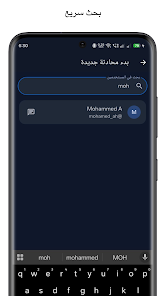
- Message search: Search conversations and files to find information quickly.
- Reactions and quick replies: React to messages and send fast inline responses.
- Offline support: Messages queue and deliver when connectivity returns.
The feature set prioritizes practical communication: easy attachment handling, message previews, and clear timestamps make conversations easier to follow. Notifications are configurable so you get relevant alerts without constant interruptions. Built-in reactions and message pinning help teams highlight important points during busy chats.
User Interface and Workflow
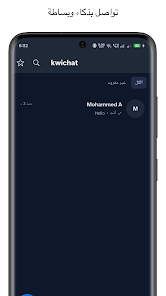
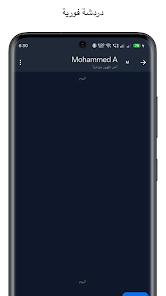
kwi Messenger uses a simple layout that puts conversations front and center. A condensed conversations list shows recent chats, unread counts, and contact photos. Tapping into a thread opens a focused view with media previews and message context. The input area supports quick attachments, emoji, and voice recording without obscuring conversation history.
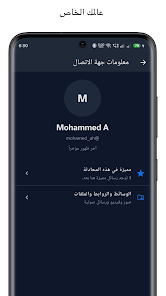
Navigation is intentionally shallow: users can jump from a chat to contact details, shared media, or pinned messages with a couple of taps. Search is accessible from the main view and filters by people, messages, or file types. This workflow reduces friction when switching between personal and professional conversations.
Security and Privacy
Privacy is a core consideration. kwi Messenger provides per-chat privacy settings, optional passcode or biometric locks for the app, and permission controls to limit access to the camera, microphone, or storage. Backups are offered with user-controlled encryption so you decide how and where chat data is stored.
For people concerned about message visibility, temporary messages and message deletion options are available. The app also minimizes metadata exposure by letting users manage contact sync and delivery receipts. These choices give individuals and teams control over how much information is shared and retained.
Performance and Compatibility
Designed to run smoothly on a wide range of Android devices, kwi Messenger emphasizes low memory usage and efficient battery consumption. The app is optimized for slower networks, compressing media transfers when needed to reduce data usage while preserving visual quality. Regular updates improve performance and add compatibility for new Android releases.
Because the codebase favors lightweight frameworks, users on older hardware will find the experience responsive. Background sync adapts to device conditions, balancing immediacy with battery preservation so messages arrive promptly without draining power.
Getting Started and Practical Tips
Installing kwi Messenger is straightforward: register with a phone number or email, customize your profile, and grant only the necessary permissions. Start by creating a group for close contacts to test features like polls, pinned messages, and media albums. Use contact labeling and conversation pinning to keep essential threads accessible.
For teams, enable admin controls and shared file folders to centralize resources. Adjust notification channels for different groups so priority messages stand out. Explore privacy settings to set automatic message expiry for sensitive conversations. With a few simple steps, kwi Messenger adapts to both casual chatting and structured collaboration, offering a practical, efficient communication tool for everyday use.
Show More
Information
Screenshots
Latest Update












Hot Tags
Latest News
-
![Revealing the Launch Playlists and Cross-Progression for COD Warzone Mobile News]()
-
![March 2024 Free Redemption Codes for Honkai: Star Rail News]()
-
PUBG Mobile Teams Up with Bentley Motors: Luxury Cars, Exclusive Collectibles, and Beyond 2024-04-18
![PUBG Mobile Teams Up with Bentley Motors: Luxury Cars, Exclusive Collectibles, and Beyond News]()
-
![Monster Never Cry is now accessible on both Android and iOS mobile devices. News]()
-
V2.2 of the Farlight 84 update introduces an overhauled Season structure, fresh in-game currency, an 2024-04-16
![V2.2 of the Farlight 84 update introduces an overhauled Season structure, fresh in-game currency, an News]()
-
![Arrival of Genshin Impact 4.6 Update: 'Embers of Two Realms, Twilight of Crimson' News]()
-
April 2024 Clash of Clans Update: Unveiling a Fresh Companion, Enhanced Levels, Chat Tagging, and Be 2024-04-16
![April 2024 Clash of Clans Update: Unveiling a Fresh Companion, Enhanced Levels, Chat Tagging, and Be News]()






