
HelpShare
Version:1.0.0
Published:2026-10-17
Introduction
HelpShare is a lightweight Android utility that streamlines file transfers, remote assistance, and collaborative sharing across devices. Designed for quick setup and minimal permissions, it helps users send files, troubleshoot remotely, and keep shared content organized with folders and links, making everyday device-to-device tasks smoother and faster.
First impressions
From the moment you open the app, HelpShare aims for clarity. Menus are concise, action buttons are prominent, and onboarding takes only a few taps. The size of the download is modest and the app avoids intrusive prompts, which is important for users who prioritize speed and privacy. The pairing flow between devices is straightforward and supports both QR codes and one-time links.
Core functionality
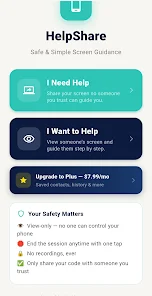
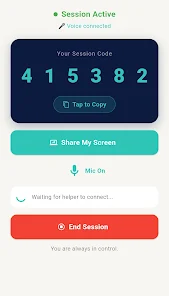
HelpShare focuses on three practical areas: fast file transfer, remote support tools, and organized sharing. File transfers work on local networks or via a secure relay when devices are apart. Remote support includes screen sharing, simple chat, and temporary control, useful for troubleshooting without complex configuration. The sharing module generates persistent links and lets you manage content with labels and expiration rules.
Key features at a glance
- Fast transfers — High-speed local copy with retry logic for weak connections.
- Secure sessions — End-to-end encryption for transfers and remote access.
- Temporary control — Grant one-time remote control or view-only access.
- Organized sharing — Create folders, set expirations, and track downloads.
- Cross-platform links — Share with Windows, macOS, or web users via a browser link.
How it works
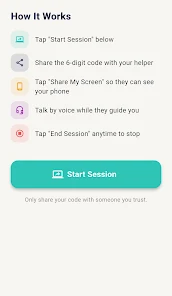
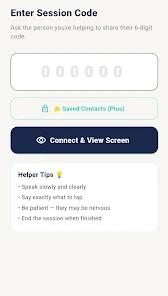
After installing, you create a simple profile and set basic preferences for transfer size limits and default expiration times. To send a file, pick items from your storage, choose recipients, and select immediate or deferred transfer. HelpShare will attempt a direct local connection first; if that fails it seamlessly switches to its server relay so transfers continue without user intervention. Remote assistance is initiated via an invitation code that the helper uses to connect for a fixed session length.
Interface and performance
The interface balances utility and minimalism. A clear status bar displays active transfers with pause, resume, and cancel controls. Performance is generally solid on modern devices; transfers take advantage of multi-threaded uploads when possible and conserve battery by pausing long tasks on low power mode. Animations are subtle and informative, helping you track progress without distracting from other tasks.
Customization and control
HelpShare offers granular controls for power users. You can set transfer speed caps, configure auto-delete for shared files after a set period, and whitelist networks for automatic connection. For privacy-minded users, the app logs session activity locally and allows clearing of history. Administrators can enable stricter policies when the tool is used in small-team environments.
Practical use cases
HelpShare fits a range of workflows: professionals sending large media files between devices, IT support staff offering quick remote fixes, families sharing photos and videos without cloud uploads, and mixed-device teams exchanging documents with link-based access. The lack of heavy setup makes it suitable for ad-hoc scenarios where time is limited.
Tips for new users
- Verify both devices are on the same Wi-Fi for fastest transfers.
- Use QR pairing for guests to avoid typing long codes.
- Set reasonable expirations on shared links to reduce clutter.
- Enable notification permissions to monitor transfers in real time.
Why people pick this app
Users appreciate HelpShare for its straightforward workflow, consistent transfer reliability, and clear privacy settings. It doesn’t try to be a full cloud replacement; instead, it focuses on secure, efficient device-to-device operations. The combination of local speed and fallback relay ensures transfers complete even when networks vary.
Getting started
Installation is quick: download, create a profile, and follow the short walkthrough. If you plan to use remote assistance, test a session with a trusted device first to familiarize yourself with permissions and session controls. The in-app help section includes short guides for common tasks and troubleshooting steps that cover connectivity issues and permission prompts.
Overall, HelpShare is a practical tool for anyone who needs dependable file movement and occasional remote help without the overhead of complex services. Its balance of features, performance, and privacy controls make it a useful addition to personal and small-team toolkits.
Show More
Information
Screenshots

Latest Update












Hot Tags
Latest News
-
![Revealing the Launch Playlists and Cross-Progression for COD Warzone Mobile News]()
-
![March 2024 Free Redemption Codes for Honkai: Star Rail News]()
-
PUBG Mobile Teams Up with Bentley Motors: Luxury Cars, Exclusive Collectibles, and Beyond 2024-04-18
![PUBG Mobile Teams Up with Bentley Motors: Luxury Cars, Exclusive Collectibles, and Beyond News]()
-
![Monster Never Cry is now accessible on both Android and iOS mobile devices. News]()
-
V2.2 of the Farlight 84 update introduces an overhauled Season structure, fresh in-game currency, an 2024-04-16
![V2.2 of the Farlight 84 update introduces an overhauled Season structure, fresh in-game currency, an News]()
-
![Arrival of Genshin Impact 4.6 Update: 'Embers of Two Realms, Twilight of Crimson' News]()
-
April 2024 Clash of Clans Update: Unveiling a Fresh Companion, Enhanced Levels, Chat Tagging, and Be 2024-04-16
![April 2024 Clash of Clans Update: Unveiling a Fresh Companion, Enhanced Levels, Chat Tagging, and Be News]()






