
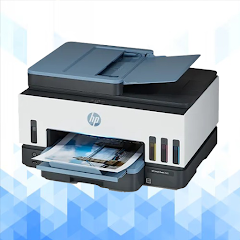
HP Smart Tank 7602 Guide
Version:1.1.1
Published:2026-10-18
Introduction
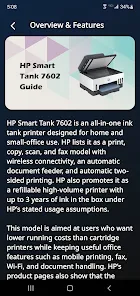
HP Smart Tank 7602 Guide puts step-by-step instructions, setup walkthroughs, and maintenance tips for the HP Smart Tank 7602 printer into one accessible companion. Built for home and small office users, it streamlines configuration, explains ink management, and helps troubleshoot common issues without jargon or long technical manuals.
Practical overview
The HP Smart Tank 7602 Guide is designed as a utility-focused reference that complements the printer's built-in help. Rather than acting as a replacement for official firmware or drivers, the guide organizes essential tasks into clear, repeatable steps. Users can rely on it to speed up initial setup, understand ongoing maintenance, and reduce downtime caused by routine errors.
What you'll find inside
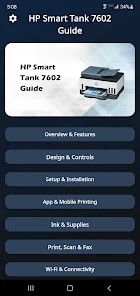
- Setup walkthroughs — network pairing, driver installation, and first-print calibration.
- Ink and tank care — filling, monitoring, and cleaning recommendations to keep pages crisp.
- Connectivity tips — Wi-Fi, mobile printing, and cloud services explanations.
- Troubleshooting steps — common error codes and quick fixes for jams and print quality issues.
Key features and tools
Focused on utility, the HP Smart Tank 7602 Guide highlights features that matter to everyday users. Clear diagrams and concise procedures reduce guesswork. Time-saving checklists are included for tasks like nozzles alignment and firmware checks. The guide also outlines recommended settings for photo and document printing so results match expectations without repeated trial and error.
How it helps with workflows
For small offices or remote workers, predictable printer behavior is essential. The guide helps standardize common workflows: creating preset profiles for duplex printing, setting eco-friendly draft modes for internal documents, and configuring mobile-to-print shortcuts. These small adjustments can save ink and reduce job times across recurring print tasks.
Interface and clarity
Language and layout prioritize readability. Instructions use numbered steps and short paragraphs so that technicians and casual users can both follow along. The guide minimizes technical jargon, replacing it with plain language while still explaining important concepts like head cleaning cycles, ink level sensors, and when to update firmware to fix bugs.
Performance considerations
Performance guidance in the HP Smart Tank 7602 Guide focuses on stability and longevity. Advice covers recommended paper types, print density adjustments, and environmental considerations such as temperature and humidity. Proper handling tips help prevent premature wear of mechanical components and reduce the frequency of deep cleaning cycles that waste ink.
Troubleshooting and diagnostics
The troubleshooting section groups issues by symptom for faster diagnosis. For example, if prints are streaked or faded, the guide lists step-by-step checks: verify ink levels, run nozzle tests, perform targeted head cleaning, and inspect paper paths. For connectivity problems, it walks through router checks, IP assignment, and how to reset the printer’s network settings safely.
Tips for first-time setup
- Place the printer on a flat, stable surface with adequate ventilation and a nearby power outlet.
- Use the official drivers or the HP Smart app to ensure compatibility with your OS.
- Before filling tanks, read the ink handling precautions and follow the fill-level indicators precisely.
- Perform an initial calibration print to establish baseline color and alignment.
Maintenance routines
Regular maintenance keeps the HP Smart Tank 7602 performing well. The guide recommends a simple routine: weekly quick-clean cycles for light use, monthly alignment checks, and periodic deep cleaning only when automated diagnostics recommend it. It also explains safe long-term storage if the printer will be idle for weeks.
Why users rely on this guide
Readers appreciate the way the HP Smart Tank 7602 Guide turns complex procedures into manageable tasks. It reduces interruptions, shortens setup time for new devices, and helps preserve ink efficiency. The result is a smoother printing experience and fewer emergency support calls.
If you want to get the most from your HP Smart Tank 7602, using a targeted, practical guide like this can save time and money while keeping print quality consistent across projects.
Show More
Information
Screenshots
Latest Update












Latest News
-
![Revealing the Launch Playlists and Cross-Progression for COD Warzone Mobile News]()
-
![March 2024 Free Redemption Codes for Honkai: Star Rail News]()
-
PUBG Mobile Teams Up with Bentley Motors: Luxury Cars, Exclusive Collectibles, and Beyond 2024-04-18
![PUBG Mobile Teams Up with Bentley Motors: Luxury Cars, Exclusive Collectibles, and Beyond News]()
-
![Monster Never Cry is now accessible on both Android and iOS mobile devices. News]()
-
V2.2 of the Farlight 84 update introduces an overhauled Season structure, fresh in-game currency, an 2024-04-16
![V2.2 of the Farlight 84 update introduces an overhauled Season structure, fresh in-game currency, an News]()
-
![Arrival of Genshin Impact 4.6 Update: 'Embers of Two Realms, Twilight of Crimson' News]()
-
April 2024 Clash of Clans Update: Unveiling a Fresh Companion, Enhanced Levels, Chat Tagging, and Be 2024-04-16
![April 2024 Clash of Clans Update: Unveiling a Fresh Companion, Enhanced Levels, Chat Tagging, and Be News]()






