

LostInNotes: Smart AI Notes
Version:1.0.3
Published:2026-10-18
Introduction
LostInNotes: Smart AI Notes is a minimal note-taking app that blends a distraction‑free writing surface with built-in AI support to help you capture, organize, and retrieve ideas quickly. LostInNotes: Smart AI Notes opens on a simple editor where the text and your thoughts remain the focus, while background services handle tagging, indexing, and secure synchronization so you spend less time managing files and more time creating.
Key features
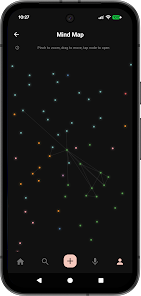
The app provides an integrated AI assistant that answers questions using the context of your own notes and general reference material, surfacing related passages and suggesting connections between items. Smart tags are applied automatically as you write, creating a dynamic network of topics that grows with your collection instead of forcing you into rigid folders. Sharing is intentional and simple: convert a note to a public link when you need collaborators to view or comment, while all notes remain private by default until you choose to share them. Cloud sync keeps entries consistent across devices and all communication is encrypted for privacy and security.
How it works
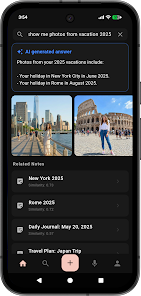
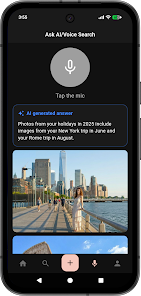
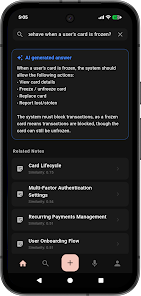
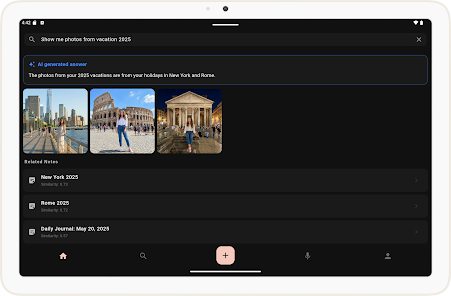
Begin by tapping the new note button to record text quickly; the minimalist editor supports plain writing and light formatting so you can focus on ideas rather than menus. A visible search field lets you query keywords or ask the AI directly; results combine exact matches from your notes with AI‑generated summaries or contextual suggestions. As your archive grows, the automatic tags and the built‑in search refine what is most relevant, helping you recover older material without manual reorganization.
Controls and user experience
Controls are kept intentionally simple to reduce friction: tap to create, tap to edit, and use the search box to jump to the content you need. The editor is optimized for touch and standard Android input methods, while common keyboard shortcuts on external keyboards are respected for faster composition. The interface focuses on legibility and minimal distractions so drafting and revising feel immediate and uninterrupted.
Organization and progression
Rather than a leveling system, progression in LostInNotes: Smart AI Notes happens through accumulation and refinement: as you add more notes, the AI and tag index provide better contextual matches, making discovery faster. Important ideas naturally rise to the surface through repeated references and tag associations, and the app’s structure supports building a lasting reference library rather than ephemeral scraps. Over time the tool helps you trace how concepts evolved across entries.
Visual style and customization
The visual design favors whitespace, clear typography, and a neutral palette so content remains central. Basic display adjustments let you make text larger or smaller for comfortable reading, and spacing choices reduce eye strain during longer writing sessions. The result is a clean aesthetic that scales from short memos to multi‑paragraph notes without cluttering the workspace with unnecessary controls.
Offline use, sync and reliability
LostInNotes: Smart AI Notes keeps recent notes available on the device so you can read and edit basic entries when a connection is intermittent, but full functionality—including real‑time cloud backup and AI lookups that draw on broader knowledge—requires an internet connection. Sync is designed to be resilient: when you come back online, changes are reconciled and encrypted to maintain continuity between phone and tablet.
Accessibility and learning curve
The app aims to be approachable for new users while offering depth for power users: the minimalist layout minimizes distractions for those who prefer simple tools, and the integrated AI reduces the time needed to learn where information lives. Accessibility considerations focus on clear text hierarchy and straightforward navigation so people using screen readers or larger text settings can still compose and search effectively.
Limitations and best practices
There are a few practical limitations to keep in mind. Dependence on cloud sync means some features need an internet connection, AI answers are helpful but should be verified against your source notes, and automatic tags may sometimes misclassify content, requiring occasional manual correction. Treat the AI as a research assistant rather than an infallible source, and back up critical material if you need multiple local copies.
Why it fits into your workflow
For anyone who has lost an idea in a pile of files, LostInNotes: Smart AI Notes offers a lightweight, secure environment that emphasizes discoverability and privacy. Its combination of a focused editor, automatic organization, and contextual AI assistance is intended to reduce time spent managing notes so you can return to writing, planning, and iterating on your work.
Show More
Information
Screenshots
Latest Update












Latest News
-
![Revealing the Launch Playlists and Cross-Progression for COD Warzone Mobile News]()
-
![March 2024 Free Redemption Codes for Honkai: Star Rail News]()
-
PUBG Mobile Teams Up with Bentley Motors: Luxury Cars, Exclusive Collectibles, and Beyond 2024-04-18
![PUBG Mobile Teams Up with Bentley Motors: Luxury Cars, Exclusive Collectibles, and Beyond News]()
-
![Monster Never Cry is now accessible on both Android and iOS mobile devices. News]()
-
V2.2 of the Farlight 84 update introduces an overhauled Season structure, fresh in-game currency, an 2024-04-16
![V2.2 of the Farlight 84 update introduces an overhauled Season structure, fresh in-game currency, an News]()
-
![Arrival of Genshin Impact 4.6 Update: 'Embers of Two Realms, Twilight of Crimson' News]()
-
April 2024 Clash of Clans Update: Unveiling a Fresh Companion, Enhanced Levels, Chat Tagging, and Be 2024-04-16
![April 2024 Clash of Clans Update: Unveiling a Fresh Companion, Enhanced Levels, Chat Tagging, and Be News]()






