

Time stamp photos: Photo Proof
Version:1.0.0
Published:2026-10-19
Introduction
Time stamp photos: Photo Proof is a practical Android tool that embeds accurate date, time and location details onto images for record-keeping, inspections and deliveries. It provides quick stamping, flexible layout options and reliable metadata handling to help professionals and everyday users add verifiable proof to their photos.
Key features at a glance
Time stamp photos: Photo Proof focuses on delivering simple, dependable stamping with enough customization to match different workflows. Core capabilities include automatic timestamping based on device clock, GPS-based location labels, and options to preserve original EXIF metadata. The app supports batch processing so you can apply stamps to many images at once, saving time when documenting sites or assets. Users can choose multiple time formats, select 12- or 24-hour displays, and include or omit seconds depending on required precision. Multiple export choices let you save stamped images back to the gallery, share via messaging apps, or upload to cloud services without losing the visible stamp.
How the system works
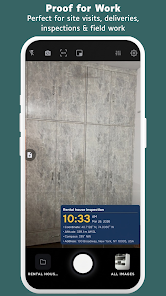
After granting camera and storage permissions, Time stamp photos: Photo Proof integrates with the device camera or processes existing photos from your album. When taking a photo through the app, the timestamp and optional location are added immediately to the image preview so you can confirm placement before saving. For existing photos, open a batch or single image, pick a timestamp template and apply the stamp instantly. Location labels are derived from GPS coordinates and can include human-readable addresses when network access is available. The app can also fall back to coordinates only when offline, ensuring continuous functionality in remote areas.
Customization and layout options
The app provides fine-grained control over how stamps appear. Choose from multiple fonts, adjust text size, color and opacity, and position the stamp in any corner or along the image edges. Additional overlay elements include custom text fields for job IDs, inspector names, or project codes. For sensitive photos, the app can add a small logo or watermark in addition to the timestamp. Templates can be saved for consistent formatting across projects, so teams maintain unified visual records without reconfiguring settings for each session.
Practical workflows and use cases
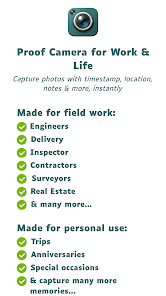
Time stamp photos: Photo Proof suits a range of professional and personal uses. Contractors and site managers use it to document progress at specific times, while delivery drivers and couriers add timestamps for proof-of-delivery records. Real estate agents can capture dated property photos for listings and inspections, and insurance adjusters often rely on visible timestamps when filing claims. Homeowners benefit from timestamped inventories for valuables. Because the app can handle batch operations, it fits daily routines where dozens or hundreds of photos need consistent labeling before archiving or sharing.
Batch processing and efficiency
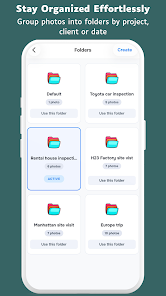
Efficiency is a strong point: the batch editor lets you import entire folders, apply a saved template, and export stamped images in one operation. File renaming options help organize output with date prefixes or job IDs. Processing speed is optimized for modern devices and you can pause or cancel large jobs without corrupting images. The app also offers a review mode where you can scan stamped photos in sequence to confirm accuracy before final export.
Performance, privacy and compatibility
Designed for Android, Time stamp photos: Photo Proof is lightweight and performs well on a wide range of devices. It minimizes battery and storage usage by compressing temporary files and preserving originals when requested. Privacy features include the ability to disable location stamping and to remove GPS data from exported files if required. The app requests only necessary permissions and explains each use case. Compatibility extends to common image formats like JPEG and PNG, and exported photos remain suitable for printing, emailing, or uploading to professional reporting systems.
Getting started tips
Begin by configuring a default template: set your preferred time format, choose placement, and add any recurring text such as company name or job number. Test the camera integration in a few indoor and outdoor conditions to confirm accurate GPS labeling and correct time zone behavior. For teams, export templates or share settings to keep documentation consistent across devices. Regularly back up originals before batch runs to ensure you can revert if you change stamping preferences later.
Whether documenting field work, protecting deliveries, or creating dated records for legal or administrative purposes, Time stamp photos: Photo Proof simplifies the process of turning ordinary pictures into trusted documentation with clear, consistent visual proof.
Show More
Information
Screenshots

Latest Update












Latest News
-
![Revealing the Launch Playlists and Cross-Progression for COD Warzone Mobile News]()
-
![March 2024 Free Redemption Codes for Honkai: Star Rail News]()
-
PUBG Mobile Teams Up with Bentley Motors: Luxury Cars, Exclusive Collectibles, and Beyond 2024-04-18
![PUBG Mobile Teams Up with Bentley Motors: Luxury Cars, Exclusive Collectibles, and Beyond News]()
-
![Monster Never Cry is now accessible on both Android and iOS mobile devices. News]()
-
V2.2 of the Farlight 84 update introduces an overhauled Season structure, fresh in-game currency, an 2024-04-16
![V2.2 of the Farlight 84 update introduces an overhauled Season structure, fresh in-game currency, an News]()
-
![Arrival of Genshin Impact 4.6 Update: 'Embers of Two Realms, Twilight of Crimson' News]()
-
April 2024 Clash of Clans Update: Unveiling a Fresh Companion, Enhanced Levels, Chat Tagging, and Be 2024-04-16
![April 2024 Clash of Clans Update: Unveiling a Fresh Companion, Enhanced Levels, Chat Tagging, and Be News]()






