
Zxhun Area Calculator
Version:1.0
Published:2026-10-19
Introduction
Zxhun Area Calculator is a compact utility that simplifies measuring surface areas across shapes, maps, and photos. Designed for mobile professionals and students, it blends quick precision tools with visual drafting, unit conversion, and export options to make area measurement fast and reliable on Android devices.
Overview of the app
Zxhun Area Calculator focuses on practical measurement tasks. Whether you need to estimate land parcels, floorspace, or irregular surfaces captured in images, the app provides a straightforward workflow. It balances simple tap-and-draw interaction with advanced accuracy settings so users can move from rough estimates to precise calculations in minutes.
Primary tools and capabilities
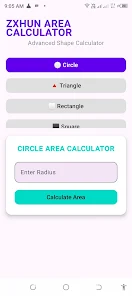
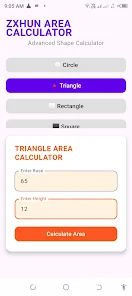
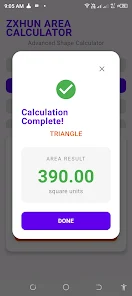
The core features center on shape recognition and manual drafting. Users can choose predefined shapes like rectangles, circles, triangles, and polygons, or draw custom boundaries directly on a canvas or imported photo. A coordinate grid helps for technical work, while automatic perimeter and area readouts update as you edit.
- Multi-shape support: Draw and combine rectangles, circles, polygons, and freehand outlines.
- Unit conversion: Switch between meters, feet, acres, hectares, and custom units with live recalculation.
- Image import: Load photos and trace outlines for real-world measurements.
- Precision controls: Snap-to-grid, coordinate entry, and vertex editing for fine adjustments.
- Export options: Save results as CSV, PNG overlays, or share coordinates directly.
How it works in practice
Getting a measurement is typically a three-step process: import or capture an image, place or draw the boundary, and review the calculated area with conversion options. Zxhun Area Calculator will prompt you to set a scale if working from photos — a known distance on the image anchors all other measurements. For map-based tasks, geolocation and map overlays allow snapping to real-world points.
Interface and performance
The interface emphasizes clarity: tools are grouped in a bottom toolbar, measurement readouts are always visible, and color-coded layers separate different measurements. The app runs smoothly on mid-range devices, and offline mode enables work in the field without a data connection. Animations are subtle to avoid distraction while editing precise shapes.
Practical workflow tips
Begin by calibrating the scale whenever possible. Use the snap and vertex-lock features for straight edges and exact corner placement. For large areas, break the region into smaller polygons to reduce distortion, then let the app sum the results. Save intermediate versions so you can revisit earlier layouts or compare measurement approaches.
Why professionals choose it
Professionals appreciate how Zxhun Area Calculator merges speed with control. Contractors, landscapers, survey technicians, and real estate agents can quickly generate reports and share them with stakeholders. The export formats are compatible with common office tools, and the accuracy modes cover both quick estimates and detailed job-ready figures.
Learning curve and support
New users can perform basic measurements immediately, while advanced options like coordinate entry and overlay exports have guided prompts to shorten the learning curve. The help section includes sample workflows and tips for avoiding common mistakes. Regular updates add convenience features and refine measurement algorithms.
Installation and system needs
Install Zxhun Area Calculator from the Android store and grant access to storage and location if you plan to import images or use maps. The app is optimized for phones and tablets and does not require high-end hardware; however, a device with a stable GPU will handle large images and complex polygons more smoothly.
Final thoughts for users
For anyone who needs an efficient way to measure areas using a mobile device, Zxhun Area Calculator offers a compact set of tools with flexible export and precision controls. It’s especially useful when measurements must be taken on-site, saved, and shared quickly without returning to a desktop environment.
Show More
Information
Screenshots
Latest Update












Latest News
-
![Revealing the Launch Playlists and Cross-Progression for COD Warzone Mobile News]()
-
![March 2024 Free Redemption Codes for Honkai: Star Rail News]()
-
PUBG Mobile Teams Up with Bentley Motors: Luxury Cars, Exclusive Collectibles, and Beyond 2024-04-18
![PUBG Mobile Teams Up with Bentley Motors: Luxury Cars, Exclusive Collectibles, and Beyond News]()
-
![Monster Never Cry is now accessible on both Android and iOS mobile devices. News]()
-
V2.2 of the Farlight 84 update introduces an overhauled Season structure, fresh in-game currency, an 2024-04-16
![V2.2 of the Farlight 84 update introduces an overhauled Season structure, fresh in-game currency, an News]()
-
![Arrival of Genshin Impact 4.6 Update: 'Embers of Two Realms, Twilight of Crimson' News]()
-
April 2024 Clash of Clans Update: Unveiling a Fresh Companion, Enhanced Levels, Chat Tagging, and Be 2024-04-16
![April 2024 Clash of Clans Update: Unveiling a Fresh Companion, Enhanced Levels, Chat Tagging, and Be News]()






