

Yabiso event
Version:1.1.10
Published:2026-10-23
Introduction
Yabiso event is a modern event-management app designed to simplify planning, ticketing and on-site coordination for meetings, festivals and corporate gatherings. It combines schedule building, attendee tracking and real-time updates into a single mobile interface that helps organizers deliver smoother experiences with less manual work.
Overview of the app
Yabiso event focuses on streamlining common organizer tasks while keeping attendee interactions intuitive. The app supports multi-day programs, speaker profiles, venue maps and push notifications. It targets planners who need a compact toolset for both pre-event preparation and live operations without switching between multiple platforms.
Primary tools and capabilities
Under the hood, the app groups functions into clear modules. Each module addresses a critical part of event management so teams can assign responsibilities and track progress:
- Schedule Builder — Create sessions, assign rooms, set capacities and publish updates instantly.
- Attendee Management — Import guest lists, manage RSVPs and check attendance via QR scanning.
- Ticketing & Payments — Sell tickets, apply discounts and monitor sales dashboards.
- On-site Operations — Build check-in flows, issue badges and coordinate staff tasks.
- Data & Reports — Download attendance reports and post-event feedback summaries.
How it works in day-to-day planning
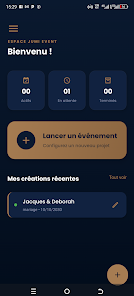
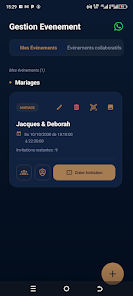
Work begins with a project hub where organizers define dates, venues and ticket tiers. From that central hub, items such as speakers, sessions and sponsors are linked to the schedule. Yabiso event keeps these elements synchronized so a change in one place updates public pages and attendee itineraries.
User interface and performance
The interface emphasizes clarity: color-coded sessions, collapsible panels and simple icons reduce cognitive load during busy setup periods. Performance is tuned for mobile use; caching allows basic functions to work offline and sync later, which is handy for locations with limited connectivity. Battery and data consumption are balanced to support long event days.
Customization and branding
Organizers can tailor the look of landing pages and tickets with logos, accent colors and custom copy. The app also supports custom registration fields so you capture the exact data required for badges, dietary requests or workshop prerequisites. These options help maintain a consistent brand presence across attendee touchpoints.
Integrations and workflow extensions
Yabiso event integrates with common calendar services, payment processors and email platforms to avoid duplicate work. Webhooks and CSV export let technical teams feed data into CRM systems or reporting tools. The integration set is practical rather than exhaustive, focusing on the most-used services for small to mid-size events.
Security and access controls
Role-based permissions allow organizers to limit access to sensitive functions like ticket refunds or attendee lists. Data is stored with standard encryption and offers options for anonymized analytics. For teams handling personal data, these controls make it easier to comply with basic privacy expectations.
Getting started quickly
New users benefit from a guided setup that walks through venue creation, schedule import and ticket configuration. Templates for common event types reduce setup time; organizers can clone past events to preserve structure and content. Support resources include documentation and responsive in-app help.
Practical tips for first-time users
- Start by creating a minimal viable schedule to test check-in flows before adding all sessions.
- Use the CSV import for attendees to avoid manual entry errors.
- Set up at least two staff accounts with different permission levels to separate check-in duties from financial actions.
- Enable push notifications selectively to avoid spamming attendees while still delivering critical updates.
For planners seeking a compact, mobile-first solution, Yabiso event offers a balanced mix of practical features and sensible defaults. It helps small teams coordinate logistics and maintain a polished attendee experience without investing in complex enterprise systems.
Show More
Information
Screenshots
Latest Update












Latest News
-
![Revealing the Launch Playlists and Cross-Progression for COD Warzone Mobile News]()
-
![March 2024 Free Redemption Codes for Honkai: Star Rail News]()
-
PUBG Mobile Teams Up with Bentley Motors: Luxury Cars, Exclusive Collectibles, and Beyond 2024-04-18
![PUBG Mobile Teams Up with Bentley Motors: Luxury Cars, Exclusive Collectibles, and Beyond News]()
-
![Monster Never Cry is now accessible on both Android and iOS mobile devices. News]()
-
V2.2 of the Farlight 84 update introduces an overhauled Season structure, fresh in-game currency, an 2024-04-16
![V2.2 of the Farlight 84 update introduces an overhauled Season structure, fresh in-game currency, an News]()
-
![Arrival of Genshin Impact 4.6 Update: 'Embers of Two Realms, Twilight of Crimson' News]()
-
April 2024 Clash of Clans Update: Unveiling a Fresh Companion, Enhanced Levels, Chat Tagging, and Be 2024-04-16
![April 2024 Clash of Clans Update: Unveiling a Fresh Companion, Enhanced Levels, Chat Tagging, and Be News]()






