

Quixar: Movie & Tv Shows Guide
Version:1.0.4
Published:2026-10-25
Introduction
Quixar: Movie & Tv Shows Guide puts up-to-date movie and television information at your fingertips, helping you decide what to watch by combining trending lists, trailers and aggregated ratings into a single, easy-to-scan interface. The app focuses on discovery: it highlights what’s popular now, surfaces new releases and provides direct pointers to where each title can be streamed or purchased so you can quickly compare options and preview content before you commit. Designed for people who jump between services to find a show or film, Quixar: Movie & Tv Shows Guide reduces friction and speeds the selection process without replacing the streaming platforms themselves.
How the guide organizes content
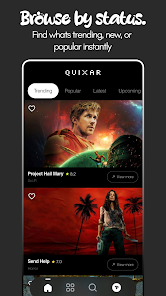
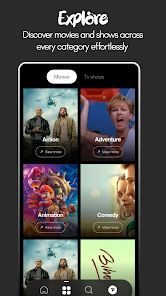
The app presents content in clearly defined sections such as Trending, New Releases, By Genre and By Provider, so you can browse high-level categories or drill down to niche topics. Navigation is straightforward: swipe and tap to move between lists, use the search box to locate specific titles by name, actor or keyword, and apply filters to restrict results by year, genre, rating or platform. These navigation controls are designed for quick scanning on phones and tablets while keeping the layout readable and uncluttered.
Discovery and progression
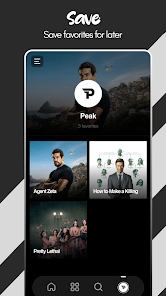
Quixar: Movie & Tv Shows Guide helps you build a personal discovery flow rather than treating each search as a one-off. You can follow trends to see how interest shifts over time, mark titles you want to revisit, and keep a short history of what you previewed so it’s easier to pick up later. This progression system is focused on content discovery rather than gamified achievements; it’s useful for maintaining a growing list of candidates and tracking what you have already decided to watch or investigate further.
Previews, ratings and decision support
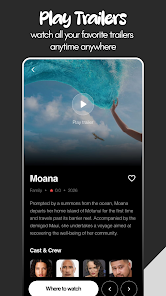
Trailers and short previews are available within the app view where supported, letting you get a sense of tone and pacing before opening a streaming service. Ratings are shown alongside brief descriptions and release details to provide context for critical and audience response. Together, these elements streamline decisions: a quick trailer, a consolidated rating score and a link to availability give you what you need to choose the next title without jumping between multiple apps and websites.
Customization and personalization
Customize the discovery experience by setting preferred regions, selecting favorite streaming services to prioritize in availability results, and sorting lists by popularity, newest releases or rating. Content filters let you narrow searches to a specific era, language or genre, and the app adapts over time to prioritize the types of titles you check most often. The personalization is practical and quiet, intended to surface relevant options rather than overwhelm with suggestions.
Visual style and accessibility
The interface emphasizes clear typography, high-contrast text and legible artwork thumbnails to make browsing comfortable on different screen sizes. Quixar: Movie & Tv Shows Guide follows accessibility best practices such as scalable text for users who prefer larger fonts and concise labels for screen readers, helping a wider range of users navigate menus and understand availability information without confusion.
Offline behavior and data handling
To keep the app usable when you have limited connectivity, Quixar caches recently viewed artwork and preserves saved searches or watch candidates so you can review your lists offline. Availability links and live streaming indicators require a connection, but the local cache makes it easy to plan viewing choices while commuting or when Wi‑Fi is intermittent. Data usage is kept modest by prioritizing small artwork and brief metadata rather than high-resolution files.
User experience and replay value
The core replay value comes from frequent content updates and regional trending lists that change regularly. Users often return to discover seasonal hits, follow emerging creators, and compare ratings and trailers for new releases. The app rewards repeated use by keeping track of what you’ve browsed and surfacing fresh items in your preferred categories so you always have a short list of new options to consider.
Limitations and regional differences
Content availability varies by country and provider, and Quixar: Movie & Tv Shows Guide points to where titles are listed rather than hosting playback itself. Some services or titles may not appear depending on regional licensing or provider participation in the underlying data sources. The app is best used as a discovery companion to help you find and evaluate titles before you open the streaming or purchase service of your choice.
This editor overview aims to highlight how Quixar: Movie & Tv Shows Guide organizes discovery, simplifies comparison, and improves your workflow for choosing movies and shows. Whether you’re searching for the latest trending series or evaluating a film by preview and rating, the guide offers a compact, user-focused way to plan what to watch next while keeping the viewing experience in your control.
Show More
Information
Screenshots
Latest Update












Hot Tags
Latest News
-
![Revealing the Launch Playlists and Cross-Progression for COD Warzone Mobile News]()
-
![March 2024 Free Redemption Codes for Honkai: Star Rail News]()
-
PUBG Mobile Teams Up with Bentley Motors: Luxury Cars, Exclusive Collectibles, and Beyond 2024-04-18
![PUBG Mobile Teams Up with Bentley Motors: Luxury Cars, Exclusive Collectibles, and Beyond News]()
-
![Monster Never Cry is now accessible on both Android and iOS mobile devices. News]()
-
V2.2 of the Farlight 84 update introduces an overhauled Season structure, fresh in-game currency, an 2024-04-16
![V2.2 of the Farlight 84 update introduces an overhauled Season structure, fresh in-game currency, an News]()
-
![Arrival of Genshin Impact 4.6 Update: 'Embers of Two Realms, Twilight of Crimson' News]()
-
April 2024 Clash of Clans Update: Unveiling a Fresh Companion, Enhanced Levels, Chat Tagging, and Be 2024-04-16
![April 2024 Clash of Clans Update: Unveiling a Fresh Companion, Enhanced Levels, Chat Tagging, and Be News]()






