

Tuner Metronome
Version:7.19
Published:2026-10-31
Introduction
Tuner Metronome is a compact musical utility that combines precise pitch detection and a dependable tempo source into one Android app, designed for focused practice and quick instrument setup. Tuner Metronome places a chromatic tuner and a flexible metronome side by side so players can tune, count, and build technique without switching tools. The app is aimed at musicians who need accuracy, low latency, and easy controls for both studio and stage environments.
Core features and workflow
The application unites two essential practice tools: an accurate chromatic tuner and a configurable metronome. The tuner provides note identification, cent deviation readouts and a moving needle display so you can see how far you are from pitch in real time. The metronome offers a wide BPM range with tap-tempo and numeric entry, multiple time signatures and selectable accent sounds to support simple clicks or complex subdivision patterns. Controls are arranged for quick access so routine tasks—tuning a string or setting a rehearsal tempo—take just a few taps.
How the tuner functions
The pitch-detection engine analyzes audio from the device microphone and converts frequency into musical information with minimal lag. Visual indicators show sharp or flat status along with numerical cent offsets, while a lockable reference frequency (default A = 440 Hz) lets you switch to alternate tuning standards for historical or ensemble contexts. The tuner adapts to loud rooms by using real-time averaging and gives users the option to isolate sustained pitches for more reliable readings when playing single notes or harmonics.
Metronome design and rhythm controls
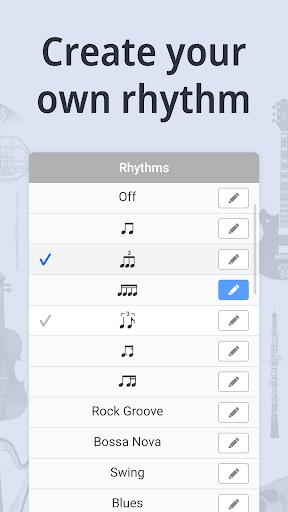
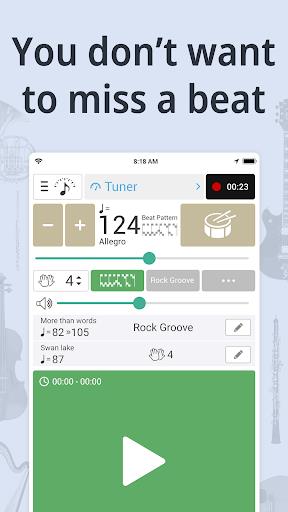
The metronome supports a broad tempo range and offers both basic and advanced rhythm controls. Tap-tempo captures your intended pulse instantly, while precise BPM input is available for strict practice regimes. Users can emphasize downbeats, choose different sounds for subdivisions, and create repeating patterns that simulate common time signatures or odd meters used in modern music. Visual pulse cues and optional vibration keep tempo awareness when audible clicks are impractical onstage.
Customization, presets and progression
Personalization helps the tool match different instruments and goals: change tone shapes (click, bell, electronic tick), adjust accent volumes, and toggle visual versus haptic feedback. Save customized tunings and tempo presets to organize rehearsal progressions—warm-up, etude, and repertoire settings can be recalled instantly. These presets act as a simple progression system, enabling structured practice sessions where you move from tuning to technique to repertoire without rebuilding settings each time.
Practice modes and challenge systems
Practice routines are supported by features that encourage steady improvement: start with slow tempos and exaggerated subdivisions, then incrementally increase BPM while maintaining accuracy. Create custom rhythmic patterns to isolate tricky measures or odd meters and repeat them until comfortable. While the app does not include online leaderboards or multiplayer modes, its internal challenge system comes from repeatable patterns, tempo ramps and stored presets that track which configurations you return to most often.
Interface, visual style and accessibility
The interface is arranged for rapid access with a split view that lets you use both tuner and metronome simultaneously. Display themes and adjustable brightness improve visibility under stage lights or in dim practice rooms. Accessibility options include larger needle readouts, contrasting color schemes and vibration cues for users who rely less on audio. The layout favors clear, uncluttered controls so players of all levels can set up quickly.
Performance, offline use and device compatibility
Efficient resource management keeps battery use modest during extended sessions and the app runs locally without requiring network access, making it suitable for offline practice and rehearsals. Low-latency audio processing minimizes perceived lag on modern devices and the app adapts to external microphones or interfaces when available, offering studio-grade accuracy without imposing heavy system demands on older phones or tablets.
Practical tips and getting started
For best tuning accuracy, reduce background noise and place the device near the instrument. Begin with a single string or a sustained note, lock the reference pitch if needed and set a slow metronome to test latency. Save a preset for your most common instrument and tempo combinations so you can jump into practice quickly. Install the app, grant microphone permission and explore the layouts; with a few saved presets and sound tweaks, Tuner Metronome becomes a dependable companion for daily practice, rehearsal and live work.
Show More
Information
Screenshots
Latest Update












Latest News
-
![Revealing the Launch Playlists and Cross-Progression for COD Warzone Mobile News]()
-
![March 2024 Free Redemption Codes for Honkai: Star Rail News]()
-
PUBG Mobile Teams Up with Bentley Motors: Luxury Cars, Exclusive Collectibles, and Beyond 2024-04-18
![PUBG Mobile Teams Up with Bentley Motors: Luxury Cars, Exclusive Collectibles, and Beyond News]()
-
![Monster Never Cry is now accessible on both Android and iOS mobile devices. News]()
-
V2.2 of the Farlight 84 update introduces an overhauled Season structure, fresh in-game currency, an 2024-04-16
![V2.2 of the Farlight 84 update introduces an overhauled Season structure, fresh in-game currency, an News]()
-
![Arrival of Genshin Impact 4.6 Update: 'Embers of Two Realms, Twilight of Crimson' News]()
-
April 2024 Clash of Clans Update: Unveiling a Fresh Companion, Enhanced Levels, Chat Tagging, and Be 2024-04-16
![April 2024 Clash of Clans Update: Unveiling a Fresh Companion, Enhanced Levels, Chat Tagging, and Be News]()






