

Simple Launcher
Version:5.1.0
Published:2026-11-02
Introduction
Simple Launcher is a lightweight Android home screen replacement designed to streamline navigation, speed up access to apps and reduce clutter. It offers a minimalist interface, essential customization options, and efficient performance on older devices, making it a practical choice for users who prefer a fast, no-frills launcher experience.
Core features at a glance
Simple Launcher focuses on the essentials: quick app access, a tidy app drawer, and low memory usage. The launcher includes a customizable grid, optional app folders, basic widget support, and straightforward search. It avoids unnecessary animations and background services so your phone spends less time juggling processes and more time running smoothly.
User interface and workflow
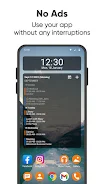
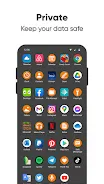
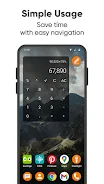
The interface prioritizes clarity. A clean home screen layout gives immediate access to your most-used apps while a swipe-up app drawer organizes the rest alphabetically or by usage. Icons and labels are clear and scalable, and the minimal notifications display helps you stay informed without distracting visual clutter. Navigation gestures are simple and intuitive, requiring little learning curve for users migrating from other launchers.
Customization options
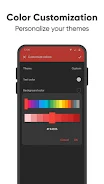
Although the word "simple" is in the name, customization is still practical. You can adjust grid size, choose icon scaling, toggle app labels, and configure an optional dock. Theme choices are intentionally limited to preserve a cohesive look, but compatibility with popular icon packs lets you change icon aesthetics without altering layout behavior.
Performance and compatibility
Designed for speed, Simple Launcher performs well on entry-level and older Android devices. It uses minimal RAM and restricts background activity to reduce battery drain. App launch times are fast because the launcher avoids heavy visual effects. Compatibility extends across a broad range of Android versions, and the launcher scales gracefully to different screen sizes, including tablets and foldables.
Personalization and organization tools
Organization features are practical rather than flashy. Create folders on the home screen, hide rarely used apps from the drawer to declutter, and mark favorites for instant access. A built-in search bar quickly locates apps and contacts. For users who want continuity, settings export and import options make it easy to transfer a familiar layout to a new phone.
Security, privacy, and resource control
Privacy-friendly by design, Simple Launcher avoids unnecessary permissions and collects no intrusive data. It asks only for permissions that directly relate to its features, such as installing widgets or providing shortcut access. You can disable usage tracking and analytics. The lean architecture reduces attack surface and limits the launcher’s influence on system resources.
Widget and shortcut support
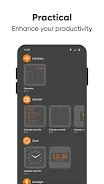
Widget support covers core system widgets and popular third-party widgets, with straightforward placement and resizing. Shortcuts let you jump into specific app actions from the home screen. The launcher’s approach keeps widget configuration simple so layouts remain predictable and stable across reboots and updates.
Useful tips for daily use
- Set up favorites: Populate the dock with your five most-used apps to cut tap time.
- Hide clutter: Move seldom-used apps into a hidden list to keep the drawer tidy.
- Export settings: Back up your layout before major updates or when switching devices.
- Limit animations: Turn off transitions to maximize responsiveness on older devices.
Installation and ongoing support
Installing Simple Launcher is quick and requires a single confirmation to make it your default home app. Once active, the launcher runs with minimal fuss and updates are focused on stability and performance improvements rather than adding complex new features. The developer provides changelogs and straightforward release notes so you can see what changed between versions.
Why choose Simple Launcher
For users who value speed, clarity, and battery-friendly operation, Simple Launcher offers a focused alternative to feature-heavy launchers. It balances enough customization to feel personal with a commitment to staying lightweight. If you want a no-nonsense home screen that emphasizes usability and resource efficiency, Simple Launcher is worth a try.
Show More
Information
Screenshots
Latest Update












Hot Tags
Latest News
-
![Revealing the Launch Playlists and Cross-Progression for COD Warzone Mobile News]()
-
![March 2024 Free Redemption Codes for Honkai: Star Rail News]()
-
PUBG Mobile Teams Up with Bentley Motors: Luxury Cars, Exclusive Collectibles, and Beyond 2024-04-18
![PUBG Mobile Teams Up with Bentley Motors: Luxury Cars, Exclusive Collectibles, and Beyond News]()
-
![Monster Never Cry is now accessible on both Android and iOS mobile devices. News]()
-
V2.2 of the Farlight 84 update introduces an overhauled Season structure, fresh in-game currency, an 2024-04-16
![V2.2 of the Farlight 84 update introduces an overhauled Season structure, fresh in-game currency, an News]()
-
![Arrival of Genshin Impact 4.6 Update: 'Embers of Two Realms, Twilight of Crimson' News]()
-
April 2024 Clash of Clans Update: Unveiling a Fresh Companion, Enhanced Levels, Chat Tagging, and Be 2024-04-16
![April 2024 Clash of Clans Update: Unveiling a Fresh Companion, Enhanced Levels, Chat Tagging, and Be News]()






