

Desh Tamil Keyboard
Version:14.6.3
Published:2026-11-02
Introduction
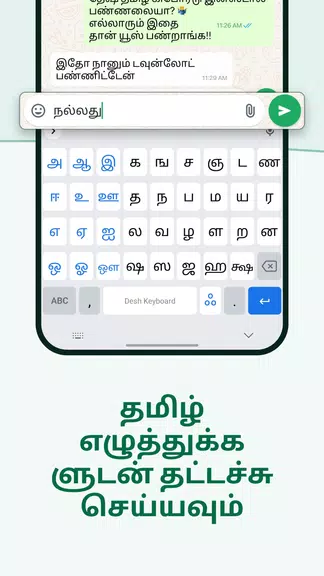
Desh Tamil Keyboard brings fast, reliable Tamil and English input to everyday chats, messages and social posts by combining multiple entry methods into a single, flexible keyboard. The app supports Tanglish phonetic typing, voice typing, handwriting recognition and a character-by-character Alphabets mode, and it includes an easy English toggle and a left-side language key for quick switching. Customization choices such as themes, fonts, an emoji row and sticker creation help you personalize your typing surface, while gesture controls and a small set of productivity tools speed up editing. During setup Android will display the standard keyboard permission warning, but Desh Tamil Keyboard is designed to protect your input and to make clear when speech services or cloud features are used.
Key features and typing mechanics
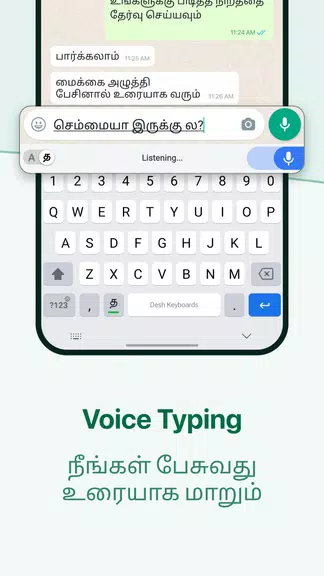
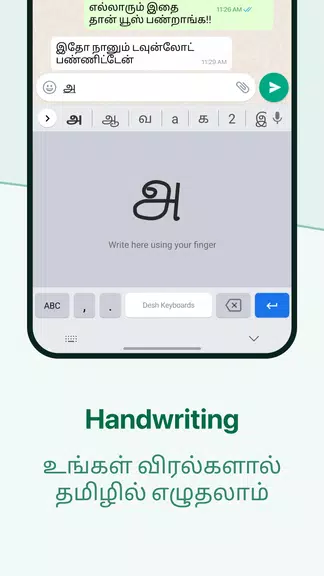
Desh Tamil Keyboard offers Tanglish predictions that convert romanized input into Tamil suggestions in real time, helping you type naturally without switching scripts. The voice typing function uses your device’s speech service to transcribe Tamil—this can be fast for hands-free messages but may depend on network access or your chosen voice engine. Handwriting mode accepts drawn Tamil characters, including common variations and strokes, making it useful for learners and users who prefer writing by hand. Alphabets mode provides single-character entry when you need precise control, and long-press shortcuts let you switch quickly between Alphabets, Handwriting and English modes without leaving the keyboard view.
Customization and visual style
The keyboard includes a variety of themes and font choices so you can match the visual style to your taste or reading needs: dark and light themes, color accents, and font options tuned for Tamil script help with legibility across devices. You can enable an emoji row and number row for one-line access to common symbols, and the sticker creator converts photos to stickers for chat use. These visual and content customizations are intended to make the keyboard feel comfortable during long typing sessions and to support different screen sizes and personal preferences.
Controls, productivity and personalization
Built-in productivity features aim to reduce repetitive tasks and speed up text entry. Gesture controls include swipe gestures for cursor movement and quick deletion, and gesture typing is available for faster English entry. A clipboard manager stores recent copied items for easy reuse and a personal dictionary remembers names, phrases and uncommon words so suggestions become more accurate the more you type. You can add or remove entries from your dictionary and adjust long-press behavior to suit how you work with punctuation and symbols.
Accessibility, offline behavior and privacy
The keyboard supports several accessibility-friendly input methods: handwriting for people who find drawing letters easier than tapping, voice input for hands-free use, and theme and font variations to improve contrast and clarity. Basic features such as Tanglish prediction, Alphabets mode and handwriting recognition can work offline on-device, while voice typing depends on the speech service you choose and may use a network connection. The app notes privacy during setup and explains that the Android system will show a standard warning for third-party keyboards; the keyboard itself focuses on local processing of typed text, and it identifies when external services (for example, cloud speech-to-text) are being used.
User experience, learning curve and long-term use
Expect a short adjustment period as you become familiar with mode switches and gesture shortcuts—long-press gestures and some advanced controls are powerful once learned but may take a few sessions to master. Over time Desh Tamil Keyboard adapts to the words and phrases you use, improving autocorrect and suggestion relevance, which increases typing speed and reduces manual edits. Frequent users will find the keyboard well suited for messaging, social posting and note-taking, and the sticker and font features add creativity and replay value by letting you produce custom visuals to share across chat apps.
Practical tips
When you first install Desh Tamil Keyboard, follow the brief setup steps to enable and select it in system settings; check your device’s speech settings if you plan to use voice typing. Try handwriting mode for unfamiliar characters, switch themes if you need larger or higher-contrast text, and add frequent phrases to the personal dictionary to speed up future typing. These small adjustments help the keyboard fit smoothly into your daily workflow while giving you more accurate and comfortable Tamil and English input.
Show More
Information
Screenshots
Latest Update












Latest News
-
![Revealing the Launch Playlists and Cross-Progression for COD Warzone Mobile News]()
-
![March 2024 Free Redemption Codes for Honkai: Star Rail News]()
-
PUBG Mobile Teams Up with Bentley Motors: Luxury Cars, Exclusive Collectibles, and Beyond 2024-04-18
![PUBG Mobile Teams Up with Bentley Motors: Luxury Cars, Exclusive Collectibles, and Beyond News]()
-
![Monster Never Cry is now accessible on both Android and iOS mobile devices. News]()
-
V2.2 of the Farlight 84 update introduces an overhauled Season structure, fresh in-game currency, an 2024-04-16
![V2.2 of the Farlight 84 update introduces an overhauled Season structure, fresh in-game currency, an News]()
-
![Arrival of Genshin Impact 4.6 Update: 'Embers of Two Realms, Twilight of Crimson' News]()
-
April 2024 Clash of Clans Update: Unveiling a Fresh Companion, Enhanced Levels, Chat Tagging, and Be 2024-04-16
![April 2024 Clash of Clans Update: Unveiling a Fresh Companion, Enhanced Levels, Chat Tagging, and Be News]()






