
Design Keyboard
Version:8.5.3
Published:2026-11-03
Introduction
Design Keyboard puts expressive typing and visual customization at your fingertips, combining a responsive keyboard engine with themed layouts, GIF and emoji access, and gesture input. It aims to speed up your typing while giving plenty of ways to personalize appearance and shortcuts for daily messaging and productivity tasks.
What Design Keyboard Does
At its core, Design Keyboard replaces the default Android keyboard with a feature-rich alternative focused on design and utility. It supports multilingual typing, autocorrect, and predictive text while adding a suite of visual themes, color schemes, and key styles so users can match the keyboard to their device aesthetic or brand identity.
Key Features Overview
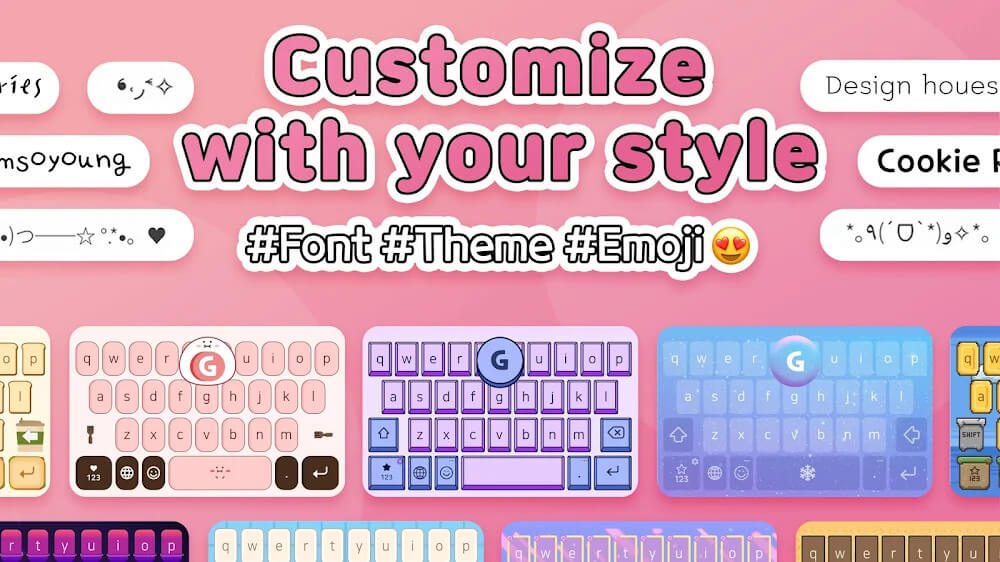
- Custom Themes: Choose from built-in themes or create your own using colors, gradients, and background images.
- Smart Typing: Includes predictive suggestions, autocorrect, and swipe-to-type recognition for faster input.
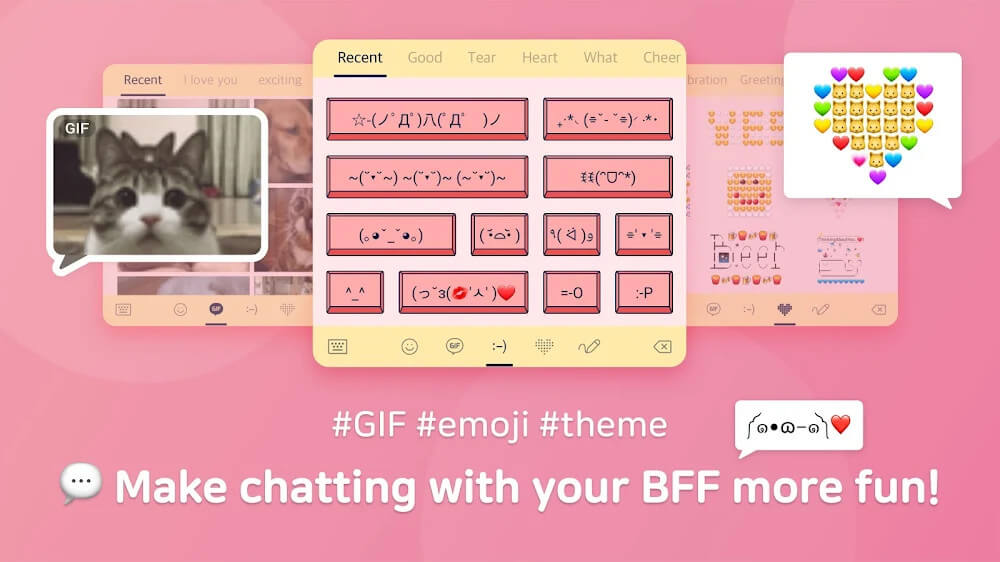
- Rich Media Access: Quick access to emojis, stickers, GIFs, and clipboard history for richer conversations.
- One-Hand Mode: Compact layouts and adjustable key spacing for easier single-thumb use.
- Privacy Controls: Local processing for sensitive data and clear permissions settings.
User Interface and Performance
Design Keyboard delivers a clean interface with large, readable keys and subtle animations. Developers optimized the input engine to keep latency low, so taps and swipes register instantly even on mid-range devices. Visual effects are balanced to reduce battery draw while still providing a modern look.
Typing Mechanics and Workflow
Typing with Design Keyboard feels familiar but faster. Predictive suggestions adapt to your writing style, while autocorrect reduces common typos without being intrusive. The swipe-to-type gesture lets you trace words in one motion, and dedicated number and symbol rows speed up data entry for work or forms.
Customization Options
One of the strongest aspects of Design Keyboard is its customization depth. You can:
- Build palettes and save theme presets for quick switching.
- Adjust key size, font, and keypress sounds independently.
- Upload background images and apply blur or transparency for a layered look.
- Create shortcuts and macros for frequently used phrases or signatures.
These settings let users tailor the keyboard for creative expression, professional communication, or accessibility needs.
Tools for Power Users
Power users will appreciate programmable hotkeys and text expansion features. Create snippets to expand short abbreviations into full sentences, insert templates in email drafts, or map long-form responses to a single tap. Clipboard management stores recent copies and organizes them for repeat use across apps.
Privacy and Security
Design Keyboard makes privacy a priority by processing sensitive tasks like local autocorrect on-device. Permission prompts are limited to essentials such as storage access for custom backgrounds and optional permissions for cloud backup. Users can disable network features if they prefer to keep all typing strictly local.
Getting Started
Installation and initial setup are straightforward. After installing, enable Design Keyboard in Android settings and select it as the default input method. A guided setup walks you through language selection, theme choice, and enabling useful features like swipe typing and autocorrect.
Tips for New Users
- Start with a default theme and slowly apply custom adjustments to find a comfortable layout.
- Enable text expansion for long email signatures or common replies.
- Use the one-hand mode in landscape or when multitasking to reduce strain.
- Backup your theme presets and shortcuts to the cloud to restore them on a new device.
Design Keyboard balances aesthetic flexibility with practical productivity tools. Whether you want a keyboard that reflects your personal style or a reliable input method that streamlines daily tasks, it delivers a thoughtful blend of design and function for Android users.
Show More
Information
Screenshots
Latest Update












Hot Tags
Latest News
-
![Revealing the Launch Playlists and Cross-Progression for COD Warzone Mobile News]()
-
![March 2024 Free Redemption Codes for Honkai: Star Rail News]()
-
PUBG Mobile Teams Up with Bentley Motors: Luxury Cars, Exclusive Collectibles, and Beyond 2024-04-18
![PUBG Mobile Teams Up with Bentley Motors: Luxury Cars, Exclusive Collectibles, and Beyond News]()
-
![Monster Never Cry is now accessible on both Android and iOS mobile devices. News]()
-
V2.2 of the Farlight 84 update introduces an overhauled Season structure, fresh in-game currency, an 2024-04-16
![V2.2 of the Farlight 84 update introduces an overhauled Season structure, fresh in-game currency, an News]()
-
![Arrival of Genshin Impact 4.6 Update: 'Embers of Two Realms, Twilight of Crimson' News]()
-
April 2024 Clash of Clans Update: Unveiling a Fresh Companion, Enhanced Levels, Chat Tagging, and Be 2024-04-16
![April 2024 Clash of Clans Update: Unveiling a Fresh Companion, Enhanced Levels, Chat Tagging, and Be News]()






