

Solid Color Wallpapers
Version:4.3.8
Published:2026-11-03
Introduction
Solid Color Wallpapers gives you a fast, no-nonsense way to create and manage phone backgrounds: Solid Color Wallpapers combines a large library of solid and gradient palettes with simple editing tools so you can design clean, personal wallpapers in seconds. The app is lightweight and focused on direct control—pick a palette, import a photo, add text or a sticker and apply or schedule the result without navigating complex menus.
Key Features
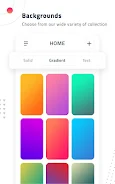
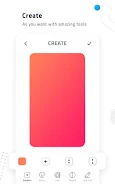
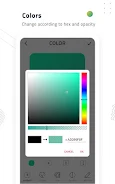
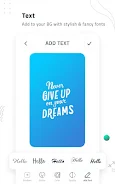
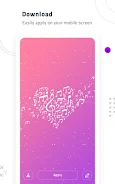
The core feature set centers on color-first design. Choose from hundreds of predefined solid tones and smooth gradients, refine a gradient with a two-point slider or select exact colors using a hex input, or build a palette from a photo you import. Layer text with adjustable fonts, size and opacity, place stickers and basic vector shapes, or use a freehand drawing tool for quick accents. Save any combination as a named preset and reuse it across devices or different projects. Every edit is previewed live so you always see how a wallpaper will look on both home and lock screens.
Controls & Workflow
Controls are optimized for touch: tap-and-drag to position elements, pinch to zoom and rotate images, long-press to edit or delete items, and a simple toolbar provides undo/redo and alignment helpers. The editor uses a single-canvas workflow so layers are easy to reorder and tweak. Project management is straightforward: create, rename, duplicate and delete designs, or save color palettes to a favorites list for later use. The interface keeps common actions within reach so creating a fresh look is quick whether you have a minute or a longer design session.
Auto-Refresh & Rotation
Automatic refresh and scheduled rotation are built into the app to keep your device feeling fresh. Set interval options ranging from hourly to weekly, select a playlist of saved wallpapers or enable random rotation from a chosen collection, and control whether changes apply to the home screen, lock screen, or both. The scheduler is designed to be power-conscious—changes are batched and limited to avoid unnecessary battery drain—and you can always pause the rotation or apply a single wallpaper manually.
Customization & Progression
The app supports a simple progression for users who like to refine a visual theme over time: start from a template or a solid color, iterate by swapping palettes, add seasonal stickers or text, and save each iteration as its own preset. Over time you can build named collections (for work, minimal, festive, dark mode, etc.) and quickly switch between them. The save-and-edit model encourages experimentation without losing previous versions, and an internal favorites system surfaces the palettes and presets you use most often.
Visual Style & Previews
Visual options range from extreme minimalism—single flat colors with subtle contrast tweaks—to vivid, layered gradients and textured photo-backed designs. The editor offers aspect-ratio presets and cropping tools to match different screen sizes and resolutions, and a realistic preview mode shows how icons and widgets interact with your chosen background. These previews help you anticipate readability issues and adjust text or sticker placement before applying a wallpaper.
Accessibility & Offline Use
Designed to be accessible, the app uses clear labels, contrast-friendly previews, and scalable UI elements so controls are easy to read and reach. You can work entirely offline: imported photos are edited locally and no account or cloud upload is required for basic use. The small app size and low memory footprint are intended to keep performance smooth on a wide range of Android phones and tablets.
Limitations
While Solid Color Wallpapers focuses on streamlined wallpaper creation, it is not a full photo-editing studio: advanced photo retouching and complex compositing features are intentionally limited to keep the tool fast and approachable. The automatic refresh relies on preset scheduling rather than dynamic context-aware triggers, so users who prefer minute-by-minute manual control may find the built-in intervals too coarse. Additionally, heavy use of high-resolution imported images can increase storage use, so keeping originals optimized will help maintain performance.
Compatibility
Solid Color Wallpapers runs on a wide range of Android devices and is tuned for simple, repeatable results: whether you want a single dependable background or a rotating set of looks to reflect the seasons and your routines, the app makes creating, saving and applying wallpapers straightforward. Try the editor to set up a few presets, organize them into collections, and let the automatic rotation keep your home and lock screens looking new with minimal effort.
Show More
Information
Screenshots
Latest Update












Latest News
-
![Revealing the Launch Playlists and Cross-Progression for COD Warzone Mobile News]()
-
![March 2024 Free Redemption Codes for Honkai: Star Rail News]()
-
PUBG Mobile Teams Up with Bentley Motors: Luxury Cars, Exclusive Collectibles, and Beyond 2024-04-18
![PUBG Mobile Teams Up with Bentley Motors: Luxury Cars, Exclusive Collectibles, and Beyond News]()
-
![Monster Never Cry is now accessible on both Android and iOS mobile devices. News]()
-
V2.2 of the Farlight 84 update introduces an overhauled Season structure, fresh in-game currency, an 2024-04-16
![V2.2 of the Farlight 84 update introduces an overhauled Season structure, fresh in-game currency, an News]()
-
![Arrival of Genshin Impact 4.6 Update: 'Embers of Two Realms, Twilight of Crimson' News]()
-
April 2024 Clash of Clans Update: Unveiling a Fresh Companion, Enhanced Levels, Chat Tagging, and Be 2024-04-16
![April 2024 Clash of Clans Update: Unveiling a Fresh Companion, Enhanced Levels, Chat Tagging, and Be News]()






