

Pocket Casts - Podcast App
Version:7.64
Published:2026-11-06
Introduction
Pocket Casts - Podcast App is a polished, user-focused podcast player designed for listeners who want dependable playback, careful episode organization, and seamless syncing across devices. The interface balances clarity with depth: large touch targets and readable episode lists make browsing fast, while more advanced controls sit nearby when you need them. Whether you manage a long backlog of subscriptions or just want a tidy commute playlist, this app arranges shows and episodes so you can spend less time managing and more time listening.
Quick overview
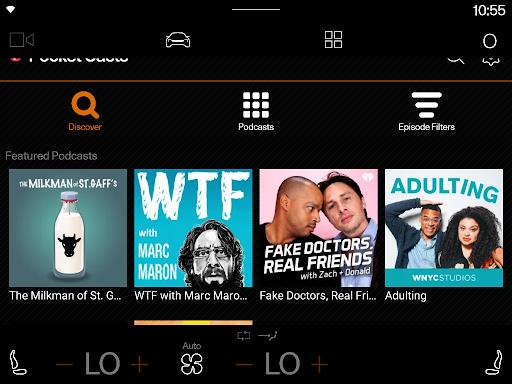
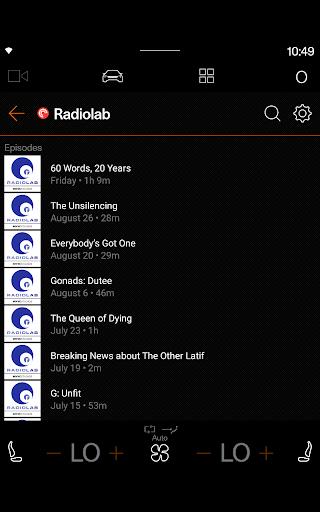
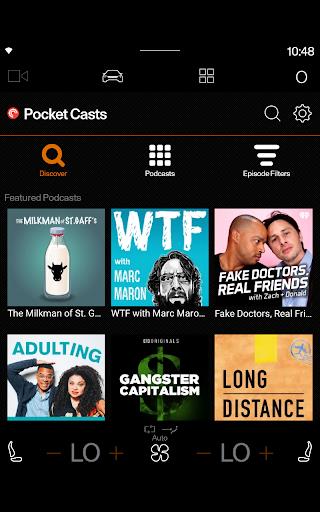
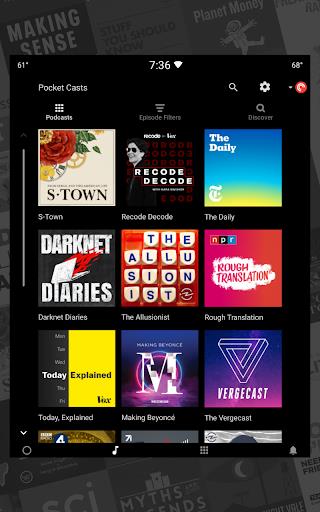
The app centralizes subscriptions, new-episode alerts, queued items, and listening progress so the experience stays consistent on phone, tablet, and web. Search and discovery tools help you find shows by category or topic and surface curated lists and trending episodes without overwhelming the main library. Artwork, episode notes, and metadata are displayed clearly, making it simple to scan episode lengths and descriptions before you queue or download.
Playback controls and audio tools
Playback is built for precision. You can change play speed in fine increments, apply silence trimming to compress long pauses, and use a modest volume boost for low-recorded shows. Gapless playback, a configurable sleep timer, and quick rewind/forward buttons make it easier to navigate long interviews or serialized storytelling. These tools are designed to be useful without requiring constant tweaking, and per-podcast defaults let you preserve preferred settings for specific shows.
Organization, progress and syncing
Subscriptions, queues, folders, and filters are the app’s organizing primitives; together they define how you progress through content. Subscriptions track the shows you follow, filters let you separate short updates from longform episodes, and the queue lists what’s next for your current listening session. Playback position and played/unplayed status are synchronized across signed-in devices, so you can pause on one device and resume on another without losing your place—a workflow that benefits commuters and multi-device listeners alike. Pocket Casts - Podcast App maintains this sync quietly in the background while letting you control what is uploaded or shared.
Discovery and offline listening
Discover features surface new programs through curated collections and category browsing rather than endless recommendations, and the search tool supports keyword and topic queries to find niche shows. Automated download rules let you fetch priority episodes on Wi‑Fi and remove older files according to retention settings so storage stays under control. Offline play is straightforward: downloaded episodes play without a network connection, and caching strategies minimize redownloads while keeping artwork and metadata available for browsing.
Customization and visual style
Appearance and workflow are adjustable without being intrusive. Choose between light and dark themes, pick compact or expanded episode lists, and customize which tabs appear on your main screen. Playback profiles and per-podcast settings let you define speed, trim, and download behavior per show, and configurable playback controls place the features you use most within easy reach. Pocket Casts - Podcast App keeps customization practical so power users can automate routine tasks while new users see a clean default layout.
Accessibility, integration and performance
The design emphasizes readability and reachability: large buttons, accessible contrast, and swipe gestures for common actions reduce friction for one-handed use. Integration with Android Auto and Chromecast enables hands-free and multi-room listening, while reliable background playback and modest battery usage make it practical for daily commutes. The app also caches artwork and metadata to keep browsing responsive even with long subscription lists.
Setup, privacy and practical tips
Getting started is simple: sign in to enable sync, import subscriptions from other players if needed, and set sensible download and retention rules. The app requests common permissions such as storage and network access; review these per device if you prefer to limit background activity. Subscription lists and playback progress are stored to provide synchronization, and sharing remains optional and user-controlled. For best results, enable automatic downloads on Wi‑Fi for priority shows and use filters to split short episodes for quick listening sessions.
Who this suits and replay value
This app is well matched to frequent listeners who value organization and listening precision. Commuters, researchers, and anyone who follows many serialized shows will appreciate rule-based playlists and synced progress. Casual listeners benefit from the discovery tools and straightforward downloads, while more active users gain replay value from automated queues, fine-grained playback adjustments, and per-podcast profiles that reduce repetitive setup. Over time the app adapts to your habits and keeps your listening consistent across devices.
Show More
Information
Screenshots
Latest Update









Hot Tags
Latest News
-
![Revealing the Launch Playlists and Cross-Progression for COD Warzone Mobile News]()
-
![March 2024 Free Redemption Codes for Honkai: Star Rail News]()
-
PUBG Mobile Teams Up with Bentley Motors: Luxury Cars, Exclusive Collectibles, and Beyond 2024-04-18
![PUBG Mobile Teams Up with Bentley Motors: Luxury Cars, Exclusive Collectibles, and Beyond News]()
-
![Monster Never Cry is now accessible on both Android and iOS mobile devices. News]()
-
V2.2 of the Farlight 84 update introduces an overhauled Season structure, fresh in-game currency, an 2024-04-16
![V2.2 of the Farlight 84 update introduces an overhauled Season structure, fresh in-game currency, an News]()
-
![Arrival of Genshin Impact 4.6 Update: 'Embers of Two Realms, Twilight of Crimson' News]()
-
April 2024 Clash of Clans Update: Unveiling a Fresh Companion, Enhanced Levels, Chat Tagging, and Be 2024-04-16
![April 2024 Clash of Clans Update: Unveiling a Fresh Companion, Enhanced Levels, Chat Tagging, and Be News]()






