

Yupmanga
Version:1.0.0
Published:2026-11-18
Introduction
Yupmanga is a Spanish-friendly manga and webtoon reader for Android that puts a tidy, discoverable library and a lightweight reading experience in your pocket. Yupmanga gathers serialized titles into clear visual lists, uses tag-driven discovery and offers adjustable reader modes so Spanish-speaking readers can browse, save and continue stories without UI clutter. Whether you prefer quick keyword searches or scanning large covers, Yupmanga is designed to help you find chapters, track progress and build a personal shelf of favorites.
Organized library and discovery
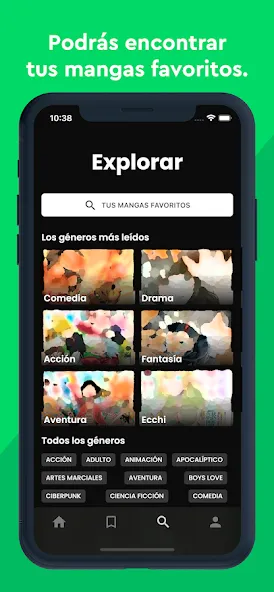
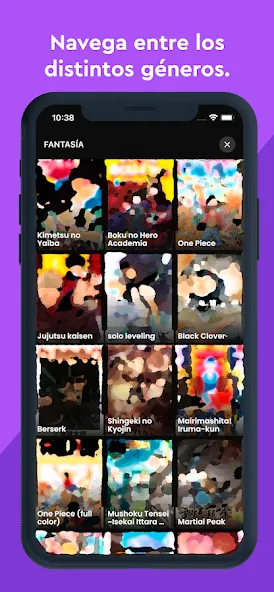
The app arranges content into genre lists, popularity feeds and release-date order so scanning large catalogs is fast. Genre pages show how many entries a tag contains and include dedicated sections — for example, a Romance group that gathers relationship-focused tags — making it easier to explore niches without sorting through unrelated results. Filter options combine keyword search with tag and date filters to narrow down results quickly, and each title page includes a summary and release details to help you decide what to read next.
Reader controls and layout
Yupmanga’s reader puts common controls within quick reach: tap or swipe to advance pages, pinch to zoom where supported, and change orientation to match reading preferences. Multiple reader modes let you switch between paginated page-by-page viewing and continuous scrolling layouts typical of webtoons; brightness and contrast adjustments help reduce eye strain during longer sessions. Large cover thumbnails and a simple toolbar mean you spend less time learning the interface and more time reading.
Progression systems and account sync
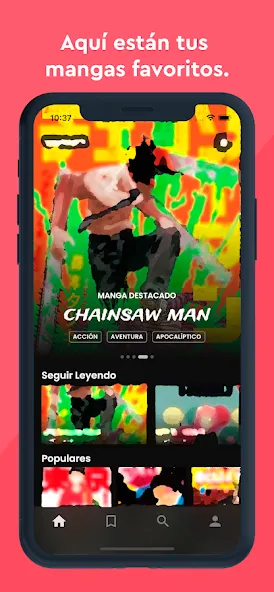
Reading progress is tracked so you can pick up where you left off: an account preserves bookmarks, saved series and the Continue Reading shortcut on the home screen, while guest mode allows immediate access without signing in. Progress is recorded per title and chapter, and as you accumulate pages read the built-in progression mechanic awards occasional card packs. These packs populate a collectible album you can inspect to view set progress; this rewards revisiting series and provides a modest replay incentive to recheck older favorites.
Collections and management
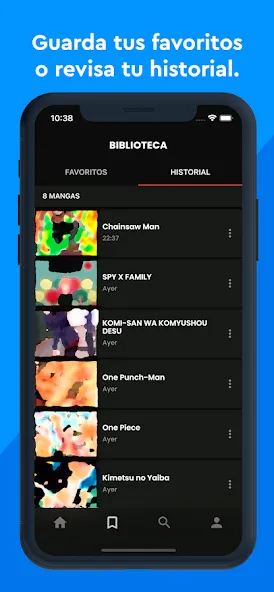
My Collection centralizes bookmarks, earned packs and an album view that shows which cards you still need. Opening a pack reveals collectible cards tied to the reading system, and album progress is persistent when you sign in. The management UI focuses on straightforward actions: add or remove bookmarks, jump to the last read chapter, and sort saved titles by recent activity or custom order so your personal shelf stays organized as your library grows.
Personalized recommendations and lightweight engine
A lightweight recommendation engine uses reading history and simple similarity signals to surface fresh titles rather than repeating the same suggestions. Personalized sections are blended with editorial and trending lists so recommendations feel varied; the app avoids aggressive promotional overlays and keeps suggested reads easy to dismiss. This approach helps you discover series that match your patterns over time while preserving control over what appears on the home screen.
Visual style, format cues and accessibility
Yupmanga emphasizes visual clarity: large cover images and a color corner marker indicate format (manga, webtoon, comic or book) so you can identify the type of content before opening a page. Reader layout options include contrast-friendly themes and orientation choices that help readers with different needs; combined with adjustable brightness and spacing, these tools improve accessibility for longer reading sessions. The interface keeps typography and icons simple for international audiences and supports common gestures so new users can learn quickly.
User experience, performance and caching
Performance is tuned for quick browsing on a range of devices: title lists load with compact metadata and thumbnails so scrolling remains responsive, and recently opened chapters are cached for faster reloads during the same session. The app minimizes background activity while preserving essential features like progress sync when you opt into an account. Overall, Yupmanga focuses on a smooth, low-friction reading experience that balances discovery with content management.
Getting started
Begin as a guest to read immediately or create an account to save bookmarks, sync progress and collect earned packs across devices. Use the top search bar or the categories page to filter by genre, tag or release date; tap a chapter to open the reader and use the on-screen controls to adjust layout and brightness. Track your progress via the Continue Reading shortcut if signed in, and open My Collection anytime to view earned packs and album progress. Yupmanga aims to centralize discovery and reading into a single, easy-to-navigate Android app for Spanish-speaking comic readers.
Show More
Information
Screenshots
Latest Update









Latest News
-
![Revealing the Launch Playlists and Cross-Progression for COD Warzone Mobile News]()
-
![March 2024 Free Redemption Codes for Honkai: Star Rail News]()
-
PUBG Mobile Teams Up with Bentley Motors: Luxury Cars, Exclusive Collectibles, and Beyond 2024-04-18
![PUBG Mobile Teams Up with Bentley Motors: Luxury Cars, Exclusive Collectibles, and Beyond News]()
-
![Monster Never Cry is now accessible on both Android and iOS mobile devices. News]()
-
V2.2 of the Farlight 84 update introduces an overhauled Season structure, fresh in-game currency, an 2024-04-16
![V2.2 of the Farlight 84 update introduces an overhauled Season structure, fresh in-game currency, an News]()
-
![Arrival of Genshin Impact 4.6 Update: 'Embers of Two Realms, Twilight of Crimson' News]()
-
April 2024 Clash of Clans Update: Unveiling a Fresh Companion, Enhanced Levels, Chat Tagging, and Be 2024-04-16
![April 2024 Clash of Clans Update: Unveiling a Fresh Companion, Enhanced Levels, Chat Tagging, and Be News]()






