

ScanDoc
Version:0.0.2.185
Published:2025-04-28
Introduction
ScanDoc is a powerful Android app designed for automotive scanning, providing a convenient way to interact with your vehicle's control units. By using the original ScanDoc adapter connected to your car via WLAN, you can access functions such as reading identification data, erasing DTC codes, and conducting actuators tests. The app works seamlessly with all control units including motor, ABS, and airbag systems. With a range of utilities available such as adaptations, programming of injectors and keys, and regeneration of DPF, ScanDoc is a valuable tool for car maintenance. For more information and to see if your vehicle is supported, visit www.quantexlab.com.
Features of ScanDoc:
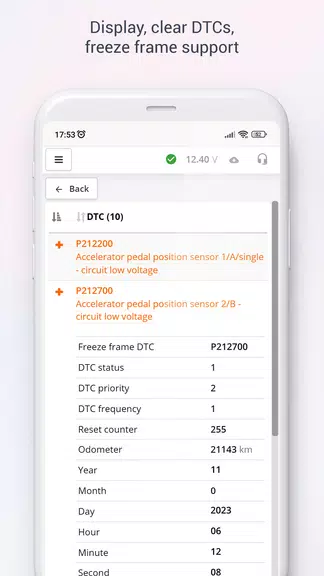
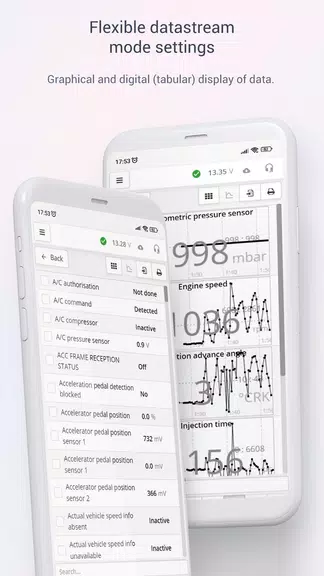
- Comprehensive Functionality: ScanDoc offers an extensive range of functions including operation with all control units of the car, reading and erasing DTC codes, display of current data, actuator tests, and more. This comprehensive functionality ensures that users can effectively diagnose and maintain their vehicles.
- Customization Options: The program allows for adaptations, programming of injectors and keys, regeneration of DPF, programming of TPMS sensors, adaptation of automatic transmissions, and more. This level of customization provides users with the flexibility to tailor their vehicle's maintenance to their specific needs.
- Supported Brands: ScanDoc supports a wide range of brands, including OBDII for free and Ssang-Yong as an in-app purchase. This broad brand support ensures that users with different vehicle types can benefit from the program's features.
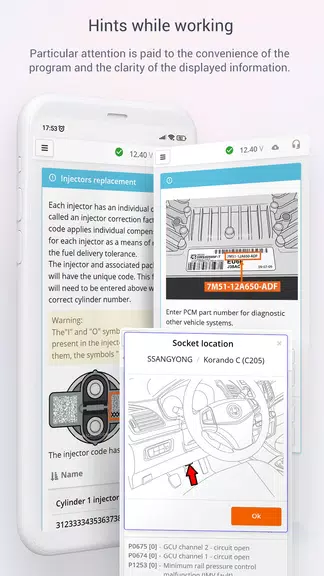
- User-Friendly Interface: The program comes with a user's manual and offers detailed information on its website, making it easy for users to navigate and utilize its various functions. The user-friendly interface enhances the overall user experience and enables smooth operation.
Playing Tips of ScanDoc:
- Familiarize Yourself with the Functions: Before using ScanDoc, take the time to familiarize yourself with its various functions and features. This will help you make the most of the program and ensure accurate diagnosis and maintenance of your vehicle.
- Regular Updates: Stay informed about software updates and new features released for ScanDoc. Regular updates will enhance the program's performance and functionality, allowing you to benefit from the latest advancements in automotive scanning technology.
- Consult the User's Manual: If you encounter any difficulties or have questions about using ScanDoc, refer to the user's manual available on the website. The manual provides detailed instructions and guidance on how to effectively use the program, ensuring a seamless user experience.
Conclusion:
ScanDoc stands out as a top-tier automotive scanner program with its comprehensive functionality, customization options, broad brand support, and user-friendly interface. By familiarizing yourself with the program's functions, staying updated on new features, and consulting the user's manual when needed, you can effectively diagnose and maintain your vehicle with ease. Whether you're a novice or experienced user, ScanDoc is a valuable tool that provides reliable and efficient automotive scanning capabilities. Download ScanDoc now and experience the convenience and efficiency of professional vehicle diagnostics.
Show More
Information
Screenshots

Latest Update












Hot Tags
Latest News
-
![Revealing the Launch Playlists and Cross-Progression for COD Warzone Mobile News]()
-
![March 2024 Free Redemption Codes for Honkai: Star Rail News]()
-
PUBG Mobile Teams Up with Bentley Motors: Luxury Cars, Exclusive Collectibles, and Beyond 2024-04-18
![PUBG Mobile Teams Up with Bentley Motors: Luxury Cars, Exclusive Collectibles, and Beyond News]()
-
![Monster Never Cry is now accessible on both Android and iOS mobile devices. News]()
-
V2.2 of the Farlight 84 update introduces an overhauled Season structure, fresh in-game currency, an 2024-04-16
![V2.2 of the Farlight 84 update introduces an overhauled Season structure, fresh in-game currency, an News]()
-
![Arrival of Genshin Impact 4.6 Update: 'Embers of Two Realms, Twilight of Crimson' News]()
-
April 2024 Clash of Clans Update: Unveiling a Fresh Companion, Enhanced Levels, Chat Tagging, and Be 2024-04-16
![April 2024 Clash of Clans Update: Unveiling a Fresh Companion, Enhanced Levels, Chat Tagging, and Be News]()






