

Device Care
Version:13.8.06.11
Published:2025-07-08
Introduction
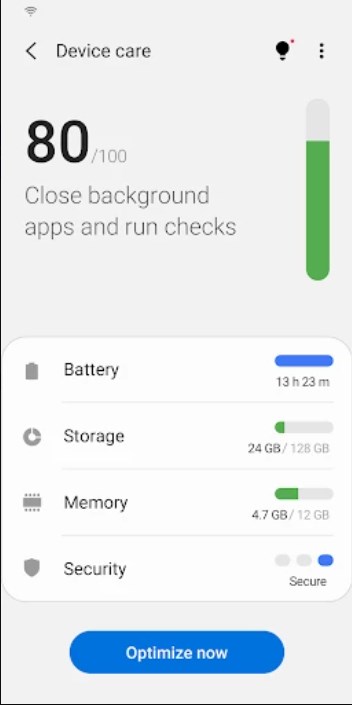
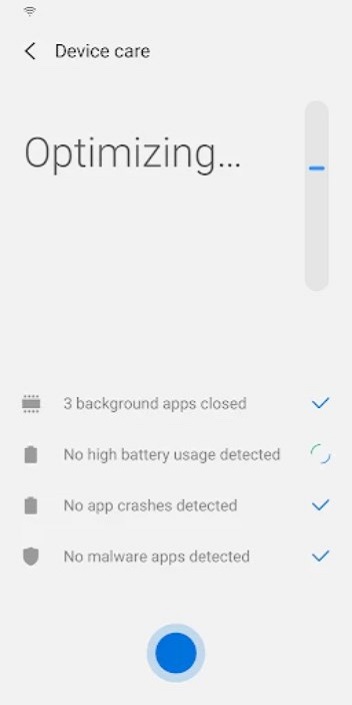
Enhance your Galaxy smartphone experience with Samsung Electronics' "Device Care" app. This easy-to-use tool allows users to quickly and efficiently maintain their device without any specialized knowledge. With a user-friendly interface, you can monitor your device's health at a glance, optimize performance with just one click, analyze battery usage, identify and manage battery-draining apps, free up memory, and even detect malware for real-time protection. Plus, with power-saving modes and customizable widgets, you can enjoy your smartphone for longer periods of time. Keep your device in top condition and enjoy a seamless user experience with "Device Care."
Features of Device Care:
Easy to Use: The intuitive screen layout and interactions make it simple for anyone to check their device's condition at a glance and take prompt actions without needing expert knowledge.
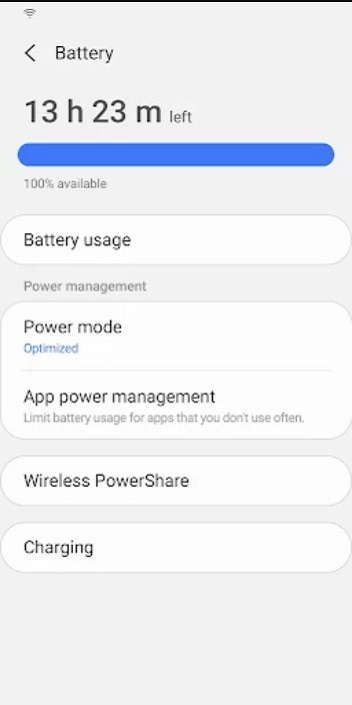
Battery Optimization: Analyzes battery usage on a per-app basis, identifies battery-draining apps, and offers power-saving modes to extend the smartphone's usage time.
Memory Management: Efficiently manages and frees up memory to ensure smooth performance.
Malware Detection: Detects malware (viruses, spyware) and provides real-time protection for the smartphone.
Convenient Widgets: Two widget types are available for easy access and convenience.
FAQs:
Will this app work on all Galaxy devices?
Can I use the app without granting optional permissions?
How often should I run device maintenance with this app?
Will the battery optimization features affect my device's performance?
Are there any additional features planned for future updates?
Conclusion:
For a hassle-free experience in maintaining your Galaxy smartphone, the "Device Care" app by Samsung Electronics is a must-download. With features like easy device monitoring, battery optimization, memory management, malware detection, and convenient widgets, this app ensures your device stays in top condition. Whether you're a tech expert or a novice user, this app provides all the tools you need to keep your smartphone running smoothly. Download "Device Care" now and enjoy a seamlessly optimized smartphone experience.
Show More
Information
Screenshots
Latest Update












Hot Tags
Latest News
-
![Revealing the Launch Playlists and Cross-Progression for COD Warzone Mobile News]()
-
![March 2024 Free Redemption Codes for Honkai: Star Rail News]()
-
PUBG Mobile Teams Up with Bentley Motors: Luxury Cars, Exclusive Collectibles, and Beyond 2024-04-18
![PUBG Mobile Teams Up with Bentley Motors: Luxury Cars, Exclusive Collectibles, and Beyond News]()
-
![Monster Never Cry is now accessible on both Android and iOS mobile devices. News]()
-
V2.2 of the Farlight 84 update introduces an overhauled Season structure, fresh in-game currency, an 2024-04-16
![V2.2 of the Farlight 84 update introduces an overhauled Season structure, fresh in-game currency, an News]()
-
![Arrival of Genshin Impact 4.6 Update: 'Embers of Two Realms, Twilight of Crimson' News]()
-
April 2024 Clash of Clans Update: Unveiling a Fresh Companion, Enhanced Levels, Chat Tagging, and Be 2024-04-16
![April 2024 Clash of Clans Update: Unveiling a Fresh Companion, Enhanced Levels, Chat Tagging, and Be News]()







Comment
Mari Evans
Everything was fine up until this past May. Suddenly one of my tools is being put into deep sleep every few hours. I have it set to unrestricted, to not remove permissions, and never sleep, but device care is ignoring all of those. This app is not using much battery at all, and the reason listed says "for sending too many notifications", but it sends none at all. I've done every bit of troubleshooting on it to no avail. Honestly it's infuriating.
Jul 12, 2025 04:29:57
A Google user
Does a good job cleaning your phone. If you clean memory a lot, eventually you have to restart your phone. The force stop & restarting may make an app act screwy. Very seldom does it but can happen. Also, disable Drive before optimizing. It doesn't like the cache being cleared. Don't do the factory default. Hit cancel. Corrupts the thumbnails. Re-enable after running. Also, AI game apps lose the stats folder. Open each AI game afterwards. The stats folder is there if you have to reinstall them.
Jul 12, 2025 01:35:48
Cat C
It's horrible. The last update wrecked my phone. My phone now runs extremely hot regardless of what it's doing, including charging and it can no longer hold a charge. Also, no matter how many times my phone locks up, activating device care is useless. It only ever shows 100%, which it obviously isn't or it wouldn't be seizing up. If this isn't fixed & I need to get another phone, you can bet it won't be Samsung.
Jul 11, 2025 19:17:17
A Google user
The app keeps sending a notification when the battery is low, but it pauses the wireless charge to tell me that it's low! I cannot force stop or turn off the notification, so it keeps pausing the charge and increasing the amount of time it takes to get my phone battery charged up. This is very frustrating, and I would uninstall it if I wasn't sure it wouldn't cause a phone issue.
Jul 11, 2025 15:33:29
Freedom 4all
Seems pointless since it does not clear old files and cache. The app just takes up phone space when it is so precious. When I first got the app it did clear cache and removed old files, so the upgrades is just a huge downgrade. I always expect improvements in future versions so this was a really big surprise. Then I thought maybe they just forgot to include that feature and it would come back. Unfortunately it hasn't and so don't waste your time. Useless waste of space. It does nothing, next!!
Jul 11, 2025 15:33:11
T J
Samsung store says it's not compatible with my device , yet won't let me remove it and it doesn't do what it says it will do. The one thing we all want is to clean the cache of all apps. It doesn't do that. It doesn't have protection mode. what does it do take up space, allow the apps to al run, and create a hacker link. great. so False advertising. And no it doesn't Detects malware (viruses, spyware) or provide real-time protection for smartphones; it just does this little thing and puts a :-)
Jul 11, 2025 05:08:52