

Sentinel Security
Version:1.0.1
Published:2026-04-17
Introduction
Sentinel Security is a compact, all-in-one security and device management app that protects your privacy, frees storage, tracks data usage, and reports real-time device health. It combines malware scanning, junk cleaning, network traffic monitoring, app management and file browsing into a single, easy-to-use tool so you can keep a tidy, secure device without switching between utilities. Users who want a straightforward way to check CPU, RAM and battery status, remove unnecessary files, or scan downloads for threats will find these core functions convenient. Sentinel Security is designed for practical everyday maintenance and security.
Key Features
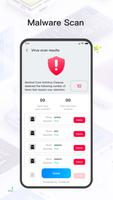
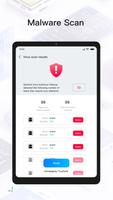
⭐ Malware scanning — Run complete scans of installed apps (excluding pre-installed applications) and downloaded files with Sentinel Security to detect viruses and protect your privacy.
⭐ Junk cleaning — Scan your device for redundant, large, duplicate, or recent items and choose which files to remove to free up storage quickly.
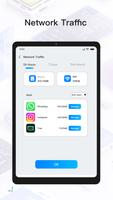
⭐ Network traffic monitoring — Track how much data your apps use with separate views for mobile data and Wi-Fi so you can manage consumption and avoid limits.
⭐ App usage management — See a full list of installed apps and uninstall ones you no longer need to make room and keep your device tidy.
⭐ Storage browsing — Explore all files and folders through an intuitive interface to delete unwanted items and manage storage with ease.
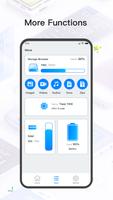
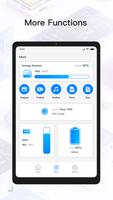
⭐ Device information viewing — Check real-time status for CPU, RAM, battery health and other system details to gain a clear picture of device condition.
Advantages
✅ Sentinel Security consolidates malware scanning, cleaning and monitoring tools into a single interface, reducing the need for multiple utilities.
✅ Helps protect your privacy by scanning downloads and installed apps while giving you control over file removal.
✅ Frees up storage quickly by identifying redundant and large files, making room for apps and media you use.
✅ Provides clear device metrics like CPU and RAM usage so you can spot issues before they affect performance.
Disadvantages
❎ Malware scans exclude pre-installed applications, so system apps are not analyzed by the scanner.
❎ Cleaning requires manual selection of files to remove, which may be slower than fully automatic cleaners.
Show More
Information
Screenshots



Latest Update












Hot Tags
Latest News
-
![Revealing the Launch Playlists and Cross-Progression for COD Warzone Mobile News]()
-
![March 2024 Free Redemption Codes for Honkai: Star Rail News]()
-
PUBG Mobile Teams Up with Bentley Motors: Luxury Cars, Exclusive Collectibles, and Beyond 2024-04-18
![PUBG Mobile Teams Up with Bentley Motors: Luxury Cars, Exclusive Collectibles, and Beyond News]()
-
![Monster Never Cry is now accessible on both Android and iOS mobile devices. News]()
-
V2.2 of the Farlight 84 update introduces an overhauled Season structure, fresh in-game currency, an 2024-04-16
![V2.2 of the Farlight 84 update introduces an overhauled Season structure, fresh in-game currency, an News]()
-
![Arrival of Genshin Impact 4.6 Update: 'Embers of Two Realms, Twilight of Crimson' News]()
-
April 2024 Clash of Clans Update: Unveiling a Fresh Companion, Enhanced Levels, Chat Tagging, and Be 2024-04-16
![April 2024 Clash of Clans Update: Unveiling a Fresh Companion, Enhanced Levels, Chat Tagging, and Be News]()






