

Inspection Project Manager
Version:1.0.266
Published:2026-05-15
Introduction
Inspection Project Manager is a mobile application built to replace paper checklists with a fully digitized inspection workflow that improves efficiency, data integrity, and on-site safety. Inspection Project Manager puts field teams on a single, consistent platform where inspections are created, executed, and archived without the need for printed forms. From routine safety checks to detailed site audits, the app’s emphasis on reliable offline operation and easy data capture helps teams complete work faster while preserving a clear audit trail.
How the workflow works
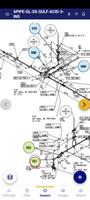
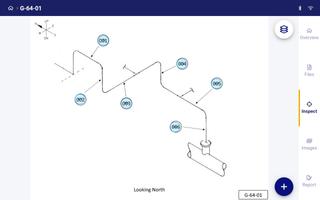
The core workflow mechanics are straightforward: create or select an inspection template, follow a guided checklist on the device, capture evidence, and finish with a digital sign-off. Controls are optimized for field use — large touch targets, simple toggles, checkboxes, dropdown selections and photo attachment buttons reduce input errors when you're wearing gloves or working in bright sunlight. Time-stamped entries and optional GPS tagging are recorded automatically to provide context for each observation, and a built-in signature capture lets supervisors sign off immediately on the device.
Progression and project structure
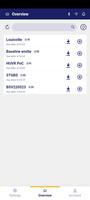
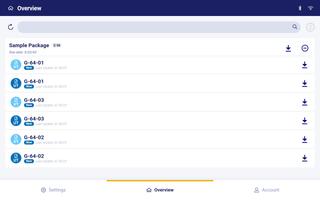
Inspections progress through defined stages so teams and managers can see status at a glance. Each inspection moves from Draft to In Progress to Completed, and progress updates propagate to the project dashboard as tasks are completed. Projects are organized by site, date range, or work package so inspectors can switch between different levels of work without losing context. This structure supports recurring inspections, multi-day audits and phased projects where tasks depend on earlier findings.
Customization and templates
To match existing procedures, templates and checklists can be customized with conditional questions, required fields and grouped sections. Admins can create fields for free-text comments, numeric measurements, pass/fail toggles and mandatory photo evidence. Customization helps teams standardize what gets recorded across sites and reduces the need for manual reconciliation after the fact. Templates are reusable, making it quick to spin up similar inspections across multiple projects.
Reporting and replay value
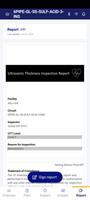
The app generates a live, automated report as you work so the inspection output evolves in real time rather than being assembled later. Reports include embedded photos, timestamps, signatures and any notes captured during the inspection, which increases the value of each inspection record and reduces follow-up work. Replay value comes from easy reuse of templates and the ability to review past inspections to find trends, train new staff or validate corrective actions. Historical records remain searchable and exportable for regulatory audits or internal reviews.
Visual design and user experience
Inspection Project Manager uses a clean, uncluttered visual design with clear typography and high-contrast elements to remain readable in varied lighting conditions. The interface focuses on one task at a time to minimize cognitive load and supports fast switching between sections within an inspection. Hints, inline validation and contextual help are provided so users can resolve common data-entry questions without leaving the app, improving first-time completion rates.
Accessibility and field-ready features
A range of accessibility considerations are included to support diverse field crews: scalable text, color contrast that meets accessibility recommendations, and keyboard navigation for tablets. Offline play is a first-class capability — inspections can be fully executed without a network connection and the app will intelligently sync changes when connectivity is restored. This ensures work continues uninterrupted in remote locations and that data integrity is preserved once devices reconnect.
Validation, challenges and device requirements
To reduce errors, the app enforces validation rules such as required fields, acceptable measurement ranges and conditional skips where questions are not relevant. Transitioning from paper may require initial training and device provisioning, and optimal use depends on having suitable handhelds or tablets with sufficient battery life. The app is designed to perform well on a range of Android devices and to minimize data usage when syncing large media files.
Who benefits and how to get started
Inspection Project Manager is well suited for contractors, safety teams, facility managers and audit groups that need consistent, auditable inspection records. Getting started typically involves importing or building a handful of templates, enrolling a small pilot team, and then rolling out across sites as users become comfortable. With centralized records and real-time progress updates, teams gain faster inspections, clearer records and fewer transcription errors across projects.
Show More
Information
Screenshots


Latest Update









Latest News
-
![Revealing the Launch Playlists and Cross-Progression for COD Warzone Mobile News]()
-
![March 2024 Free Redemption Codes for Honkai: Star Rail News]()
-
PUBG Mobile Teams Up with Bentley Motors: Luxury Cars, Exclusive Collectibles, and Beyond 2024-04-18
![PUBG Mobile Teams Up with Bentley Motors: Luxury Cars, Exclusive Collectibles, and Beyond News]()
-
![Monster Never Cry is now accessible on both Android and iOS mobile devices. News]()
-
V2.2 of the Farlight 84 update introduces an overhauled Season structure, fresh in-game currency, an 2024-04-16
![V2.2 of the Farlight 84 update introduces an overhauled Season structure, fresh in-game currency, an News]()
-
![Arrival of Genshin Impact 4.6 Update: 'Embers of Two Realms, Twilight of Crimson' News]()
-
April 2024 Clash of Clans Update: Unveiling a Fresh Companion, Enhanced Levels, Chat Tagging, and Be 2024-04-16
![April 2024 Clash of Clans Update: Unveiling a Fresh Companion, Enhanced Levels, Chat Tagging, and Be News]()






