

TBS Shop
Version:2.4.2
Published:2026-05-16
Introduction
TBS Shop is a store application built for registered customers who are explicitly approved by a store owner. TBS Shop enforces account-based access: items and checkout are available only to users with an active account that is linked to the store's web application. This design makes TBS Shop a practical choice for businesses that need a controlled, owner-managed purchasing channel rather than an open consumer storefront.
Key features
The core behavior of TBS Shop centers on verification and permission: registration begins on the store's web platform, the account must be approved by the owner, and the mobile app respects that approval status before enabling purchasing. The app mirrors the store catalog and product details from the web application so that listings, pricing, and availability remain consistent. Store owners control who can browse full product details, add items to the cart, and complete an order, which helps reduce anonymous or unauthorized purchases.
How the approval and progression flow works
Account progression in TBS Shop follows a clear verification path. Prospective customers register through the linked web application; their profile and credentials are reviewed by the store owner; once the owner grants access, the app unlocks buying and order-placement functions. Users will see status indicators in the app that reflect whether their account is pending, approved, or suspended. This stepwise progression—registration, review, approval, and purchase—gives both the merchant and the buyer a transparent record of account status and order permissions.
Navigation, controls and user interaction
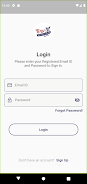
TBS Shop offers standard mobile navigation controls optimized for business users: a catalog feed, category filters, search with typed queries, product detail screens, and a cart/checkout area that remains inactive until account validation is confirmed. Controls are designed for clear touch targets and straightforward flows so users can find items, add them to a savings list or cart, and review order summaries. Buttons and form fields are labeled to match the web application terminology, reducing confusion when customers switch between web and mobile experiences.
Catalog structure and visual style
The app organizes inventory into logical categories and product pages that include images, descriptions, SKU or part numbers, pricing, and stock indicators as provided by the store's backend. The visual style is business-focused and utilitarian: clean typography, consistent spacing, and clear call-to-action elements aimed at efficient ordering. Product imagery and descriptions are supplied by the merchant through the web system, so visual quality may vary by store, but the app keeps layout consistent to aid quick scanning and comparison.
Order lifecycle and account management
Order progression in TBS Shop reflects a typical managed purchasing cycle: create a cart, submit an order, and receive status updates that the merchant controls through their web interface. Users can view order history and basic status notes in the app; final fulfillment, shipping, and invoicing are handled by the store's backend systems. Account settings allow users to maintain contact details and billing information that are required for order processing, and the app maintains a clear separation between buyer-controlled profile data and owner-controlled permissions.
Customization, accessibility and user experience
TBS Shop supports profile preferences such as saved addresses, default payment references (as configured by the merchant on their web platform), and notification preferences for approval and order updates. The app aims for accessibility with readable font sizes and an interface that works with common mobile accessibility tools; merchants should confirm content and labeling on the web side to ensure full screen-reader compatibility. The experience is intentionally straightforward to reduce training time for business customers who place repeat orders.
Connectivity and limitations
Because purchase authorization and account validation are tied to the store's web application, TBS Shop requires an internet connection for sign-in, approval checks, and order submission. Offline functionality is limited: users may be able to view previously loaded content, but creating or completing purchases normally requires online access. The controlled model also means there is no guest checkout or anonymous purchasing option; this is a purposeful trade-off to maintain secure, owner-managed sales.
Who should use TBS Shop
TBS Shop is best suited to B2B sellers, private clubs, distributors, or manufacturers that need to restrict purchasing to a vetted customer list. It benefits operations that require order oversight, customer verification, and clear records linked to web-managed accounts. If you need an open-to-the-public marketplace with guest checkout, this app is not the right match; for businesses that need a gated, accountable purchasing channel, TBS Shop provides a concise, permission-driven mobile interface that integrates directly with the store's web backend.
Show More
Information
Screenshots

Latest Update









Latest News
-
![Revealing the Launch Playlists and Cross-Progression for COD Warzone Mobile News]()
-
![March 2024 Free Redemption Codes for Honkai: Star Rail News]()
-
PUBG Mobile Teams Up with Bentley Motors: Luxury Cars, Exclusive Collectibles, and Beyond 2024-04-18
![PUBG Mobile Teams Up with Bentley Motors: Luxury Cars, Exclusive Collectibles, and Beyond News]()
-
![Monster Never Cry is now accessible on both Android and iOS mobile devices. News]()
-
V2.2 of the Farlight 84 update introduces an overhauled Season structure, fresh in-game currency, an 2024-04-16
![V2.2 of the Farlight 84 update introduces an overhauled Season structure, fresh in-game currency, an News]()
-
![Arrival of Genshin Impact 4.6 Update: 'Embers of Two Realms, Twilight of Crimson' News]()
-
April 2024 Clash of Clans Update: Unveiling a Fresh Companion, Enhanced Levels, Chat Tagging, and Be 2024-04-16
![April 2024 Clash of Clans Update: Unveiling a Fresh Companion, Enhanced Levels, Chat Tagging, and Be News]()






