

WiFi Commander
Version:1.0.1
Published:2026-05-17
Introduction
WiFi Commander is a compact, no-frills utility that surfaces essential local network details quickly and clearly. WiFi Commander displays IP information, detects access points using the WPS protocol, shows current connection parameters, and measures signal strength so you can diagnose reception issues or verify a network at a glance. The interface is intentionally lightweight, designed for fast access to the most useful metrics without extra clutter; this makes the app suitable for casual users, technicians who need a quick readout, and anyone who wants immediate insight into nearby WiFi from a single screen.
Key Features
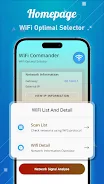
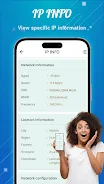
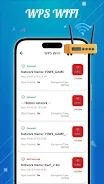
The primary screen in WiFi Commander consolidates core connection data: IPv4 and IPv6 addresses, subnet masks, gateway and DNS addresses, and DHCP state. A dedicated detector checks for WPS-enabled access points and highlights that status in the network list so you can identify networks that support the WPS protocol. Signal strength is measured in real time and presented with clear numeric values and a simple visual gauge so you can compare reception in different rooms or while moving around. Connection parameters such as link speed, frequency band, and RSSI are grouped together for a clear snapshot of the current link quality. Refresh controls let you update scans on demand or set a moderate automatic refresh interval when monitoring a changing environment.
How It Works
WiFi Commander operates entirely on-device and interacts with the phone's built-in WiFi APIs to gather local network information; it does not require internet access to scan or display the data shown in the app. When you open the app, an initial scan lists nearby access points and the current connection details. Tapping a network entry reveals its key parameters so you can compare SSIDs, security types, band, and signal level. The simple workflow moves from discovery to inspection: scan, select, and read—no nested menus or complicated settings to slow you down.
User Experience and Controls
The app uses familiar touch controls optimized for quick diagnostics: a main scan button, a refresh control, and clear tap targets for each network row. Visual organization emphasizes large text for addresses and readable labels for technical fields to make interpretation faster, even on smaller screens. WiFi Commander supports common accessibility conventions in Android, such as scalable fonts and high-contrast text, to help users who need larger interfaces. The design favors clarity over decoration, with straightforward icons and short labels so the learning curve is minimal.
Visual Style and Layout
Visually, WiFi Commander adopts a restrained aesthetic: neutral backgrounds, high-contrast type, and concise data blocks that separate IP information from signal and connection details. This layout helps you scan the most relevant fields quickly without being distracted by animations or decorative elements. Each screen is structured to put the most actionable information at the top, reducing the time it takes to find addresses, gateway data, or signal values during a site visit.
Progression, Customization, and Replay Value
Rather than a game-like progression, the app encourages a practical workflow that becomes more efficient with repeated use. As you become familiar with where key values appear, tasks such as verifying DHCP leases or finding the best router placement become faster. Customization options are deliberately light: you can adjust scan frequency and choose whether to show advanced fields, which lets you tailor the interface to either concise or detailed views. Because WiFi conditions change frequently, the utility delivers strong replay value for anyone who routinely checks connectivity, performs quick troubleshooting, or maps signal strength around a home or office.
Accessibility, Offline Use, and Limitations
WiFi Commander is built to function locally; it does not rely on cloud services and can be used offline to inspect the network your device is connected to and nearby access points visible to the phone. Accessibility is considered with clear typography and touch-friendly controls, though the app focuses on diagnostics and does not include advanced logging, long-term history, or router configuration tools. If you need deep packet analysis or persistent network logs, those capabilities are outside the app's design; WiFi Commander is intended as a fast, informative readout rather than a full network management suite.
Who Should Use It
WiFi Commander is useful for homeowners checking signal coverage, technicians performing quick site checks, and anyone who wants immediate access to core WiFi metrics without navigating complex utilities. The app balances simplicity and useful detail so you can quickly identify IP settings, security types, WPS status, and relative signal strength when time matters.
Show More
Information
Screenshots

Latest Update








Latest News
-
![Revealing the Launch Playlists and Cross-Progression for COD Warzone Mobile News]()
-
![March 2024 Free Redemption Codes for Honkai: Star Rail News]()
-
PUBG Mobile Teams Up with Bentley Motors: Luxury Cars, Exclusive Collectibles, and Beyond 2024-04-18
![PUBG Mobile Teams Up with Bentley Motors: Luxury Cars, Exclusive Collectibles, and Beyond News]()
-
![Monster Never Cry is now accessible on both Android and iOS mobile devices. News]()
-
V2.2 of the Farlight 84 update introduces an overhauled Season structure, fresh in-game currency, an 2024-04-16
![V2.2 of the Farlight 84 update introduces an overhauled Season structure, fresh in-game currency, an News]()
-
![Arrival of Genshin Impact 4.6 Update: 'Embers of Two Realms, Twilight of Crimson' News]()
-
April 2024 Clash of Clans Update: Unveiling a Fresh Companion, Enhanced Levels, Chat Tagging, and Be 2024-04-16
![April 2024 Clash of Clans Update: Unveiling a Fresh Companion, Enhanced Levels, Chat Tagging, and Be News]()






