

Local Ai LLM
Version:1.1.4
Published:2026-05-20
Introduction
Local Ai LLM is a privacy-first, on-device AI assistant that runs entirely on your smartphone without routing data through cloud servers, giving you local control over text generation, document summarization, image analysis, and simple phone automation even when offline.
What this app does
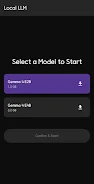
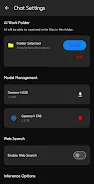
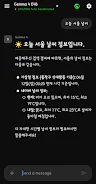
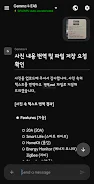
Local Ai LLM loads a powerful Gemma 4 family model (E2B and E4B variants) directly on-device so you can generate drafts, rewrite text, summarize long documents, extract structured data from images, and ask context-aware questions about files stored locally. The assistant can accept voice or typed commands, open and edit documents from a designated Work Folder, and perform routine phone tasks such as toggling settings or reporting device status without sending your data to external servers.
Controls and interaction
You interact with Local Ai LLM using a straightforward conversation interface that supports both text input and voice dictation. Voice commands are processed on-device and can be used for hands-free control and quick notes; typed prompts are ideal for precision editing or code snippets. File operations are initiated from the app or via a Work Folder integration so the assistant can read, create, or modify files you explicitly allow. The interface includes adjustable response length and clarity controls so you can favor concise summaries or more detailed explanations depending on the task.
Progression, customization, and workflow
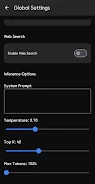
The app is designed around progressive personalization rather than levels: as you use Local Ai LLM you can refine the system prompt, save preferred stylistic presets, and adjust sampling parameters like temperature, top-K, and max tokens to shape model behavior. Custom workflows are achievable by combining voice or text commands with file actions; for example, you can set a repeatable pipeline to summarize a set of documents, extract key points into a new note, and save results back into the Work Folder. These features create a practical progression where power users gradually build faster, more accurate prompts and presets for recurring tasks.
Visual style and user experience
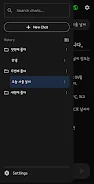
The app focuses on clarity and low distraction: a simple chat-style layout, readable typography, and clear buttons for core actions. Visual feedback highlights model activity and file operations so you always know what the assistant is doing. The design prioritizes legibility and predictable controls over decorative elements, which helps when using the app outdoors or in low-light conditions. Where available, GPU/NPU acceleration is used to speed up response generation while conserving energy through optimized processing paths.
Accessibility and offline play
Offline operation is a core strength: Local Ai LLM keeps everything on-device so people with intermittent connectivity can rely on the assistant for important tasks. Voice input and screen-reader compatibility are supported to make interactions easier for users with differing needs. Because processing occurs locally, no internet connection is required for the standard feature set, and optional online features such as real-time web search or cloud-based document lookups only run if you explicitly enable them.
Practical limitations and system requirements
There are trade-offs to local deployment. The initial model download can be large—typically between 1.5GB and 3.2GB—so a stable Wi‑Fi connection is recommended. Performance and latency depend on device hardware: modern phones with substantial RAM and GPU/NPU acceleration will produce the most responsive experience, while older devices may see slower generation times and increased battery use during intensive sessions. Local Ai LLM provides settings to limit resource usage, including shorter response defaults and lower sampling rates to reduce CPU/GPU load.
Security and privacy
Privacy is built into the architecture: conversations, attachments, and generated files remain on your device unless you export them. The Work Folder approach gives you explicit control over which files the assistant can access and edit. If you choose to enable online lookup features for broader context or live information, those requests are isolated and optional so the default behavior remains strictly local.
Use cases and replay value
Local Ai LLM is useful for a variety of daily tasks: drafting emails and reports, summarizing long articles, extracting text from photos, automating simple phone workflows, and serving as an on-device coding helper for small snippets. Because you can save prompts and create repeatable workflows, the app retains long-term value for productivity rather than one-off novelty. Regular updates to the on-device model and saved presets allow the experience to improve with continued use while keeping your data private.
Show More
Information
Screenshots

Latest Update









Hot Tags
Latest News
-
![Revealing the Launch Playlists and Cross-Progression for COD Warzone Mobile News]()
-
![March 2024 Free Redemption Codes for Honkai: Star Rail News]()
-
PUBG Mobile Teams Up with Bentley Motors: Luxury Cars, Exclusive Collectibles, and Beyond 2024-04-18
![PUBG Mobile Teams Up with Bentley Motors: Luxury Cars, Exclusive Collectibles, and Beyond News]()
-
![Monster Never Cry is now accessible on both Android and iOS mobile devices. News]()
-
V2.2 of the Farlight 84 update introduces an overhauled Season structure, fresh in-game currency, an 2024-04-16
![V2.2 of the Farlight 84 update introduces an overhauled Season structure, fresh in-game currency, an News]()
-
![Arrival of Genshin Impact 4.6 Update: 'Embers of Two Realms, Twilight of Crimson' News]()
-
April 2024 Clash of Clans Update: Unveiling a Fresh Companion, Enhanced Levels, Chat Tagging, and Be 2024-04-16
![April 2024 Clash of Clans Update: Unveiling a Fresh Companion, Enhanced Levels, Chat Tagging, and Be News]()






