
Note Nest
Version:1.0
Published:2026-05-20
Introduction
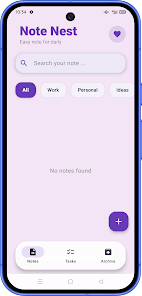
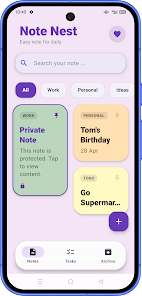
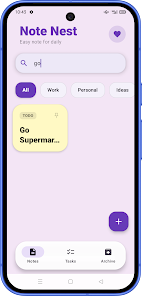
Note Nest is a lightweight note-taking app focused on capturing daily notes, ideas and task lists in a single organized place. The first screen presents colorful card-style notes that make it easier to scan content at a glance, and the interface keeps common actions close so you can jot down a thought or build a quick checklist without distraction. Whether you open the app for a one-line reminder or to assemble a short plan for the day, Note Nest emphasizes speed, clarity and a calm visual layout that reduces friction when you need to record information fast.
Core features and everyday use
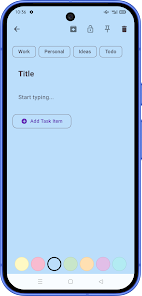
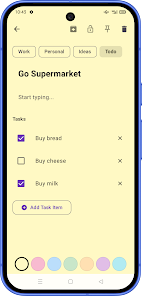
The app centers on a few practical tools: categorized note cards, in-note checklists that let you mark progress as tasks are completed, pinning to keep priority items at the top of your view, and archiving to remove older content from the active list while retaining it for later retrieval. Creating a new entry is intentionally simple — open a new note, type or paste content, and add checklist items where needed. Built-in search helps you find past entries by text or category so older notes and ideas remain useful rather than getting lost.
Controls and interaction model
Note Nest keeps controls familiar and unobtrusive to reduce the learning curve for new users. New notes are created with a single tap, and editing happens directly within the card so changes feel immediate. Tasks inside notes are toggled on or off to reflect progress, and contextual options let you pin or archive an item without navigating away from the list. These core interactions are designed to match common mobile patterns so you can work quickly with one hand when needed.
Organization, progression and workflows
Rather than imposing complex project structures, the app supports steady progression through small, repeatable habits: capture, categorize, prioritize, and archive. Categories such as Work, Personal, Ideas and Todo let you group related entries, and a combination of pinned cards and checklists serves as a lightweight progression system for day-to-day tasks. Users often adapt this pattern into a daily review process—create quick notes during the day, check items off as you progress, pin what remains important, and archive completed or older material to keep the active view concise.
Visual style and customization
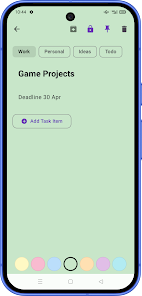
The card-based design pairs clear typography with soft color accents to improve scanability. Each note card is intentionally compact but legible, helping you spot high-priority items quickly without clutter. Note Nest offers simple customization to make the workspace feel personal: color-coded categories and a calm layout make it straightforward to differentiate between note types, and adjustable text sizes and spacing improve readability on a variety of screen sizes.
Privacy, accessibility and reliability
For users who need an extra layer of privacy, the app supports protection for selected notes so personal content can be separated from general lists; protection is applied at the note level and is intended as an additional option rather than a global lock. Accessibility considerations are reflected in the clean interface, readable contrast and straightforward navigation, making it easier for a wide range of users to create and manage content. The app is built for responsive local performance so opening, searching and editing notes feels immediate on most modern devices.
Limitations and target audience
Note Nest is purposefully designed for simple, distraction-free daily use, not for advanced project management or elaborate document formatting. If you need multi-user collaboration, deep task dependencies, or complex formatting tools, this app may feel limited. Protection is available for selected notes, which means sensitive items benefit from manual organization to ensure they are secured as intended. These trade-offs keep the core experience lightweight and approachable for users who want a fast, visual way to capture ideas and manage small task lists.
Long-term value and replayability
Even without complex features, the app delivers ongoing utility: regular capture and review turn the note collection into a growing personal archive of ideas and decisions. Because notes can be pinned, archived and searched, the app stays useful over time as your collection grows. Frequent short interactions—adding a note, checking off items, scanning pinned cards—encourage continued engagement and help build effective habits around organization and productivity.
Show More
Information
Screenshots
Latest Update









Latest News
-
![Revealing the Launch Playlists and Cross-Progression for COD Warzone Mobile News]()
-
![March 2024 Free Redemption Codes for Honkai: Star Rail News]()
-
PUBG Mobile Teams Up with Bentley Motors: Luxury Cars, Exclusive Collectibles, and Beyond 2024-04-18
![PUBG Mobile Teams Up with Bentley Motors: Luxury Cars, Exclusive Collectibles, and Beyond News]()
-
![Monster Never Cry is now accessible on both Android and iOS mobile devices. News]()
-
V2.2 of the Farlight 84 update introduces an overhauled Season structure, fresh in-game currency, an 2024-04-16
![V2.2 of the Farlight 84 update introduces an overhauled Season structure, fresh in-game currency, an News]()
-
![Arrival of Genshin Impact 4.6 Update: 'Embers of Two Realms, Twilight of Crimson' News]()
-
April 2024 Clash of Clans Update: Unveiling a Fresh Companion, Enhanced Levels, Chat Tagging, and Be 2024-04-16
![April 2024 Clash of Clans Update: Unveiling a Fresh Companion, Enhanced Levels, Chat Tagging, and Be News]()






