

PMII Swan
Version:3.0.4
Published:2026-05-20
Introduction
PMII Swan is a productivity app designed to simplify how teams and individuals plan, track and complete work. PMII Swan centralizes task communication, reduces repetitive manual steps and provides both summary and detailed views so users can monitor progress without switching between multiple tools. The app focuses on time calculation, task control and clearer outcomes so organizations can identify inefficiencies, lower operating costs and free up time for higher-value activities.
Key features and workflow
The core of PMII Swan is a structured task model that groups work into projects, tasks and subtasks. Each item can carry a short description, expected duration and a simple status marker; comments and attachments collected on a task form a single communication thread so context stays with the work item. Built-in time calculation tools let users start and stop timers, enter manual time entries and compare planned versus actual effort, helping teams spot recurring bottlenecks. Overview screens provide a high-level snapshot across projects while detailed task views reveal assignees, notes, time logs and next steps.
Controls and user interactions
Interactions in PMII Swan are designed for straightforward use on touchscreens and larger devices alike. Primary controls include tapping or clicking a task to open details, swiping or selecting to change status, and long-press or context controls for quick actions like duplicating or reassigning a task. The interface favors direct manipulation: start/stop timers, edit time entries inline, and add comments without leaving the task view. Keyboard navigation and shortcuts are available for productivity-focused users, and common gestures are consistent throughout the app to reduce the learning curve.
Progression and productivity tracking
Progression in PMII Swan is achieved through clear task lifecycles and lightweight milestones. Teams move items from planned to in-progress to completed, and milestones group related tasks into deliverable phases. The app surfaces simple progress metrics—percent complete, time spent versus estimate, and recent activity—to help managers and individual contributors identify where attention is needed. Repetitive workflows can be turned into templates so teams progressively reduce setup time as they refine their process.
Visual style and level structure
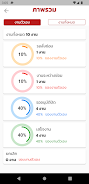
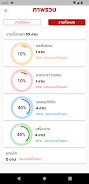
PMII Swan uses a clean, minimal visual language that emphasizes readability and quick scanning. Overview dashboards present cards or rows of projects and tasks with clear status colors and compact progress indicators. When users drill down, detail views prioritize the most relevant information—assignee, due date, time entries and recent comments—so decisions can be made quickly. The level structure supports nested tasks so complex assignments can be broken into manageable pieces while preserving the parent-child relationship for reporting and review.
Customization and adaptability
The app includes practical customization options that align with everyday workflow needs. Users can create and save templates for recurring projects, set default time estimates, and configure notification preferences to avoid overload. Custom fields and tags let teams categorize work in ways that match their process without forcing a single approach. These options make it easier to adapt PMII Swan to different departments, roles or personal productivity styles while keeping core data consistent.
Replay value and ongoing use
PMII Swan is built for continuous use rather than single-session interactions. Its value increases over time as teams refine templates, build a history of time and task data, and use summaries to improve planning. Regular retrospectives informed by the app's time comparisons and task histories help teams reduce repetitive steps and gradually increase throughput. Because templates and workflows persist, the app rewards repeated use through incremental efficiency gains.
Accessibility, offline support and reliability
Accessibility is considered in the interface design: adjustable text sizes, high-contrast colors and consistent layout patterns help users with different needs navigate tasks reliably. PMII Swan supports offline work for basic actions—reading task details, editing fields and queuing time entries—which sync automatically when connectivity is restored so users can continue productive work in varied environments. Local data caching and clear sync status indicators reduce uncertainty when switching between online and offline modes.
Challenges and practical considerations
PMII Swan helps surface common productivity challenges such as ambiguous ownership, unclear time estimates and repetitive setup work, but it requires initial configuration and disciplined use to deliver full benefits. Teams should invest a short period to set up templates, agree on status conventions and enter consistent time information. With that foundation, PMII Swan becomes a practical assistant for reducing wasted effort, improving visibility and making routine work easier to measure and refine.
Show More
Information
Screenshots
Latest Update







Latest News
-
![Revealing the Launch Playlists and Cross-Progression for COD Warzone Mobile News]()
-
![March 2024 Free Redemption Codes for Honkai: Star Rail News]()
-
PUBG Mobile Teams Up with Bentley Motors: Luxury Cars, Exclusive Collectibles, and Beyond 2024-04-18
![PUBG Mobile Teams Up with Bentley Motors: Luxury Cars, Exclusive Collectibles, and Beyond News]()
-
![Monster Never Cry is now accessible on both Android and iOS mobile devices. News]()
-
V2.2 of the Farlight 84 update introduces an overhauled Season structure, fresh in-game currency, an 2024-04-16
![V2.2 of the Farlight 84 update introduces an overhauled Season structure, fresh in-game currency, an News]()
-
![Arrival of Genshin Impact 4.6 Update: 'Embers of Two Realms, Twilight of Crimson' News]()
-
April 2024 Clash of Clans Update: Unveiling a Fresh Companion, Enhanced Levels, Chat Tagging, and Be 2024-04-16
![April 2024 Clash of Clans Update: Unveiling a Fresh Companion, Enhanced Levels, Chat Tagging, and Be News]()






