

InspectPro
Version:1.4.1.2
Published:2026-05-20
Introduction
InspectPro is a practical factory inspection app built to bring clarity and consistency to industrial maintenance workflows. InspectPro helps technicians quickly locate equipment, start scheduled checks and capture precise machine status so maintenance teams and managers can act faster on site. By centralizing inspection records and making status updates available in the field, the app supports better preventive maintenance planning while keeping the interface simple for crews who need reliable information without excess steps.
Key features
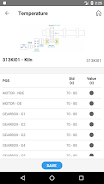
InspectPro supports fast equipment identification using on-device camera scanning of barcodes, QR codes and visible ID tags, with the option for manual selection when a tag is not present. Each inspection step can record a pass/fail outcome, attach photos and brief notes, and include timestamps and technician identifiers to preserve a full audit trail. Checklists and inspection templates are customizable so common rounds can be tailored to machine type or location, and templates keep entries consistent to improve downstream planning and forecasting.
Workflow and controls
The user interface focuses on one-handed operation for technicians on the move: a clear inspection list, a prominent scan button, and swipeable items to mark status or add comments. Controls are purposely straightforward—tap to open a checklist, scan to identify an asset, fill simple fields and submit—so training time is minimized. For supervisors and planners, search and filter controls let you quickly find recent failures, overdue checks or asset histories. Navigation emphasizes predictable steps and minimal taps to help crews maintain pace during rounds.
Progression and reporting
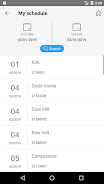
InspectPro organizes work into progressive inspection rounds and scheduled checks, showing completion percentages and outstanding items to help teams measure progress during a shift. Completed inspections build a chronological record of machine condition that planners can use to spot recurring faults and refine preventive maintenance intervals. The app produces concise inspection summaries that can be reviewed immediately on device and exported or shared with colleagues using common file formats when connectivity is available, supporting clear handovers between shifts and streamlined service coordination.
Visual style and customization
The app favors a clean, utilitarian visual style with high-contrast text, clear icons and large touch targets suited to industrial environments. InspectPro lets administrators customize checklist content and inspection frequency so the visual flow matches real-world procedures at each facility. Photo attachments and inline notes add visual context to defect reports, while configurable status labels help teams adopt a consistent language for prioritizing repairs and spare-parts needs.
Reliability, offline use and accessibility
InspectPro is designed to remain useful in areas with limited connectivity: inspections can be completed offline and synchronized with the central data store when a network connection is restored. This local-first approach reduces interruptions during rounds and protects collected data until it can be uploaded. Accessibility considerations include legible type sizes, clear contrast, and simple touch interactions so the app is usable in noisy, fast-paced environments with gloved hands or through protective screens.
Replay value and long-term utility
For maintenance teams the value of InspectPro grows over time as the inspection history accumulates: repeating rounds creates a practical dataset for trend analysis, root cause discovery and more effective scheduling. Routine use reduces downtime by shortening the time it takes to locate assets and by surfacing recurrent issues earlier. The app also supports ad hoc inspections and incident-driven checks, so crews can use the same workflow for both planned and unexpected tasks.
Limitations and operational notes
InspectPro requires an initial asset mapping and template setup to achieve best results; investing time early to tag equipment and define checklists pays off by reducing confusion during inspections. Performance depends on device camera quality for reliable scanning and on-site connectivity for immediate status updates; where connectivity is limited, the built-in offline mode ensures data is retained until it can synchronize. Minimal training for staff on scanning best practices and consistent naming conventions will help maximize accuracy and reduce manual corrections.
Who should use InspectPro
InspectPro is well suited to maintenance crews, facility managers and planners who need a practical tool for routine equipment checks, defect reporting and preventive maintenance planning. It emphasizes straightforward workflows, dependable data capture and configurable templates so small teams and larger sites can adopt the app with minimal disruption. If your goal is to reduce time spent locating assets, improve the quality of inspection records and support smarter scheduling decisions, InspectPro provides a focused, easy-to-use solution.
Show More
Information
Screenshots



Latest Update











Hot Tags
Latest News
-
![Revealing the Launch Playlists and Cross-Progression for COD Warzone Mobile News]()
-
![March 2024 Free Redemption Codes for Honkai: Star Rail News]()
-
PUBG Mobile Teams Up with Bentley Motors: Luxury Cars, Exclusive Collectibles, and Beyond 2024-04-18
![PUBG Mobile Teams Up with Bentley Motors: Luxury Cars, Exclusive Collectibles, and Beyond News]()
-
![Monster Never Cry is now accessible on both Android and iOS mobile devices. News]()
-
V2.2 of the Farlight 84 update introduces an overhauled Season structure, fresh in-game currency, an 2024-04-16
![V2.2 of the Farlight 84 update introduces an overhauled Season structure, fresh in-game currency, an News]()
-
![Arrival of Genshin Impact 4.6 Update: 'Embers of Two Realms, Twilight of Crimson' News]()
-
April 2024 Clash of Clans Update: Unveiling a Fresh Companion, Enhanced Levels, Chat Tagging, and Be 2024-04-16
![April 2024 Clash of Clans Update: Unveiling a Fresh Companion, Enhanced Levels, Chat Tagging, and Be News]()






