
Batch Flow
Version:1.0
Published:2026-05-21
Introduction
Batch Flow is an offline-first inspection app designed for manufacturing and production teams that need a faster, more accurate way to handle incoming raw material checks. Batch Flow replaces paper forms with a guided digital workflow that captures batch numbers, supplier names, inspector identity, quantities and configurable quality parameters so teams can make consistent receiving decisions on the factory floor even when internet access is unavailable.
Key features and workflow
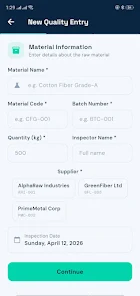
The app walks inspectors through a structured, multi-step entry form that enforces required fields and helps reduce human error. Each step resembles a short level in a checklist-style workflow: identify material, record supplier and batch details, enter measured values, select observed defects and add optional notes or photos. Controls are simple and touch-optimized for tablets and phones — large input fields, dropdown selectors for common values, toggle switches to mark pass/fail items, and an intuitive camera button to attach images. The guided flow shortens training time and allows new inspectors to follow a consistent procedure.
Scoring, grading and progression
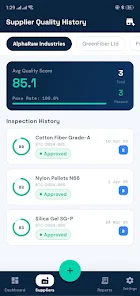
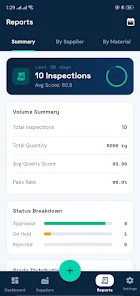
As data is entered, Batch Flow calculates a numeric quality score on a 0–100 scale and assigns a grade according to configurable thresholds. This immediate score provides a clear progression from raw entry to final decision: inspectors see how specific parameters affect the overall score and can iterate inspections if additional checks are required. Progression is tied to the entry flow — completed inspections become part of a timeline and an inspector can filter records by status, date range or supplier to track how materials progress from arrival to approved, on hold or rejected.
Dashboard and visual analytics
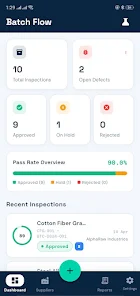
The centralized dashboard aggregates inspection records to give floor managers a real-time overview of average scores, pass rates and active defect alerts. Charts and time-based trend views highlight changes in supplier performance and recurring defect types so teams can prioritize corrective actions. The visual analytics are designed for quick interpretation on the production line: color-coded status indicators, sortable tables and drilldowns into individual inspection records make traceability straightforward without complex setup.
Customization, templates and inspector controls
Batch Flow supports configurable inspection templates so teams can create forms tailored to different material types or quality specifications. Administrators can define which parameters are required, adjust scoring weights, and set grade thresholds to reflect company policies. The app records inspector identity and timestamps for every entry, which helps with accountability and allows managers to review who completed an inspection and when. Form templates speed repeated inspections and reduce data entry variation between shifts.
Offline reliability and data management
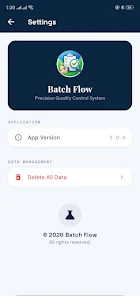
Designed for environments with intermittent connectivity, the app uses a local lightweight database so inspections remain fully functional without internet access. Entries and analytics are stored on-device and can be exported when a network connection is available. Data is organized to maintain traceability: batch-level records, supplier histories and defect logs are all searchable on the device. Enterprises that require built-in cloud synchronization or remote access should plan for additional integration, since Batch Flow focuses on robust local operation first.
Usability, accessibility and visual design
The interface favors clarity and industrial practicality over decorative elements: high-contrast labels, large touch targets, and readable fonts reduce mistakes under factory lighting conditions. Accessibility options include support for larger text and straightforward navigation to accommodate users with differing visual or dexterity needs. The visual style is intentionally minimal so inspectors can perform checks quickly; icons and labels are used sparingly to avoid clutter while ensuring essential information is always visible.
Replay value and repeatability
Because inspections are repeatable tasks, Batch Flow increases long-term value by enabling consistent re-use of templates and quick duplication of similar records. Teams gain replay value when they revisit previous inspections to compare outcomes, retest recurring suppliers, or validate corrective actions. Time-based reports and defect trend comparisons encourage regular review cycles that help improve supplier quality over successive receiving events.
Limitations and practical considerations
Batch Flow is optimized for incoming raw material inspections and does not currently aim to replace full-featured enterprise quality management suites. Data is stored locally by design, so organizations seeking native cloud collaboration features will need to consider supplemental integrations. The app intentionally avoids complex modules that extend beyond receiving workflows, keeping the user experience focused and lightweight for frontline operators.
Batch Flow is well suited for small-to-medium production teams and larger plants that require a dependable, offline-capable inspection tool. With configurable templates, clear scoring, and a centralized dashboard, Batch Flow helps teams reduce paperwork, improve traceability and speed decision-making on the factory floor while keeping the user experience straightforward and accessible.
Show More
Information
Screenshots
Latest Update











Hot Tags
Latest News
-
![Revealing the Launch Playlists and Cross-Progression for COD Warzone Mobile News]()
-
![March 2024 Free Redemption Codes for Honkai: Star Rail News]()
-
PUBG Mobile Teams Up with Bentley Motors: Luxury Cars, Exclusive Collectibles, and Beyond 2024-04-18
![PUBG Mobile Teams Up with Bentley Motors: Luxury Cars, Exclusive Collectibles, and Beyond News]()
-
![Monster Never Cry is now accessible on both Android and iOS mobile devices. News]()
-
V2.2 of the Farlight 84 update introduces an overhauled Season structure, fresh in-game currency, an 2024-04-16
![V2.2 of the Farlight 84 update introduces an overhauled Season structure, fresh in-game currency, an News]()
-
![Arrival of Genshin Impact 4.6 Update: 'Embers of Two Realms, Twilight of Crimson' News]()
-
April 2024 Clash of Clans Update: Unveiling a Fresh Companion, Enhanced Levels, Chat Tagging, and Be 2024-04-16
![April 2024 Clash of Clans Update: Unveiling a Fresh Companion, Enhanced Levels, Chat Tagging, and Be News]()






