

Liboo AI
Version:0.0.2
Published:2026-05-23
Introduction
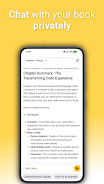
Liboo AI is an offline assistant that streamlines document study by letting you interact directly with your files on-device. Liboo AI analyzes text locally to produce concise summaries, answer questions with context-aware replies, and highlight passages that matter most, all without sending content to external servers. This makes the app a practical choice for students, researchers, and professionals who need fast, private access to the core ideas inside notes, reports, and articles while retaining full control over document storage.
Key features
The app extracts key points, generates short summaries and paraphrases, and supports direct question-and-answer interaction with the text. It works with common document types so you can import PDFs, plain text, and many document formats through the system file picker, then query any loaded file. Document-based querying helps you jump to relevant sections rather than scanning entire files, and on-device processing ensures response generation stays local to your device. Liboo AI is optimized to balance speed and fidelity so summaries are concise but focused on the main ideas.
Controls and interaction
Interaction is designed to be intuitive: select a passage to ask a question about it, use the search bar to find keywords across a document, and tap a result to navigate directly to the source context. Touch gestures such as long-press to highlight or tap-to-select are supported, along with simple toolbar controls for summarizing a page, requesting clarification, or extracting an answer. Text can be copied or exported as snippets for local note-taking, and a small in-app history helps you revisit recent queries and refinements without leaving the app environment.
Study progression and customization
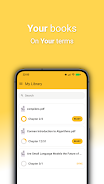
The app supports a study-oriented workflow by letting you break documents into sections, bookmark important segments, and create short review prompts from summaries. You can choose summary length and tone to match quick reviews or deeper study sessions, adjust font size and line spacing for comfortable reading, and organize documents into folders and tags for a clearer progression through topics. Over time you can use repeated queries and bookmarked passages to track which parts of a document you’ve reviewed, making the app useful for iterative learning and revision without relying on cloud synchronization.
Visual style and accessibility
The visual approach favors a clean, minimal interface that keeps focus on text content: configurable light and dark themes, adjustable typography, and high-contrast elements to aid readability. Accessibility features include larger text options and compatibility with system screen readers to support users with visual impairments. Interface controls are intentionally simple so navigation works comfortably on both phones and tablets, and the layout adapts to portrait and landscape orientations for uninterrupted study sessions.
Offline use and privacy
Because all processing happens locally, Liboo AI keeps your documents private by design. There is no automatic cloud backup or remote indexing, so you remain responsible for your own file copies and manual backups. The offline model makes the app useful in low- or no-network situations and reduces the need to transmit sensitive materials. Be aware that on-device analysis can use extra storage and CPU resources depending on file size and the depth of processing you request, so performance varies by device capability.
Limitations and support
The assistant is a practical tool for summarizing and exploring documents, but it is not a replacement for domain experts; complex or technical questions may require specialist review. Older devices may experience slower response times for very large files, and because there is no cloud sync, sharing or syncing documents across devices requires manual transfer. Regular app updates add refinements and additional format support, and the interface includes in-app guidance to help you get the most from document querying and study features.
Show More
Information
Screenshots

Latest Update











Latest News
-
![Revealing the Launch Playlists and Cross-Progression for COD Warzone Mobile News]()
-
![March 2024 Free Redemption Codes for Honkai: Star Rail News]()
-
PUBG Mobile Teams Up with Bentley Motors: Luxury Cars, Exclusive Collectibles, and Beyond 2024-04-18
![PUBG Mobile Teams Up with Bentley Motors: Luxury Cars, Exclusive Collectibles, and Beyond News]()
-
![Monster Never Cry is now accessible on both Android and iOS mobile devices. News]()
-
V2.2 of the Farlight 84 update introduces an overhauled Season structure, fresh in-game currency, an 2024-04-16
![V2.2 of the Farlight 84 update introduces an overhauled Season structure, fresh in-game currency, an News]()
-
![Arrival of Genshin Impact 4.6 Update: 'Embers of Two Realms, Twilight of Crimson' News]()
-
April 2024 Clash of Clans Update: Unveiling a Fresh Companion, Enhanced Levels, Chat Tagging, and Be 2024-04-16
![April 2024 Clash of Clans Update: Unveiling a Fresh Companion, Enhanced Levels, Chat Tagging, and Be News]()






