

Fuel Insight
Version:1.0.3
Published:2026-05-23
Introduction
Fuel Insight is a practical vehicle fuel management app designed to help drivers log fill-ups, monitor mileage and control running costs with a clean, easy-to-use interface. Fuel Insight puts refuelling and odometer entries at the center of its workflow so you can calculate average fuel economy, cost per kilometre and review long-term trends without clutter. The introduction is aimed at drivers who want a reliable, lightweight companion for day-to-day fuel budgeting and multi-vehicle record keeping.
Key features
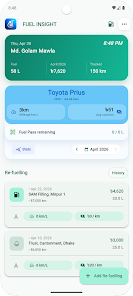
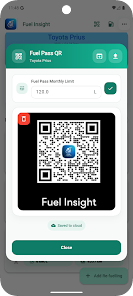
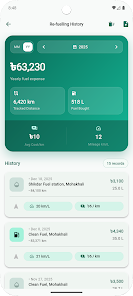
The app captures each refuelling and odometer reading, then computes average km/L (or your preferred fuel efficiency unit) and cost per kilometre automatically from the data you enter. Monthly and yearly fuel history pages make it straightforward to identify consumption patterns and seasonal changes in spend. Fuel Pass support lets you store Fuel Pass QR codes and set a monthly allowance so remaining entitlement can be monitored at a glance. Fuel Insight also supports multiple vehicles, secure cross-device sync, and import of bulk refuelling records from Excel or CSV files for fast setup.
How it works — controls and interaction
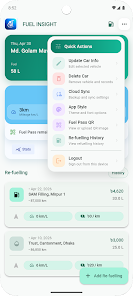
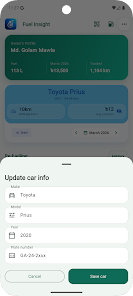
Data entry is intentionally simple: open a vehicle record, tap to add a fill-up, enter litres and odometer, and save. The app reduces repetitive typing by remembering recent values and offering sensible defaults; average economy and cost per kilometre update instantly so you can confirm numbers before saving. Navigation relies on clear, touch-friendly controls and straightforward forms rather than crowded menus, making it easy to add entries on the roadside or during short breaks.
User experience, customization and visual style
Fuel Insight keeps the layout minimal and readable so tables and charts remain useful even on smaller screens. You can choose a dark or custom theme to match your preference, and units for distance, volume and currency can be set in settings to reflect local formats. Vehicle names, notes and custom tags let you classify entries for different drivers, business trips or vehicle types, improving the usefulness of reports and allowing quick filtering when you need to inspect a particular dataset.
Progression, reports and replay value
Progression in Fuel Insight comes from richer historical data: the more entries you add, the more accurate your averages and the more insightful your monthly and yearly comparisons become. Regular use surfaces fuel-economy trends and cost drivers so the app naturally rewards consistent logging with clearer budgeting decisions. Detailed history views act like a light reporting system, helping you track improvements after maintenance, tyre changes or driving-style adjustments.
Sync, backups and privacy
Records are stored locally by default so you can use the app fully offline and keep confidential data on-device. When you choose to enable cross-device sync, the app transfers records securely so your entries remain consistent on phone and tablet. Export and backup options let you create copies of data for safekeeping; synchronization is optional and designed to respect user control over where and how records are stored.
Import, export and interoperability
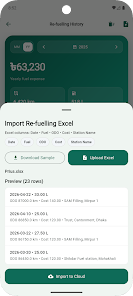
For users migrating from spreadsheets or other tools, Fuel Insight accepts common Excel and CSV formats for bulk import, which speeds up initial setup when you have historical refuelling data. Export functions produce files you can open in spreadsheet software for bookkeeping or tax reporting. These import/export capabilities are implemented to reduce manual re-entry while keeping the source data visible and editable.
Accessibility and offline use
The interface uses clear contrast, scalable text sizes and large touch targets to improve accessibility for a wide range of users. Because entries are stored locally, Fuel Insight remains fully functional without a network connection; sync and backup actions can be performed later when a connection is available. This design supports drivers who need reliable access to their fuel records in areas with limited coverage.
Advantages
Fuel Insight organizes fuel and cost information in a straightforward, easy-to-navigate interface that suits daily use and long-term tracking. Multi-vehicle handling and optional secure sync ensure records remain consistent across devices. Built-in Fuel Pass QR storage and monthly allowance tracking simplify management for drivers using fuel cards. Excel/CSV import, unit and theme customization add practical flexibility for different workflows and personal preferences.
Limitations
Accurate analytics depend on regular entry of each fill-up and odometer reading, so manual input is required to maintain precise records. Fuel Pass tracking requires that you store the QR code and set a monthly limit in the app for the allowance monitoring to work. The app focuses on logging and reporting rather than automated detection of refuelling events, so users should expect to enter data after each fill-up for the best results.
Show More
Information
Screenshots

Latest Update











Latest News
-
![Revealing the Launch Playlists and Cross-Progression for COD Warzone Mobile News]()
-
![March 2024 Free Redemption Codes for Honkai: Star Rail News]()
-
PUBG Mobile Teams Up with Bentley Motors: Luxury Cars, Exclusive Collectibles, and Beyond 2024-04-18
![PUBG Mobile Teams Up with Bentley Motors: Luxury Cars, Exclusive Collectibles, and Beyond News]()
-
![Monster Never Cry is now accessible on both Android and iOS mobile devices. News]()
-
V2.2 of the Farlight 84 update introduces an overhauled Season structure, fresh in-game currency, an 2024-04-16
![V2.2 of the Farlight 84 update introduces an overhauled Season structure, fresh in-game currency, an News]()
-
![Arrival of Genshin Impact 4.6 Update: 'Embers of Two Realms, Twilight of Crimson' News]()
-
April 2024 Clash of Clans Update: Unveiling a Fresh Companion, Enhanced Levels, Chat Tagging, and Be 2024-04-16
![April 2024 Clash of Clans Update: Unveiling a Fresh Companion, Enhanced Levels, Chat Tagging, and Be News]()






