

Visso
Version:1.7.2
Published:2026-05-26
Introduction
Visso is a practical mobile application built for professionals and teams who manage impact investment projects and need straightforward tools for consistent record-keeping and activity tracking. Visso helps users capture training sessions, workshops, field activities and other project events with clear, structured entries so teams can preserve context and measure progress against client objectives. The app runs on Android devices and is designed to be lightweight and easy to use by project managers, field officers, monitoring and evaluation staff, and small teams who want a focused way to log session details on the go.
How it works
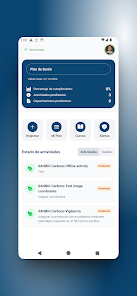
The core interaction model centers on simple entry forms where each activity or training session is recorded with date, time, location, participant notes and outcome fields. Users tap to create a new record, choose the activity type, add descriptive text and any relevant tags or categories that reflect project goals. Entries can include long-form notes to preserve qualitative context and short summary fields for quick reporting. Navigation is driven by straightforward touch controls: create, edit, save and browse recent entries with familiar Android gestures that require no steep learning curve.
Progression and project structure
Visso follows a progression model that mirrors typical project stages: planning, delivery, monitoring and review. Project owners can use repeated entries to build a chronological record that shows how activities contribute to intermediate milestones. Although Visso is not a game, the app supports a task-oriented progression where regular logging and structured summaries help teams move toward measurable outcomes. This structure makes it easier to prepare periodic reports and identify gaps in training or activity coverage over time.
User interface and visual style
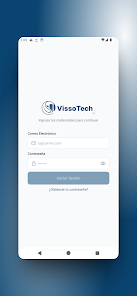
The visual style is intentionally minimal and professional to emphasize readability and fast data entry. Standard Android UI patterns are used for lists, form fields and navigation, with clear typography and high-contrast elements for legibility in a variety of lighting conditions. Icons and section headings help separate session metadata from narrative notes so users can scan records quickly. The compact installation footprint keeps the interface responsive on older Android 7.0+ devices.
Controls, customization and templates
Controls are optimized for touch: large input areas, clear save and back buttons, and simple date and time pickers. Users can organize entries with customizable tags or categories to reflect their own project terminology, allowing teams to adapt the tracking structure without changing the app. Lightweight templates for common session types are supported through reusable field patterns, which speeds up repeated data entry for recurring trainings or standard activity formats.
Offline use and data handling
Visso is designed to work reliably in field environments where connectivity can be intermittent. All entries can be created and reviewed offline on the device, ensuring that teams can continue to log activities without network access. Data is stored locally on the device and can be exported or backed up according to the user’s workflow; the app emphasizes predictable behavior for offline-first project teams and avoids features that require constant online connectivity.
Accessibility and user experience
Accessibility considerations include readable font sizes, clear contrast and simple navigation flows that reduce cognitive load during busy fieldwork. The app aims to accommodate users who may switch between data entry and observation roles, and the interface supports quick entry modes for capturing short notes during sessions as well as more detailed input when time allows. The experience was shaped to minimize taps and streamline common tasks so that teams can maintain accurate records with limited time.
Replay value and long-term use
While Visso is not oriented around entertainment, it offers replay value in the form of repeatable workflows: teams can reuse templates, keep longitudinal logs for recurring training programs and maintain a searchable history of activities that becomes more valuable over time. Regular use builds an audit trail that supports monitoring and evaluation, and the compact storage size encourages sustained installation on field devices.
Limitations and practical considerations
Users should note that Visso is an Android-only application requiring Android 7.0 or later and is targeted at record-keeping rather than comprehensive project management suites. Current download counts are modest, and the app is maintained by Visso-tech with ongoing updates; the listed release date is Apr 30, 2026 and the current version is 1.7.2 (updated May 1, 2026) with an approximate size of 56 MB. Content rating is Everyone and the developer recommends using the app alongside your organization’s reporting processes rather than as a full replacement for centralized management systems.
Developer and support
Visso is offered by Visso-tech, a small development team focused on tools that support impact investment workflows and client outcome tracking. The team provides release notes with each update and encourages feedback from early adopters to improve stability and field usability. For teams seeking a compact, offline-friendly activity logger that aligns everyday entries with larger impact goals, Visso provides an accessible starting point for structured field tracking on Android.
Show More
Information
Screenshots
Latest Update











Hot Tags
Latest News
-
![Revealing the Launch Playlists and Cross-Progression for COD Warzone Mobile News]()
-
![March 2024 Free Redemption Codes for Honkai: Star Rail News]()
-
PUBG Mobile Teams Up with Bentley Motors: Luxury Cars, Exclusive Collectibles, and Beyond 2024-04-18
![PUBG Mobile Teams Up with Bentley Motors: Luxury Cars, Exclusive Collectibles, and Beyond News]()
-
![Monster Never Cry is now accessible on both Android and iOS mobile devices. News]()
-
V2.2 of the Farlight 84 update introduces an overhauled Season structure, fresh in-game currency, an 2024-04-16
![V2.2 of the Farlight 84 update introduces an overhauled Season structure, fresh in-game currency, an News]()
-
![Arrival of Genshin Impact 4.6 Update: 'Embers of Two Realms, Twilight of Crimson' News]()
-
April 2024 Clash of Clans Update: Unveiling a Fresh Companion, Enhanced Levels, Chat Tagging, and Be 2024-04-16
![April 2024 Clash of Clans Update: Unveiling a Fresh Companion, Enhanced Levels, Chat Tagging, and Be News]()