

Pingmate.app - Chat Automation
Version:1.0.1
Published:2026-05-26
Introduction
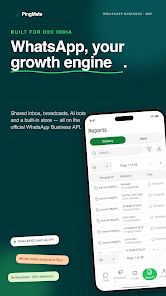
Pingmate.app - Chat Automation is a business messaging platform built to help companies run large-scale outreach, automate customer touchpoints, and manage support conversations from a single interface. The editor-style dashboard groups marketing broadcasts, transactional messages, and a team inbox so organizations can treat messaging as a full sales and support channel rather than a separate toy widget. This description walks through the platform’s core capabilities, how teams interact with it day to day, and practical trade-offs to consider before rollout.
Key features
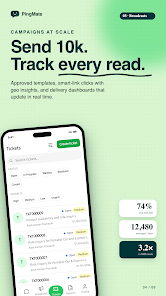
The platform supports scheduled and real-time mass broadcasts with audience segmentation, delivery and read tracking, and message templates that accept images, video, documents, and interactive buttons. Broadcasts can be targeted by customer attributes or recent behavior, and the template system provides a preview and A/B testing before sending. Message composition includes a visual editor and the option to insert quick-reply buttons and structured payloads so customers can respond or complete actions without leaving the chat.
Automation and chatbot flows
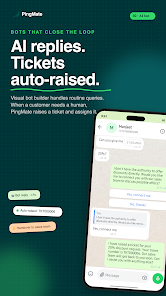
Automation in Pingmate.app - Chat Automation lets you build flows for abandoned carts, order confirmations, shipping updates, payment reminders, and other transactional touchpoints by wiring triggers from your store or CRM. The flow builder supports conditional branches, timed follow-ups, and handoff rules to escalate complex queries to human agents. AI-powered chatbots can be trained on your product catalog and FAQ content to address routine questions; they also include confidence thresholds that route ambiguous conversations to live staff to avoid errors in customer-facing messages.
Shared inbox and teamwork
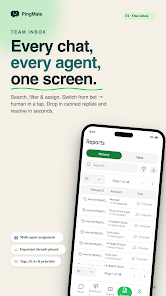
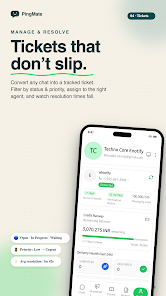
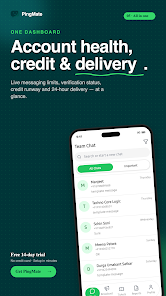
The shared team inbox centralizes conversations with assignment, tagging, and internal notes so multiple agents can collaborate without duplicating work. Agents can use quick replies and saved templates to speed responses, while supervisors monitor queue size and SLA timers. Role-based access controls let administrators restrict editing of templates, broadcast lists, or billing settings so teams maintain compliance and governance as they scale.
Integrations, analytics, and compliance
Built on the official business messaging API, the solution emphasizes verified delivery and regulatory compliance for enterprise scenarios. Integrations support product catalog syncing so customers can browse items inside chat and place orders, and webhooks or a REST API enable two-way connections with e-commerce platforms, CRMs, and order management systems. Analytics dashboards report on campaign delivery, open and engagement rates, agent performance, and conversion metrics, with exportable reports to inform iterative improvement.
User experience, controls, and accessibility
The user interface focuses on clarity: a left-hand navigation for conversations and campaigns, a central workspace for the active chat or editor, and contextual side panels for contact history and fulfillment details. Controls include keyboard shortcuts for common actions, drag-and-drop campaign scheduling, and a visual flow editor for automation. The platform supports preview and test modes so teams can validate messages on staged recipients before going live. Accessibility considerations cover readable contrast, scalable text, and keyboard navigation. For intermittent connectivity, drafts and recent conversation history remain available locally so agents can continue working and sync when a connection returns.
Setup, limitations, and operational notes
Expect initial setup steps such as API verification, business profile approval, and template registration with the messaging provider; these steps ensure compliance but add configuration time before mass sends. Template-based outbound messaging means some message types require pre-approval, which limits spontaneous broadcasts but reduces the risk of policy violations. Additionally, send rate limits imposed by carriers or the messaging API may affect how quickly very large lists can be reached; the platform provides delivery backoff and retry controls to manage throughput safely.
Target users and progression
Pingmate.app - Chat Automation is aimed at small and medium businesses, direct-to-consumer brands, and online retailers that want to use messaging as a measurable sales and support channel. Teams typically progress from single-use templates and manual replies to automated flows, catalog-driven conversations, and finally to blended bot + human routing for high-volume scenarios. The product encourages iterative growth: start with a few approved templates, add segmented campaigns, automate common transactional flows, and expand agent capacity as engagement increases.
Support and extensibility
The platform provides documentation, onboarding guides, and developer resources to connect commerce systems and build custom integrations. For teams that need hands-on assistance, professional services or partner integrators can help with verification, catalog sync, and flow design. These resources make it practical to adopt messaging as a core channel while keeping compliance and operational controls in place.
Show More
Information
Screenshots
Latest Update












Latest News
-
![Revealing the Launch Playlists and Cross-Progression for COD Warzone Mobile News]()
-
![March 2024 Free Redemption Codes for Honkai: Star Rail News]()
-
PUBG Mobile Teams Up with Bentley Motors: Luxury Cars, Exclusive Collectibles, and Beyond 2024-04-18
![PUBG Mobile Teams Up with Bentley Motors: Luxury Cars, Exclusive Collectibles, and Beyond News]()
-
![Monster Never Cry is now accessible on both Android and iOS mobile devices. News]()
-
V2.2 of the Farlight 84 update introduces an overhauled Season structure, fresh in-game currency, an 2024-04-16
![V2.2 of the Farlight 84 update introduces an overhauled Season structure, fresh in-game currency, an News]()
-
![Arrival of Genshin Impact 4.6 Update: 'Embers of Two Realms, Twilight of Crimson' News]()
-
April 2024 Clash of Clans Update: Unveiling a Fresh Companion, Enhanced Levels, Chat Tagging, and Be 2024-04-16
![April 2024 Clash of Clans Update: Unveiling a Fresh Companion, Enhanced Levels, Chat Tagging, and Be News]()