

Fit Station
Version:2.0.800
Published:2026-05-26
Introduction
Fit Station brings the convenience of your EVO gym into your pocket: Fit Station lets members view and manage workouts, reserve classes and handle check-ins from anywhere. The app centralizes your schedule, class reservations, waitlist positions and direct messages so you spend less time navigating multiple systems and more time training.
Key Features
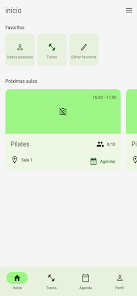
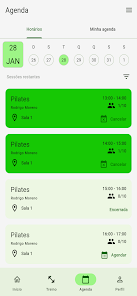
Fit Station displays your upcoming sessions in an easy-to-scan calendar and agenda view, lets you reserve a spot in classes and join waiting lists, and pushes timely notifications to remind you of bookings and messages. The app also shows detailed class times, locations and the status of your reservations, and provides tools to manage personal training plans that are connected to your EVO membership. Quick check-in functionality speeds arrival at the gym while notifications help prevent missed classes and last-minute surprises.
Navigation and Controls
The interface emphasizes simple touch interactions: tap to reserve or cancel a class, swipe through days in the schedule, and use filters to focus on class types or facilities. Menus and buttons are designed for quick one-handed use so you can manage bookings before or after a workout. Pull-to-refresh and clear status indicators help you see live availability without hunting through multiple screens.
Training Plans and Progression
Fit Station supports structured training plans assigned through your EVO account and makes it easy to track completion of scheduled sessions. Progression is managed by marking workouts as completed and viewing recent activity in your plan history, so you can follow a prescribed routine and see how your schedule evolves over weeks. While the app is focused on scheduling rather than biometric analysis, it helps you maintain a consistent progression by keeping workouts and class commitments visible and organized.
Visual Style and Level Structure
The app uses a clean, readable layout with clear class cards, color-coded status indicators and a compact calendar that keeps important details in view. Classes are presented by level and type when available, so you can quickly identify beginner, intermediate or advanced sessions and choose what best fits your current goals. This structure makes it straightforward to plan a balanced week of group training, studio classes and gym floor sessions.
Customization and User Experience
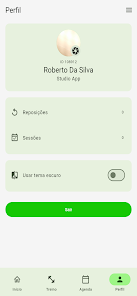
Fit Station allows customization of notification preferences and schedule views so you receive the alerts that matter and see your agenda in a format that suits your routine. You can tailor reminders for upcoming classes and direct messages, control how far in advance you get check-in prompts, and prioritize the facilities or instructors you use most often. These options help reduce friction and make daily use more efficient.
Offline Use and Reliability
The app caches recent schedules and training-plan details so you can review bookings and workout lists when you briefly lose connectivity, such as in transit or inside a facility with limited signal. Real-time actions like joining waitlists or receiving message updates require an internet connection, but cached views preserve access to essential information until connectivity is restored.
Accessibility and Inclusive Design
Fit Station is built with legible typography, clear contrast and straightforward navigation to support a wide range of users. The layout is compatible with common screen readers and supports adjustable text sizes where available, helping ensure members with different needs can manage schedules and bookings without unnecessary barriers.
Advantages
Fit Station keeps bookings, training plans and communications organized in one place, reducing the chance of missed classes and simplifying day-to-day planning. Fast reservation and waitlist alerts increase the likelihood of securing spots in popular sessions, and the compact mobile interface is helpful for members who need to manage their routine on the go. Notifications and calendar-style overviews are particularly useful for maintaining consistency.
Disadvantages
Access to Fit Station requires an EVO membership and is intended for users connected to that network; it is not a standalone public scheduling system. The app prioritizes scheduling, reservations and messaging and may not include broader fitness-tracking features such as detailed biometric analytics or third-party wearable integration. For members who need advanced activity tracking, a separate dedicated tracker may still be useful.
Tips for Best Use
Keep the app updated, enable notifications for timely reminders, and review your agenda regularly to avoid last-minute changes. If you rely on the app while traveling or in low-signal areas, open the schedule briefly before you lose connection to ensure cached data is available. Fit Station is best used as the central scheduling tool for EVO members who want a straightforward way to manage classes, check-ins and training plans from their phone.
Show More
Information
Screenshots
Latest Update











Latest News
-
![Revealing the Launch Playlists and Cross-Progression for COD Warzone Mobile News]()
-
![March 2024 Free Redemption Codes for Honkai: Star Rail News]()
-
PUBG Mobile Teams Up with Bentley Motors: Luxury Cars, Exclusive Collectibles, and Beyond 2024-04-18
![PUBG Mobile Teams Up with Bentley Motors: Luxury Cars, Exclusive Collectibles, and Beyond News]()
-
![Monster Never Cry is now accessible on both Android and iOS mobile devices. News]()
-
V2.2 of the Farlight 84 update introduces an overhauled Season structure, fresh in-game currency, an 2024-04-16
![V2.2 of the Farlight 84 update introduces an overhauled Season structure, fresh in-game currency, an News]()
-
![Arrival of Genshin Impact 4.6 Update: 'Embers of Two Realms, Twilight of Crimson' News]()
-
April 2024 Clash of Clans Update: Unveiling a Fresh Companion, Enhanced Levels, Chat Tagging, and Be 2024-04-16
![April 2024 Clash of Clans Update: Unveiling a Fresh Companion, Enhanced Levels, Chat Tagging, and Be News]()