

Biz Contacts
Version:1.17
Published:2026-05-27
Introduction
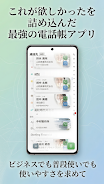
Biz Contacts is a modern, flexible contacts manager that combines phonebook organization, a dialer and a unified call history into a single app designed for professionals and everyday users alike. The first impression is focused on speed and clarity: search and reach the right person quickly, review recent interactions at a glance, and apply visual themes to make the interface comfortable for daily use. Biz Contacts places emphasis on handling business and personal workflows together, with tools aimed at reducing friction when you switch between tasks or accounts.
Key features and how they work
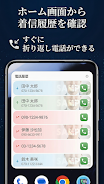
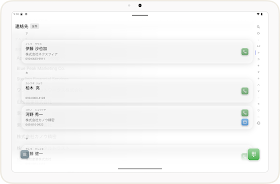
The app offers a multi-field search that finds entries by name, company, phone number or email, and includes a specialized lookup for Japanese kanji using reading-based search so you can locate contacts without adding furigana. Call management is unified: incoming, outgoing and missed calls appear in a single history view with per-contact histories, duration, and timestamps. Contacts can be organized through groups, company records, tags and pinned favorites; filters are available to hide entries without phone numbers and focus on the records you need.
Controls and daily interactions
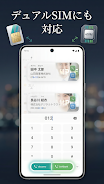
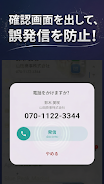
Interaction design centers on common mobile gestures and straightforward controls. Primary actions like calling, messaging, or editing a contact are reachable from a contact card; long-press or swipe gestures are supported for quick actions such as pinning or deleting. Dialer functions and confirmation dialogs reduce accidental calls with optional swipe-to-call and a cancelable call confirmation. Dual SIM selection is integrated where supported, and the app respects account boundaries so you can view and manage contacts for multiple accounts from one interface.
Organization, progression and productivity
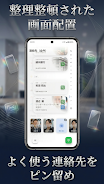
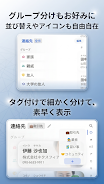
Instead of game-style levels, progression in Biz Contacts comes from gradually refining your contact database and setup to match your workflows: create groups for projects or teams, tag contacts by role or priority, and rely on filters to surface the most relevant entries. Over time, pinned favorites and saved filters reduce search time and act as personal shortcuts. Exporting and sharing via QR codes or vCard (vcf) files makes it easy to migrate or distribute curated contact sets, supporting a natural progression from casual use to a structured, business-ready address book.
Customization and visual style
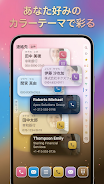
Visual options let you tailor the app’s look and feel. Multiple color themes, font choices and adjustable font sizes help improve readability and match personal taste or corporate branding. Left-handed mode and selectable start screens let you optimize layout for comfort. The premium tier unlocks additional styling and productivity options for users who want deeper control over list appearance, widget theming and advanced layout choices; these enhancements are optional and do not affect core functionality.
Widgets, offline use and backup
Home screen widgets provide immediate access to favorites or recent calls without opening the full app, improving one-tap productivity. Biz Contacts works offline for core operations: browsing, editing, calling and local exporting do not require a network connection. Backup and restore are intentionally handled via local export/import so you retain direct control over your data; share vcf files or keep local copies as part of your device backup routine.
Accessibility and user experience
Accessibility considerations include adjustable text sizes, high-contrast themes and a simplified layout option that reduces visual clutter for users who prefer minimal interfaces. Left-handed layout and large tap targets are designed to make one-handed operation easier. The app aims for predictable behavior: actions produce immediate feedback, and common tasks remain discoverable through consistent placement of buttons and gestures.
Safety, limits and pricing
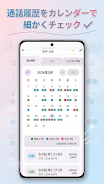
Safety features help prevent mistakes: optional call confirmation dialogs and swipe-to-call gestures reduce accidental dial-outs. Some advanced features noted in the app—such as detailed list styling, certain widget themes and a calendar-style call history view—are available only with a paid monthly premium subscription. Core contact management, kanji reading search, dual SIM support and local export remain available in the free version so users can rely on essential tools without subscribing.
Why it may suit your workflow
Biz Contacts is a practical choice if you need an address book that balances business features with personal flexibility. Its search capabilities, robust contact organization tools and local sharing/export options let you manage a growing contact base without depending on cloud services. The design emphasizes clarity, incremental productivity gains and adaptability, so whether you are organizing a small team, managing multi-account contact lists or simply keeping personal and work numbers separate, the app supports a steady improvement in day-to-day communication efficiency.
Show More
Information
Screenshots
Latest Update












Hot Tags
Latest News
-
![Revealing the Launch Playlists and Cross-Progression for COD Warzone Mobile News]()
-
![March 2024 Free Redemption Codes for Honkai: Star Rail News]()
-
PUBG Mobile Teams Up with Bentley Motors: Luxury Cars, Exclusive Collectibles, and Beyond 2024-04-18
![PUBG Mobile Teams Up with Bentley Motors: Luxury Cars, Exclusive Collectibles, and Beyond News]()
-
![Monster Never Cry is now accessible on both Android and iOS mobile devices. News]()
-
V2.2 of the Farlight 84 update introduces an overhauled Season structure, fresh in-game currency, an 2024-04-16
![V2.2 of the Farlight 84 update introduces an overhauled Season structure, fresh in-game currency, an News]()
-
![Arrival of Genshin Impact 4.6 Update: 'Embers of Two Realms, Twilight of Crimson' News]()
-
April 2024 Clash of Clans Update: Unveiling a Fresh Companion, Enhanced Levels, Chat Tagging, and Be 2024-04-16
![April 2024 Clash of Clans Update: Unveiling a Fresh Companion, Enhanced Levels, Chat Tagging, and Be News]()