

Pachiviar
Version:2.0.800
Published:2026-05-27
Introduction
Pachiviar brings your gym schedule and workouts to your phone, making it simple for students at participating gyms to manage training on the go. The app puts assigned workouts, group class timetables, booking tools and messaging into one interface so you can check a session, confirm attendance or read coach notes from anywhere. Pachiviar emphasizes clarity and convenience so planning a week of training becomes part of your routine rather than an extra chore.
Key features and how they work
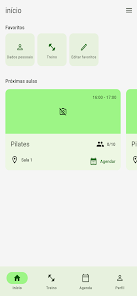
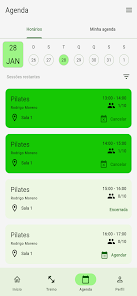
The app shows personalized workouts and training plans that your gym or coach assigns, with clear descriptions, target sets and suggested rest intervals where available. You can browse the full class schedule by time and type, reserve a place and join waiting lists that send automatic notifications when a spot opens. Check-in is handled in-app so attendance records stay synchronized with the gym’s management system, and direct messages from staff and instructors arrive through the message center to keep communications consolidated.
Booking and waiting-list mechanics are straightforward: select a class, confirm a reservation, or opt to join the list; the app notifies you only when your position becomes available. Notifications are configurable so you control reminders for upcoming sessions, changes to class times or direct messages. Many gyms allow trainers to attach notes or small media to assigned workouts, and those attachments appear inline so you can review technique and session goals before you arrive.
Controls and user interaction
Navigation in Pachiviar relies on simple taps and swipes designed for quick access during a commute or between sets. Core actions—viewing today’s schedule, booking a class, marking a workout complete—are reachable in two taps from the main screen. The interface emphasizes legible text and large touch targets so you can act quickly even while moving. Calendar integration and share options allow you to export booked classes to your device calendar where supported.
Progression and training tracking
Assigned training plans include basic progress indicators that record completed sessions and allow you to view recent history. This provides a simple progression system: mark workouts done, review past sessions and follow a coach-prescribed sequence of exercises across weeks. Progress markers are intended to help you and your trainer see adherence to the plan rather than to create competitive ranking; they are a personal record for planning and follow-up conversations with staff.
Visual style and layout
The visual design focuses on clear hierarchy and readable schedules: class blocks, time labels and instructor names are presented with unobtrusive color cues so you can scan availability quickly. Images or small icons for class types help differentiate sessions at a glance, while messages and workout details use a clean list layout to keep long descriptions easy to read. The overall style aims to be neutral and functional so that schedules remain the focal point.
Class structure and session types
Pachiviar supports a variety of session formats common in managed gyms, including recurring group classes, single-session workshops and coach-assigned program days. Each class entry shows its duration, any capacity limits, whether booking is required and the instructor responsible. Where gyms provide difficulty or target tags (for example, beginner, intermediate, strength, cardio), those appear with the session to help you choose the right option for your ability and goals.
Customization and personalization
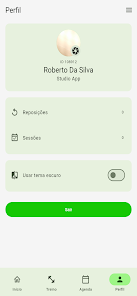
You can tailor Pachiviar to your preferences by selecting favorite classes or instructors, setting notification windows, and choosing how many days of schedule to display on the home view. Trainers and gyms can attach different training plans for individuals, and you can opt to receive only essential alerts to avoid notification fatigue. Display preferences such as font size and compact list density are available in the settings to improve readability.
Replay value, offline access and reliability
Because training is cyclical, the app is designed for repeated daily use: recurring bookings, saved workout templates and message threads keep the same information at hand across weeks and months. Basic schedule and assigned workout details are cached on the device so you can view upcoming sessions even with limited connectivity; however, booking and live waitlist changes require a connection to the gym’s system. Push alerts depend on your device settings, so enabling notifications ensures you receive timely updates.
Accessibility and challenges
Pachiviar includes accessibility considerations such as scalable text, clear contrast and simple navigation to help users with visual or motor impairments. Challenge systems are limited to reminders and completion indicators rather than competitive elements: the app is intended to support your consistency with gentle nudges, not to provide social ranking. Note that availability and some functions depend on the gym’s use of a compatible class-management system, so features may vary by location.
Practical advantages and limitations
Using Pachiviar centralizes schedules, messages and bookings so planning training is faster and clearer, and real-time alerts reduce missed sessions. Reservation and waitlist handling simplify group class logistics while mobile access keeps your routine organized at home, during travel or at the gym. Limitations include restricted availability to students at participating gyms and dependence on facility-side settings for bookings and notifications, so check with your gym for full functionality.
Show More
Information
Screenshots
Latest Update











Latest News
-
![Revealing the Launch Playlists and Cross-Progression for COD Warzone Mobile News]()
-
![March 2024 Free Redemption Codes for Honkai: Star Rail News]()
-
PUBG Mobile Teams Up with Bentley Motors: Luxury Cars, Exclusive Collectibles, and Beyond 2024-04-18
![PUBG Mobile Teams Up with Bentley Motors: Luxury Cars, Exclusive Collectibles, and Beyond News]()
-
![Monster Never Cry is now accessible on both Android and iOS mobile devices. News]()
-
V2.2 of the Farlight 84 update introduces an overhauled Season structure, fresh in-game currency, an 2024-04-16
![V2.2 of the Farlight 84 update introduces an overhauled Season structure, fresh in-game currency, an News]()
-
![Arrival of Genshin Impact 4.6 Update: 'Embers of Two Realms, Twilight of Crimson' News]()
-
April 2024 Clash of Clans Update: Unveiling a Fresh Companion, Enhanced Levels, Chat Tagging, and Be 2024-04-16
![April 2024 Clash of Clans Update: Unveiling a Fresh Companion, Enhanced Levels, Chat Tagging, and Be News]()