

PearDrop
Version:1.0.1
Published:2026-05-28
Introduction
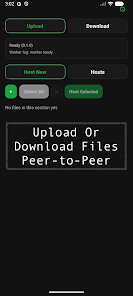
PearDrop is a lightweight peer-to-peer file sharing app built for small, trusted groups who need to move photos, videos, documents and project files quickly between devices. PearDrop places group collaboration at the center of the mobile experience, creating shared spaces where members can drop files instantly and remain synchronized in real time without a clunky setup. If you value fast, private transfers across phones and tablets, PearDrop makes it easy to keep a project’s assets together and accessible while preserving a simple, familiar workflow.
Key features and how they work
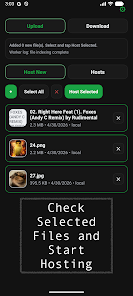
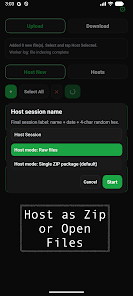
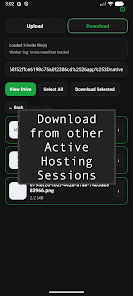
The app relies on peer-to-peer shared spaces that appear as collaborative folders visible only to invited members; new files added to a space propagate to other devices with minimal delay so everyone sees updates as they happen. Real-time group sync is designed around small teams and trusted circles rather than anonymous public drops, which keeps the experience focused and tidy. PearDrop supports common file types—including images, video clips, office documents and compressed archives—and presents quick previews for many formats so you can scan content before downloading. Transfers are handled in the background and resume automatically if a device temporarily loses connectivity, reducing the need for repeated manual restarts.
Controls and user interface
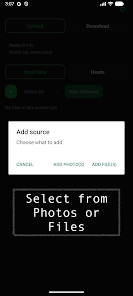
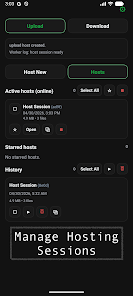
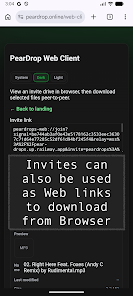
The interface favors touch-first controls: tap to open a shared space, long-press to reveal action options such as rename or remove, and swipe gestures to archive or prioritize items. Sharing from other apps works through the native Android share sheet, and incoming transfers show inline progress indicators so you always know what’s moving. Creating a new shared space requires only a name and an invitation step; members join by scanning a QR code or accepting an in-app invite, keeping setup straightforward for teams that need to start working immediately.
Organization, progression and file history
PearDrop keeps files organized at the space level, with optional subfolders and a simple activity feed that records adds, edits and removals so teams can follow a project’s progression over time. The activity feed functions like a lightweight change log: it helps you track who added what and when, and it surfaces recent changes at the top of a space. For ongoing projects, you can use space names, timestamps and file tags to create a practical progression model that replaces ad-hoc sharing with an organized sequence of versions and updates.
Visual style and customization
The visual design is intentionally minimal and mobile-focused: clear typography, large tap targets and a neutral palette that keeps attention on shared content rather than decoration. Users can personalize shared spaces with custom names and cover images, set notification preferences per space, and pin high-priority folders to the top of their dashboard. These customization options let teams tune the app to different workflows—creative studios, school project groups or family albums—without introducing complex configuration screens.
Offline use, reliability and conflict handling
PearDrop supports queued transfers so that files you drop while offline will be sent when connectivity is restored, and local device-to-device transfers work over the same network when peers are nearby. The app minimizes conflicts by showing simple conflict-resolution choices when two devices change the same file; you can keep both copies, accept the incoming change, or rename one to preserve both versions. Transfer reliability focuses on pragmatic behaviors—automatic resume, clear progress visibility and retry logic—so everyday sharing completes without constant supervision.
Accessibility, privacy and intended use
The app is designed with accessibility in mind: scalable text, descriptive labels for screen readers and high-contrast options improve usability for people with differing needs. Privacy features emphasize invite-only access and straightforward permissions rather than public distribution, aligning with the app’s goal of serving trusted groups. PearDrop is not aimed at anonymous file drops or enterprise-grade centralized management; instead it prioritizes ease of use, predictable behavior and keeping group content private within a small circle.
Limitations and ideal scenarios
PearDrop is best suited for teams, families and small project groups that want fast, direct transfers without a steep learning curve. It intentionally avoids heavy enterprise controls and public distribution models, so organizations that require centralized administration or advanced compliance features should consider other tools. For everyday mobile collaboration—moving photos, short videos and documents between phones and tablets—PearDrop offers a focused, reliable option that gets shared content where it needs to go with minimal fuss.
Show More
Information
Screenshots
Latest Update











Latest News
-
![Revealing the Launch Playlists and Cross-Progression for COD Warzone Mobile News]()
-
![March 2024 Free Redemption Codes for Honkai: Star Rail News]()
-
PUBG Mobile Teams Up with Bentley Motors: Luxury Cars, Exclusive Collectibles, and Beyond 2024-04-18
![PUBG Mobile Teams Up with Bentley Motors: Luxury Cars, Exclusive Collectibles, and Beyond News]()
-
![Monster Never Cry is now accessible on both Android and iOS mobile devices. News]()
-
V2.2 of the Farlight 84 update introduces an overhauled Season structure, fresh in-game currency, an 2024-04-16
![V2.2 of the Farlight 84 update introduces an overhauled Season structure, fresh in-game currency, an News]()
-
![Arrival of Genshin Impact 4.6 Update: 'Embers of Two Realms, Twilight of Crimson' News]()
-
April 2024 Clash of Clans Update: Unveiling a Fresh Companion, Enhanced Levels, Chat Tagging, and Be 2024-04-16
![April 2024 Clash of Clans Update: Unveiling a Fresh Companion, Enhanced Levels, Chat Tagging, and Be News]()