

Metrolist
Version:12.7.1
Published:2026-08-15
Introduction
Metrolist is a full-featured Android music client designed to combine flexible playback, playlist control and reliable offline caching in one polished package. Metrolist lets you stream audio and video from a connected music catalog, manage a personal library, and fine-tune playback with tempo and pitch controls, while offering live lyrics, fast search and background play for everyday listening.
Core playback mechanics
The app centers on predictable, high-quality playback: tempo and pitch adjustment give you precise control for practice or casual listening, while audio normalization keeps tracks at a consistent volume. A skip-silence option trims gaps automatically for more continuous listening, and background playback works with standard media buttons and notification controls so you can pause, skip or seek without opening the app. Video playback is supported when streaming, and audio tracks can be cached for offline use to keep music available on the go.
Key features
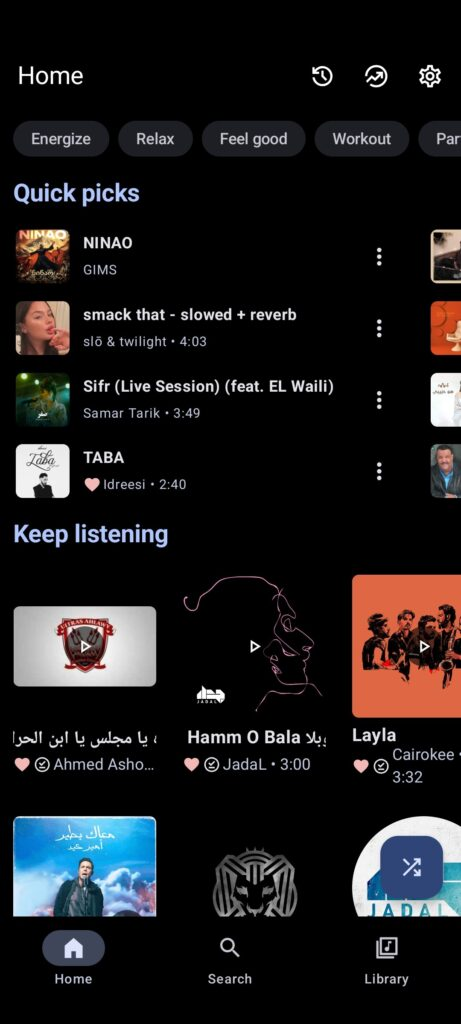
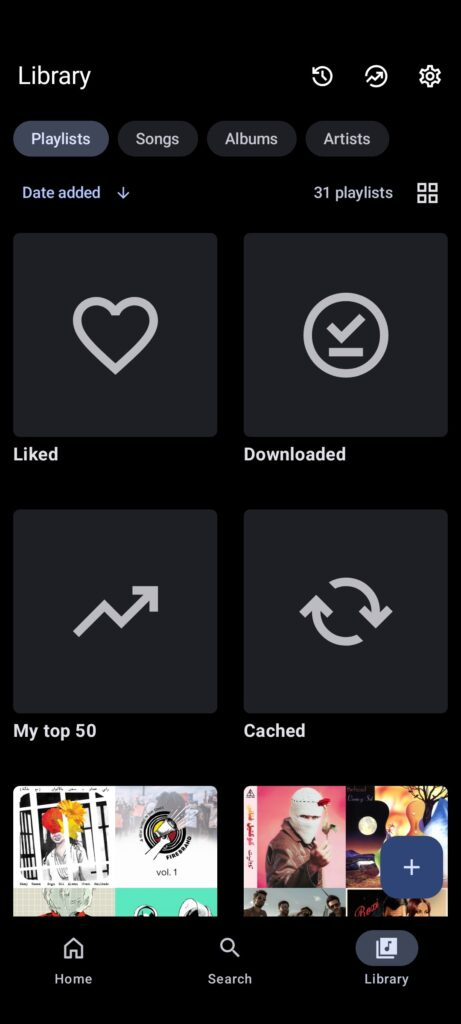
Metrolist offers comprehensive search across tracks, albums, artists, videos and playlists so you can find material quickly even with large libraries. Library and playlist management supports importing external playlists, creating and editing local playlists, and reordering queue or playlist items to shape listening sessions. Live lyrics display updates as a track plays, and personalized quick picks surface recommendations based on play history to make discovery simple. Multiple theme options, including light, dark, black and Material 3 dynamic theming, let you match the interface to your device and environment.
Controls, customization and interface
The interface favors straightforward controls: transport buttons, scrubbing, and queue manipulation are accessible from the main player and minimized playback view, and persistent notifications allow control from the lock screen. Customization extends to visual options and playback behavior — choose a theme, enable audio normalization, toggle skip-silence, and adjust tempo or pitch per track. The Material 3 styling emphasizes clear hierarchy and touch targets, helping the app remain comfortable to use across phone sizes.
Library progression and discovery
As your collection grows, Metrolist helps you progress from casual listening to a personalized catalog. Import playlists from other sources, curate local lists for specific moods or activities, and rely on quick picks to surface favorite artists or lesser-known tracks. Search filters and sorting let you move through large libraries efficiently, and playlist reordering provides a simple progression mechanic: build a sequence of tracks that matches a workout, study session or commute and refine it over time.
Offline play and storage management
Offline caching and downloadable tracks are a core strength when connectivity is limited. You can save albums and playlists for offline playback, listen without interruptions on flights or commutes, and remove cached material when you need space. Keep in mind that downloaded music consumes device storage; Metrolist provides clear options to manage cached content so you can balance availability with free space.
Accessibility and user experience
Design choices aim to make the app usable for a wide audience: readable typography, high-contrast theme variants and large touch targets support accessibility needs, and live lyrics help follow songs without straining to read. The app's controls and layout are intentionally simple to reduce friction for new users while providing depth through advanced playback options for power users.
Limitations and account requirements
Some streaming and synchronization features require signing in to a music account, so full functionality may depend on account access and catalog permissions. Video content generally requires an online connection, and offline caching is focused on audio tracks. Finally, downloading large libraries will increase local storage use, so plan accordingly if you maintain extensive offline collections.
Why this app fits different listening styles
Metrolist works well for people who want control over how music plays and looks: whether you need tempo adjustments for practice, clean background playback for productivity, or strong library tools to organize a growing collection, the app balances advanced options with a straightforward experience. Its combination of offline caching, live lyrics and robust search makes it a practical daily driver for listening at home, on the move, or in low-connectivity situations.
Show More
Information
Screenshots
Latest Update











Hot Tags
Latest News
-
![Revealing the Launch Playlists and Cross-Progression for COD Warzone Mobile News]()
-
![March 2024 Free Redemption Codes for Honkai: Star Rail News]()
-
PUBG Mobile Teams Up with Bentley Motors: Luxury Cars, Exclusive Collectibles, and Beyond 2024-04-18
![PUBG Mobile Teams Up with Bentley Motors: Luxury Cars, Exclusive Collectibles, and Beyond News]()
-
![Monster Never Cry is now accessible on both Android and iOS mobile devices. News]()
-
V2.2 of the Farlight 84 update introduces an overhauled Season structure, fresh in-game currency, an 2024-04-16
![V2.2 of the Farlight 84 update introduces an overhauled Season structure, fresh in-game currency, an News]()
-
![Arrival of Genshin Impact 4.6 Update: 'Embers of Two Realms, Twilight of Crimson' News]()
-
April 2024 Clash of Clans Update: Unveiling a Fresh Companion, Enhanced Levels, Chat Tagging, and Be 2024-04-16
![April 2024 Clash of Clans Update: Unveiling a Fresh Companion, Enhanced Levels, Chat Tagging, and Be News]()