

kubenav - Kubernetes Dashboard
Version:4.2.3
Published:2026-08-21
Introduction
kubenav - Kubernetes Dashboard is a compact, cross-platform tool that brings Kubernetes cluster inspection and basic management into a single, consistent interface for phones, tablets and desktops. kubenav - Kubernetes Dashboard presents resource lists, detailed views and operational controls so you can quickly inspect Pod status, read events, stream container logs and open a shell into running containers without jumping between tools. The app is designed for engineers and operators who need fast, on-the-go access to cluster state and the ability to perform routine changes from the device at hand.
Key features and resource handling
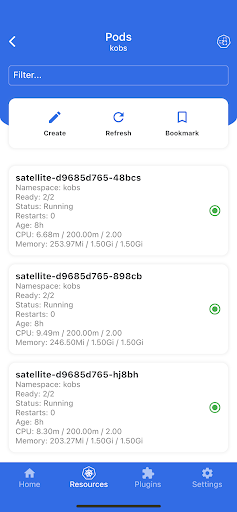
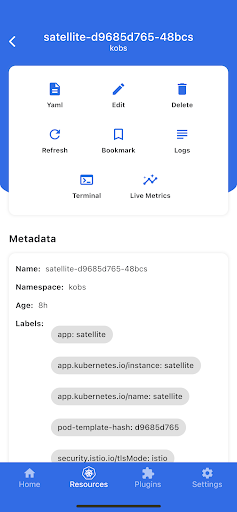
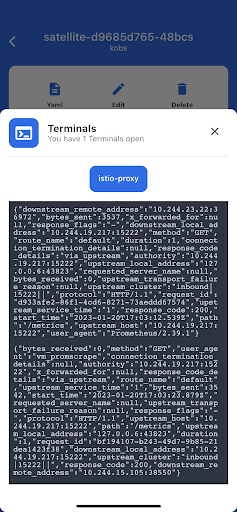
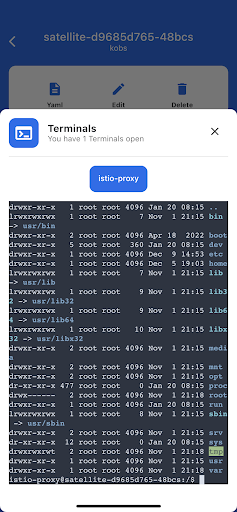
Browse core Kubernetes objects such as Deployments, StatefulSets, DaemonSets, Pods and Services alongside Custom Resource Definitions and their instances. Each resource view shows critical status fields, recent events and common actions so you can safely edit manifests, delete objects or scale workloads. Log streaming is provided in real time and an integrated terminal lets you run commands inside containers when troubleshooting. Connections can be added from a kubeconfig file or via supported cloud provider authentication, and the app can surface Prometheus metrics through an optional plugin to complement logs and resource status.
Workflow, controls and progression
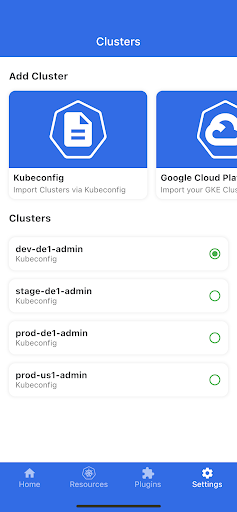
The typical workflow in kubenav - Kubernetes Dashboard guides you through three steps: connect, explore and act. First, add clusters using kubeconfig or cloud provider sign-in; once a cluster is connected you can explore namespaces, resource types and individual objects with a few taps or clicks. On mobile, touch-friendly navigation and contextual action menus make common tasks fast; on desktop, a more compact, information-dense layout and keyboard-friendly controls speed repetitive operations. Progression comes from familiarity: as you learn the resource hierarchy and preferred filters, routine maintenance and incident response become quicker and less error-prone.
Controls, customization and saved contexts
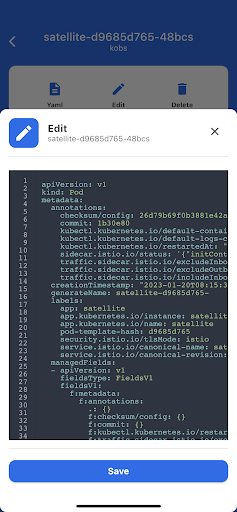
kubenav focuses on practical controls that map to real operational needs. Use in-line editors to update resource manifests or scale replica counts, open terminals for interactive debugging, and create port-forwards for local access to cluster services. Filters, sort options and saved contexts let you pin the clusters and namespaces you use most often, reducing navigation time for recurring tasks. The interface adapts to screen size so the same saved context is available on mobile and desktop, preserving your workflow across devices.
Visual design and accessibility
The app emphasizes clarity and signal over visual clutter: resource lists highlight health and error conditions, timestamps and event summaries are easy to scan, and detail panes present YAML alongside status information. The layout is responsive to different device sizes so elements remain legible on small screens while providing denser views on larger displays. Accessibility conveniences, such as larger text scaling and clear contrast between status states, are considered to help users review cluster state quickly under different lighting conditions and usage scenarios.
Multi-cluster operation and observability
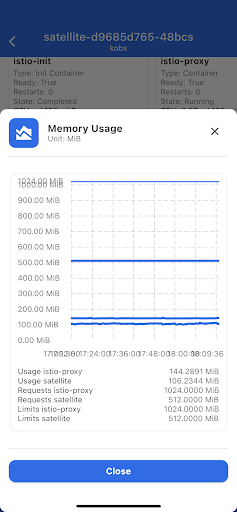
kubenav supports multiple clusters so you can operate separate environments from a single interface. Context switching is designed to be explicit to avoid mistakes when applying changes. For observability, the app integrates log streaming and an optional Prometheus metrics plugin to help correlate workload health with resource activity. Port-forwarding is available to expose service endpoints to your local device during development and debugging sessions.
Security, privacy and data handling
Connections are established using your provided kubeconfig credentials or cloud provider authentication; kubenav does not require external accounts to function beyond the providers you choose to connect. Credential handling follows standard client-side practices so authentication data stays under your control. When you add clusters, the app surfaces connection details and permission-relevant information so you can confirm access boundaries before making changes.
Limitations and compatibility
Some advanced cluster operations that require cluster-level automation or specialized plugins are outside the scope of kubenav and are best handled by CI/CD pipelines or dedicated operator tooling. Mobile and desktop builds share nearly all code to provide a consistent experience, but small platform-specific differences can exist in layout and available keyboard or gesture shortcuts. You must supply a kubeconfig or sign in with a supported cloud provider to add clusters and make modifications.
Who benefits most
kubenav - Kubernetes Dashboard is well suited for developers on the move, site reliability engineers who need quick incident context, and operators who maintain several clusters and prefer a single, consistent interface across devices. It complements existing CLI and web-console workflows by offering immediate, focused access to logs, terminals and edit actions without replacing established automation and deployment pipelines.
Show More
Information
Screenshots
Latest Update












Hot Tags
Latest News
-
![Revealing the Launch Playlists and Cross-Progression for COD Warzone Mobile News]()
-
![March 2024 Free Redemption Codes for Honkai: Star Rail News]()
-
PUBG Mobile Teams Up with Bentley Motors: Luxury Cars, Exclusive Collectibles, and Beyond 2024-04-18
![PUBG Mobile Teams Up with Bentley Motors: Luxury Cars, Exclusive Collectibles, and Beyond News]()
-
![Monster Never Cry is now accessible on both Android and iOS mobile devices. News]()
-
V2.2 of the Farlight 84 update introduces an overhauled Season structure, fresh in-game currency, an 2024-04-16
![V2.2 of the Farlight 84 update introduces an overhauled Season structure, fresh in-game currency, an News]()
-
![Arrival of Genshin Impact 4.6 Update: 'Embers of Two Realms, Twilight of Crimson' News]()
-
April 2024 Clash of Clans Update: Unveiling a Fresh Companion, Enhanced Levels, Chat Tagging, and Be 2024-04-16
![April 2024 Clash of Clans Update: Unveiling a Fresh Companion, Enhanced Levels, Chat Tagging, and Be News]()






