

MT Manager
Version:2.15.3
Published:2026-09-24
Introduction
MT Manager is a professional-grade file manager and APK editor designed for advanced Android users who need precise control over app files, resources and code. MT Manager places a combined file browser and editing suite on your device, letting developers, modders and power users inspect, tweak and repack apps without moving to a desktop. This description highlights what to expect from the app, how the interface works, and which workflows are best suited to its tools.
Key features and editors
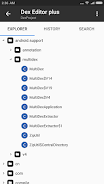
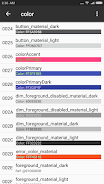
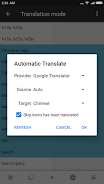
MT Manager bundles a built-in file manager with FTP and WiFi remote access for transferring files between devices, plus an APK editing suite that supports decompiling and compiling XML (with a free 200-line limit), ARSC resource editing, DEX modifications and Java code viewing. The app includes utilities for cloning APKs, optimizing packages, optional encryption and the creation of .bak backups, and it can integrate with a keystore/JKS for optional signing workflows. Translation and resource tools let you search XML and ARSC files, add or remove locales, and transfer unique strings efficiently. Archive handling covers common formats including ZIP and RAR, and the integrated translation support can use multiple engines (some advanced options are marked VIP).
User interface and controls
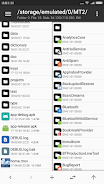
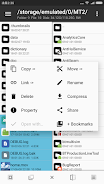
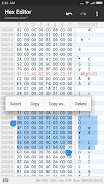
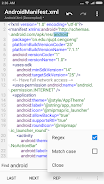
The interface in MT Manager is organized to support mobile workflows: tap-to-open files, long-press selection for batch operations and contextual menus for copy, move, rename and delete tasks. Portrait mode is supported to make single-handed use practical on phones, and separate editors open within the same app window so you can switch between a text view, ARSC view and DEX inspector without leaving the utility. The text editor provides syntax highlighting and a compare tool for files up to 500 KB, and you can view embedded fonts (.ttf) or run simple scripts to automate repetitive tasks.
Workflows, progression and learning curve
New users often begin with the file manager and simple archive or text edits, then progress to more advanced tasks such as resource localization and APK cloning. MT Manager is layered so casual maintenance—copying files, extracting archives, editing small XML snippets—works quickly, while deeper actions like DEX modification and repacking require more experience. The free 200-line XML decompile limit and VIP-marked translator options make the app useful immediately, with optional upgrades unlocking heavier workflows. Because APK editing can break apps, the recommended progression is to create backups, test changes on noncritical packages and follow step-by-step tutorials until familiar with the compile/repack process.
Editors, tools and practical uses
Developers and localizers will find the ARSC and resource search tools helpful for translating or pruning locales, and the DEX editor and Java viewer are useful for inspection and lightweight fixes. The APK utilities for cloning, optimizing and encrypting are intended to streamline testing and distribution scenarios when done responsibly. MT Manager’s batch operations—delete, copy, move, rename—are designed to save time when reorganizing large directories or preparing resource packages for localization. Archive and translation features complement these workflows by reducing context switching between separate utilities.
Customization, accessibility and offline use
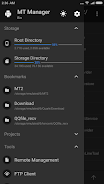
MT Manager supports both local and remote workflows: you can work entirely offline on-device or connect via FTP/WiFi to manage files on another host. The app exposes common view and sorting options so users can quickly find files, and keyboard shortcuts or external input methods are supported in many editing screens for faster operation. Because it runs on-device and does not require an account, the tool is useful in environments with limited connectivity and for privacy-conscious users who prefer local processing for sensitive APK work.
Safety, backups and limitations
MT Manager centralizes a powerful set of editing tools, which is both an advantage and a caution: improper edits can render apps unusable. The app provides .bak backup creation and encourages testing changes in isolated copies. Some advanced functions are gated behind VIP or premium unlocks and APK signing features are disabled by default; enabling full signing may require additional keystore or JKS configuration. Users should understand signing, certificate management and the legal implications of modifying third-party apps before performing wide-scale edits.
Who should use MT Manager
This utility is aimed at power users, independent developers and localization teams who need a compact on-device toolkit for file management, resource editing and lightweight reverse-engineering tasks. MT Manager is not a general consumer file browser only; it is most valuable when you need edit access to APK internals, batch file operations, and integrated editors that keep common maintenance and localization tasks in a single application.
Show More
Information
Screenshots
Latest Update












Hot Tags
Latest News
-
![Revealing the Launch Playlists and Cross-Progression for COD Warzone Mobile News]()
-
![March 2024 Free Redemption Codes for Honkai: Star Rail News]()
-
PUBG Mobile Teams Up with Bentley Motors: Luxury Cars, Exclusive Collectibles, and Beyond 2024-04-18
![PUBG Mobile Teams Up with Bentley Motors: Luxury Cars, Exclusive Collectibles, and Beyond News]()
-
![Monster Never Cry is now accessible on both Android and iOS mobile devices. News]()
-
V2.2 of the Farlight 84 update introduces an overhauled Season structure, fresh in-game currency, an 2024-04-16
![V2.2 of the Farlight 84 update introduces an overhauled Season structure, fresh in-game currency, an News]()
-
![Arrival of Genshin Impact 4.6 Update: 'Embers of Two Realms, Twilight of Crimson' News]()
-
April 2024 Clash of Clans Update: Unveiling a Fresh Companion, Enhanced Levels, Chat Tagging, and Be 2024-04-16
![April 2024 Clash of Clans Update: Unveiling a Fresh Companion, Enhanced Levels, Chat Tagging, and Be News]()






