

Beehive
Version:1.0.0
Published:2026-09-25
Introduction
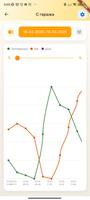
Beehive puts Bluetooth hubs and scales into a single, practical monitoring and control app so you can see live readings, record contextual notes, and keep device settings consistent across multiple phones and tablets. The Beehive app connects directly to supported Bluetooth hardware to display weight, temperature and other sensor values in real time, and it preserves measurement histories with clear visual graphs so trends are easy to follow.
Core features and workflows
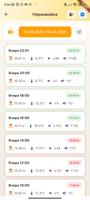
Beehive’s interface centers on paired devices and a timeline of readings. Pairing is guided with on-screen prompts and progress indicators, while device tiles let you open a detailed view to watch live values and review historical charts. Calibration wizards walk you through step-by-step procedures for scales and temperature sensors, helping you complete zeroing and span checks with visual confirmations so you know when a sensor is ready for use.
Controls and interaction
The app uses simple touch controls for day-to-day tasks: tap a device to view live data, swipe between chart time ranges, and pinch to zoom into historical graphs. Editable fields and sliders let you adjust device settings and calibration offsets, while contextual action buttons make it clear when a change requires confirmation. Photo attachment works from the same device view, letting you capture images and tie them to a specific reading or note for easier traceability.
Progression and organization
Rather than levels, Beehive offers a practical progression of setup and organization: add devices, group them into locations or zones, and build a reliable history by taking periodic readings and notes. As you accumulate data, the app surfaces longer-term trends and simple summaries that help you prioritize recalibration or maintenance. Grouping and naming strategies make large deployments manageable and speed up navigation across many sensors.
Data visualization and replay value
Historical logs include clear, scrollable charts and time-based filters that encourage regular review and comparison. This visual context increases the value of repeated measurements — returning to past sessions to compare readings, inspect photo-backed notes, and export or share summaries keeps the app useful over time and supports routine quality checks.
Customization and device settings
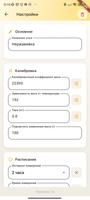
Device-level options let you choose display units, sampling intervals, and threshold alerts that match your workflow. Beehive synchronizes these preferences across signed-in devices so a calibration setting you apply on one phone appears on another. Photo labels and custom note fields let teams add contextual metadata to readings without changing core measurement data.
User experience and accessibility
The app places emphasis on clear text, large touch targets and high-contrast charts to help users operate devices in bright or low-light conditions. Tooltips and short inline help explain calibration terms and setting impacts, reducing the learning curve for new users. Offline caching of recent readings means you can review recent measurements without a network connection.
Cloud sync and privacy
Cloud synchronization is optional: Beehive allows immediate access to core features without creating an account, and enabling sync requires signing in to back up histories and share settings between devices. When you choose cloud backup, data is stored to your account to protect against device loss; local-only use keeps all data on the device until you opt in to syncing.
Limitations and supported hardware
Beehive is designed specifically for Bluetooth hubs and scales and does not support non-Bluetooth devices or unrelated sensor types. Syncing and cloud backup require creating an account and logging in, and the app relies on the paired devices for all measurement sources and calibration procedures.
Maintenance, diagnostics and long-term value
Built-in diagnostic views help you check connection quality and battery status for each paired device, and the combination of time-stamped logs, photo-linked notes and calibration history makes Beehive a practical tool for routine maintenance and auditing. Regular use improves data continuity and helps teams spot drift or anomalies earlier, preserving the value of measurements over months and years.
Show More
Information
Screenshots



Latest Update












Hot Tags
Latest News
-
![Revealing the Launch Playlists and Cross-Progression for COD Warzone Mobile News]()
-
![March 2024 Free Redemption Codes for Honkai: Star Rail News]()
-
PUBG Mobile Teams Up with Bentley Motors: Luxury Cars, Exclusive Collectibles, and Beyond 2024-04-18
![PUBG Mobile Teams Up with Bentley Motors: Luxury Cars, Exclusive Collectibles, and Beyond News]()
-
![Monster Never Cry is now accessible on both Android and iOS mobile devices. News]()
-
V2.2 of the Farlight 84 update introduces an overhauled Season structure, fresh in-game currency, an 2024-04-16
![V2.2 of the Farlight 84 update introduces an overhauled Season structure, fresh in-game currency, an News]()
-
![Arrival of Genshin Impact 4.6 Update: 'Embers of Two Realms, Twilight of Crimson' News]()
-
April 2024 Clash of Clans Update: Unveiling a Fresh Companion, Enhanced Levels, Chat Tagging, and Be 2024-04-16
![April 2024 Clash of Clans Update: Unveiling a Fresh Companion, Enhanced Levels, Chat Tagging, and Be News]()






