

Icon Changer App Widget Kit
Version:1.0
Published:2026-10-12
Introduction
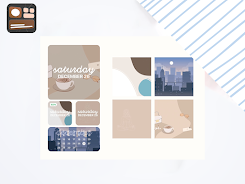
The Icon Changer App Widget Kit transforms your Android home screen by letting you replace app icons and create custom widgets without rooting your device. With an intuitive drag-and-drop editor, built-in icon packs, and quick shortcuts, the tool adapts to varied workflows and aesthetic preferences in a few taps.
What this tool does
Icon Changer App Widget Kit is aimed at users who want precise visual control over their phone interface. Rather than a full launcher replacement, it focuses on modifying icons and crafting widgets that link to apps, contacts or actions. The result is a cleaner, more personalized home screen while keeping your existing launcher and layout.
Primary features at a glance
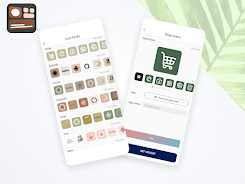
- Custom icon assignment: Choose any image from your gallery or select an icon pack to override default app icons.
- Widget designer: Build compact widgets that display a single app, a toggle, or a multi-function shortcut.
- Shortcut mapping: Attach deep links or app-specific actions to custom icons and widgets for faster access.
- Backup and restore: Save configurations and apply them across devices or after resets.
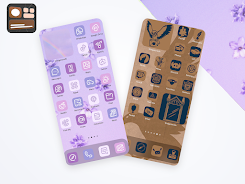
- Batch editing: Replace multiple icons at once to apply consistent themes quickly.
How it works in practice
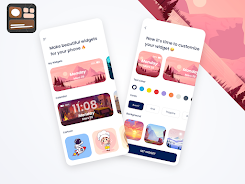
After installing Icon Changer App Widget Kit, you tap the plus icon to start a new icon or widget. The editor lets you crop images, add a shadow or stroke, and adjust size and padding to match your desktop grid. Instead of replacing system files, the app creates shortcuts that mimic native icons, which keeps the process reversible and compatible with most launchers.
Customization tools explained
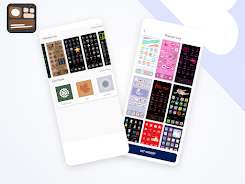
The customization panel provides layered controls: background shape, foreground glyph or image, color filters, and optional label text. Built-in templates speed up creation, while the manual mode gives pixel-level control. For power users, the app supports importing multi-format icon packs and exporting themes as shareable ZIP files.
Interface and performance notes
Design is straightforward and oriented toward quick edits. Menus are grouped by task, and preview modes show how icons will appear on different grid sizes. The app is lightweight, with minimal RAM overhead; most operations run locally and complete in seconds. Battery impact is negligible because the shortcuts rely on existing launcher processes rather than constant background services.
User experience highlights
- Fast previews: Immediate visual feedback helps you iterate without applying changes to the home screen.
- Undo history: A multi-step undo makes it safe to experiment.
- Accessibility: Large controls and clear labels assist users who prefer simple navigation.
Getting started quickly
To set up, grant the app permission to create shortcuts and access storage if you plan to use gallery images. Then select an app from the list, pick or import an image, tweak the style, and place the generated icon on your home screen. For widgets, choose a layout and assign actions before dropping them onto the desktop.
Tips for beginners
- Start with a small set of five icons to test a theme before applying it broadly.
- Use consistent color tones or shapes across icons to maintain visual cohesion.
- Export your favorite setup so you can restore it after updates or device changes.
Advanced workflows and integrations
Advanced users can combine Icon Changer App Widget Kit with automation tools to trigger actions on tap, such as launching split-screen apps or toggling system settings. The app’s batch functions make it simple to re-theme an entire app drawer according to seasonal or productivity-focused palettes.
Why people choose this tool
People appreciate the minimal impact on system stability, the speed of creating polished icons, and the variety of customization options. The ability to personalize each shortcut while keeping familiar launcher behavior is a strong selling point for users who want a custom look without a steep learning curve.
If you want to refresh your phone’s look without complex setups, Icon Changer App Widget Kit offers a balanced set of creative controls and practical shortcuts. Whether you value aesthetics, productivity, or both, it provides a fast route to a more organized and visually pleasing home screen.
Show More
Information
Screenshots
Latest Update












Hot Tags
Latest News
-
![Revealing the Launch Playlists and Cross-Progression for COD Warzone Mobile News]()
-
![March 2024 Free Redemption Codes for Honkai: Star Rail News]()
-
PUBG Mobile Teams Up with Bentley Motors: Luxury Cars, Exclusive Collectibles, and Beyond 2024-04-18
![PUBG Mobile Teams Up with Bentley Motors: Luxury Cars, Exclusive Collectibles, and Beyond News]()
-
![Monster Never Cry is now accessible on both Android and iOS mobile devices. News]()
-
V2.2 of the Farlight 84 update introduces an overhauled Season structure, fresh in-game currency, an 2024-04-16
![V2.2 of the Farlight 84 update introduces an overhauled Season structure, fresh in-game currency, an News]()
-
![Arrival of Genshin Impact 4.6 Update: 'Embers of Two Realms, Twilight of Crimson' News]()
-
April 2024 Clash of Clans Update: Unveiling a Fresh Companion, Enhanced Levels, Chat Tagging, and Be 2024-04-16
![April 2024 Clash of Clans Update: Unveiling a Fresh Companion, Enhanced Levels, Chat Tagging, and Be News]()






