

Chirper Chat
Version:v2.77 Strange Brew
Published:2026-10-12
Introduction
Chirper Chat is a lightweight, privacy-focused messaging app that brings fast text, voice and media sharing into a clean, accessible interface. Designed for everyday conversations and small groups, Chirper Chat balances simple navigation with advanced features like end-to-end encryption, threaded replies and customizable notifications.
What Chirper Chat Offers
Chirper Chat delivers a set of core tools built for smooth, secure communication. Text messages, voice notes, image and video attachments, and group chats work together with message search, archives and message reactions. The app keeps performance lean so conversations load quickly even on older or limited-bandwidth devices.
Key Features
- Secure Messaging: End-to-end encryption for private chats and optional passcode locks for sensitive conversations.
- Rich Media: Fast photo and video sharing with automatic resizing to save data while preserving quality.
- Voice Messaging: One-tap voice notes and playback speed controls for quick listening.
- Organized Chats: Threaded replies and pinned messages make it easy to follow group discussions.
- Custom Alerts: Per-chat notification settings, do-not-disturb schedules and vibration patterns.
User Interface and Workflow
The interface in Chirper Chat emphasizes clarity. A main conversation list displays unread counts, recent attachments and contact statuses at a glance. Opening a chat shows media previews and inline replies so users rarely need to switch screens. An intuitive toolbar gives immediate access to camera, file picker and voice recorder, streamlining the messaging flow.
Practical Uses and Scenarios
Chirper Chat is equally suited to casual conversations, family groups and small teams coordinating tasks. Its media handling and threaded replies are useful for sharing photos of receipts, plans, or short video updates. Lightweight syncing helps remote workers who need reliable messaging while traveling on variable connections.
Privacy and Controls
Privacy is a standout focus. Users can enable encryption for one-on-one chats and choose to verify contact keys for added assurance. Message timers allow content to disappear after a set period, and the app includes granular permission controls for access to camera, location and files. Chirper Chat also supports local backups with optional password protection.
Performance and Compatibility
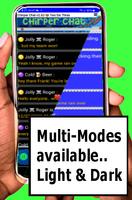
Chirper Chat runs efficiently across a wide range of Android devices. Background data usage is optimized so battery drain and network overhead are minimized. The app adapts to different screen sizes and provides accessibility options like larger fonts and high-contrast themes to improve readability for all users.
Customization and Personalization
Users can personalize Chirper Chat with themes, chat colors and custom notification tones. Profile settings allow multiple display names and status messages, and group admins can set icons and shared descriptions. These options make conversations feel familiar while keeping control centralized for group communication.
Tips for Getting Started
- Enable message backups during initial setup to protect conversation history.
- Adjust notification settings per chat to silence non-essential groups while keeping close contacts audible.
- Use threaded replies and pin important messages to maintain clarity in busy group chats.
- Verify encryption keys with frequent contacts when privacy is critical.
Support and Updates
The app offers in-app help and a concise FAQ for common tasks like restoring backups or managing permissions. Regular updates add polish and security improvements, and release notes highlight performance tweaks and new features so users can stay informed about changes that affect their workflows.
Final Thoughts on Chirper Chat
Chirper Chat presents a balanced messaging experience that prioritizes privacy without sacrificing convenience. Whether users need a fast way to exchange media with friends or a reliable channel for coordinating small teams, the app's combination of security options, clear interface and efficient performance makes it a practical choice for modern mobile communication.
Show More
Information
Screenshots





Latest Update












Hot Tags
Latest News
-
![Revealing the Launch Playlists and Cross-Progression for COD Warzone Mobile News]()
-
![March 2024 Free Redemption Codes for Honkai: Star Rail News]()
-
PUBG Mobile Teams Up with Bentley Motors: Luxury Cars, Exclusive Collectibles, and Beyond 2024-04-18
![PUBG Mobile Teams Up with Bentley Motors: Luxury Cars, Exclusive Collectibles, and Beyond News]()
-
![Monster Never Cry is now accessible on both Android and iOS mobile devices. News]()
-
V2.2 of the Farlight 84 update introduces an overhauled Season structure, fresh in-game currency, an 2024-04-16
![V2.2 of the Farlight 84 update introduces an overhauled Season structure, fresh in-game currency, an News]()
-
![Arrival of Genshin Impact 4.6 Update: 'Embers of Two Realms, Twilight of Crimson' News]()
-
April 2024 Clash of Clans Update: Unveiling a Fresh Companion, Enhanced Levels, Chat Tagging, and Be 2024-04-16
![April 2024 Clash of Clans Update: Unveiling a Fresh Companion, Enhanced Levels, Chat Tagging, and Be News]()






