

Afiro
Version:1.1.5
Published:2026-10-12
Introduction
Afiro is a streamlined productivity app designed to centralize daily tasks, notes, and project timelines into a single, focused workspace. It balances straightforward tools with flexible organization, helping users manage routines, collaborate when needed, and stay on top of deadlines without clutter or steep learning curves.
What Afiro Brings to Your Workflow
Afiro targets professionals and casual users who want a clean interface paired with powerful task management. Instead of overwhelming the screen with features, it focuses on core utilities: task lists, calendar integration, quick notes, and lightweight project views. The result is an app that speeds up planning and reduces context switching.
Primary Features at a Glance
- Unified Task Lists: Create, sort, and prioritize tasks with ease. Subtasks and recurring schedules help keep bigger projects moving.
- Smart Calendar Sync: Two-way syncing with major calendar services ensures appointments and deadlines appear in both places.
- Notes and Quick Capture: Fast note entry minimizes friction when ideas strike. Notes can be linked to tasks or left standalone.
- Custom Labels and Filters: Organize work with tags and filters for fast retrieval of related items.
- Collaboration Basics: Share lists and assign tasks for light team coordination without a heavy project-management overhead.
User Interface and Design Choices
The Afiro interface favors clarity. A muted color palette directs attention to content rather than chrome. Key actions are accessible within two taps: add a task, set a reminder, or jump to today’s agenda. Buttons and gestures feel responsive, and the layout adapts smoothly to both phones and tablets.
Navigation and Accessibility
Top-level navigation uses a bottom bar for essential sections: Home, Tasks, Calendar, and Settings. The compact structure reduces cognitive load, and text sizes are adjustable for accessibility. There are no deep nested menus, which makes common workflows faster.
How Task Management Works
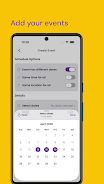
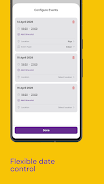
At the core of Afiro is a straightforward task engine. Items can be created quickly with titles, due dates, and optional descriptions. Subtasks provide a simple checkable list under each main item. For recurring tasks, flexible rules let you specify daily, weekly, or custom intervals. Priorities and tags give you visual cues so you can focus on what matters now.
Project Views and Filters
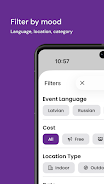
Projects are lightweight collections rather than heavyweight boards. You can switch between list and compact project views depending on how much detail you want. Filters let you slice data by tag, due date, or assignee — useful for shifting focus between personal work and shared tasks.
Performance and Reliability
Afiro emphasizes speed. The app launches quickly, and data operations feel instantaneous even on older devices. Offline support allows you to continue working without a network; changes sync automatically when connectivity returns. Backup and restore options protect your data and make migrations straightforward.
Battery and Resource Use
Resource consumption is kept low through efficient background sync and conservative notification polling. Users report minimal impact on battery life during typical usage patterns, and the app adapts to system-wide battery-saving modes.
Customization and Extensions
Customization in Afiro is practical rather than cosmetic. Choose between compact and comfortable list spacing, adjust notification tones, and set default due-date behaviors. The app supports integrations with common cloud storage and calendar services, plus export options for CSV or plain text for long-term archiving.
Tips for New Users
- Start with a Weekly List: Create a short list for the week to build momentum and establish a habit.
- Use Tags Sparingly: Limit tags to three or four main contexts to avoid overcomplicating filters.
- Link Notes to Tasks: Attach quick notes to tasks to keep reference material near the work item.
- Enable Calendar Sync: Sync early so your events and tasks live together and reduce double-booking.
Why People Choose Afiro
Users appreciate Afiro for reducing task clutter while retaining essential features for planning and collaboration. It sits between simple to-do lists and heavy-duty project managers, making it a strong option for freelancers, small teams, and anyone who wants focused productivity tools without unnecessary complexity.
Getting Started
Download, sign in with an email or supported third-party account, and import tasks or calendars if needed. The onboarding walkthrough highlights the main areas so new users can start organizing their day within minutes.
Show More
Information
Screenshots




Latest Update












Latest News
-
![Revealing the Launch Playlists and Cross-Progression for COD Warzone Mobile News]()
-
![March 2024 Free Redemption Codes for Honkai: Star Rail News]()
-
PUBG Mobile Teams Up with Bentley Motors: Luxury Cars, Exclusive Collectibles, and Beyond 2024-04-18
![PUBG Mobile Teams Up with Bentley Motors: Luxury Cars, Exclusive Collectibles, and Beyond News]()
-
![Monster Never Cry is now accessible on both Android and iOS mobile devices. News]()
-
V2.2 of the Farlight 84 update introduces an overhauled Season structure, fresh in-game currency, an 2024-04-16
![V2.2 of the Farlight 84 update introduces an overhauled Season structure, fresh in-game currency, an News]()
-
![Arrival of Genshin Impact 4.6 Update: 'Embers of Two Realms, Twilight of Crimson' News]()
-
April 2024 Clash of Clans Update: Unveiling a Fresh Companion, Enhanced Levels, Chat Tagging, and Be 2024-04-16
![April 2024 Clash of Clans Update: Unveiling a Fresh Companion, Enhanced Levels, Chat Tagging, and Be News]()






