

Faketalk
Version:2.9.9
Published:2026-10-12
Introduction
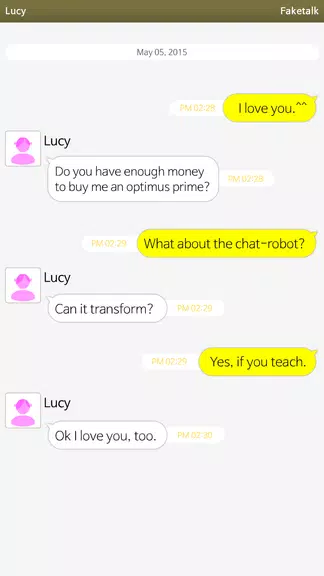
Faketalk is a lightweight Android app that creates realistic mock conversations for screenshots, storytelling, and pranks. It combines a clean interface with flexible templates so users can craft believable chats quickly. Ideal for social media posts, testing UI layouts, or playful messaging scenarios without involving real accounts.
What Faketalk Does
At its core, Faketalk converts user input into polished chat images that mirror popular messaging platforms. You can design both sides of a thread, add timestamps, delivery marks, and even custom avatars. The goal is straightforward: produce convincing chat visuals without connecting to any service or exposing personal data.
Key capabilities
- Template library with multiple conversation styles and device frames.
- Message editing allowing text, emojis, and attachments.
- Export options for high-resolution images ready to share.
- Local-only operation so messages stay on the device.
How It Works: Simple Steps
Faketalk follows a three-step workflow: choose a template, enter messages, and fine-tune visual details. The editor shows a live preview while you type, so adjustments are immediate. Advanced controls let you change message order, set read receipts, and simulate typing indicators for extra realism.
Editing tools explained
- Drag-and-drop sequencing to reorder messages and build realistic conversation flow.
- Appearance toggles for colors, font sizes, and bubble shapes.
- Avatar uploader to insert profile images or initials.
Customization Options and Styling
One of the strengths of Faketalk is the depth of customization. Templates serve as starting points, but you can tweak almost every visual element. Choose dark or light themes, alter background textures, and change status bar details to match the look of different devices. These adjustments help content creators match the aesthetic of their platform or narrative.
Persona and context
Beyond visuals, you can create character profiles—names, statuses, and contact info—so repeated usage keeps consistent personas across multiple scenes. This feature is particularly useful for writers and designers who need recurring chat interactions in a series of images.
Performance and Interface
The interface prioritizes speed and clarity. Menus are organized into clear sections and the preview updates without lag on mid-range hardware. Faketalk maintains small memory and storage footprints, and exports are optimized to balance image quality and file size. For users focused on productivity, the app supports quick-save presets and batch export of multiple scenes.
Accessibility and responsiveness
Buttons and fields are large enough for touch navigation, and color contrast meets common readability standards. Offline capability ensures you can work anywhere, making the app reliable for on-the-go content creation.
Practical Use Cases
Faketalk suits a range of users: content creators making promotional mockups, educators illustrating digital literacy, and developers previewing chat UI without building a backend. It can also serve as a testing tool to prototype messaging layouts or as a playful utility for personalized greetings and social media pranks.
Responsible usage
While the app enables convincing chat creation, it’s designed for harmless, creative purposes. Respect privacy and legal considerations when sharing generated content; avoid impersonation or misinformation that could harm others.
Tips for New Users
- Start with presets: Choose a template and adjust only a few elements to learn the interface quickly.
- Use the preview: Check the conversation flow for natural pacing before exporting.
- Save persona profiles: Reuse names and avatars to keep consistency across projects.
- Export at the right size: Pick image resolution based on whether the final use is web or print.
Installation and First Run
Installing Faketalk is straightforward from standard Android sources. After launch, a short onboarding tour highlights the editor, template chooser, and export button. New users can create a sample chat in minutes and experiment with style settings. If you expect to create many scenes, take advantage of preset saving to speed up future workflows.
Faketalk balances creativity with practicality: it’s a focused tool for producing believable chat visuals quickly while keeping controls simple and accessible. For anyone needing mock conversations—whether for design, storytelling, or lighthearted sharing—it provides a flexible, privacy-conscious option that integrates well into a digital content toolkit.
Show More
Information
Screenshots

Latest Update












Latest News
-
![Revealing the Launch Playlists and Cross-Progression for COD Warzone Mobile News]()
-
![March 2024 Free Redemption Codes for Honkai: Star Rail News]()
-
PUBG Mobile Teams Up with Bentley Motors: Luxury Cars, Exclusive Collectibles, and Beyond 2024-04-18
![PUBG Mobile Teams Up with Bentley Motors: Luxury Cars, Exclusive Collectibles, and Beyond News]()
-
![Monster Never Cry is now accessible on both Android and iOS mobile devices. News]()
-
V2.2 of the Farlight 84 update introduces an overhauled Season structure, fresh in-game currency, an 2024-04-16
![V2.2 of the Farlight 84 update introduces an overhauled Season structure, fresh in-game currency, an News]()
-
![Arrival of Genshin Impact 4.6 Update: 'Embers of Two Realms, Twilight of Crimson' News]()
-
April 2024 Clash of Clans Update: Unveiling a Fresh Companion, Enhanced Levels, Chat Tagging, and Be 2024-04-16
![April 2024 Clash of Clans Update: Unveiling a Fresh Companion, Enhanced Levels, Chat Tagging, and Be News]()






