

NCheck Guard
Version:5.2.1.111
Published:2026-10-12
Introduction
NCheck Guard is a mobile security and attendance tool designed to streamline biometric verification and device monitoring for organizations. It combines face and fingerprint recognition with location and tamper detection to deliver reliable attendance logs, access control, and centralized management for administrators and field teams.
What NCheck Guard does
NCheck Guard focuses on accurate identity capture and secure record keeping. The app collects biometric inputs, validates user presence, and attaches contextual data such as GPS coordinates and timestamps. Admins get consolidated logs that simplify payroll, compliance checks, and audit trails without complex hardware installations.
Core features and functionality
- Biometric verification: Face and fingerprint authentication with configurable thresholds for accuracy and liveness checks.
- Location tagging: Automatic GPS stamping to confirm that check-ins occur at approved sites or geofenced zones.
- Anti-tamper detection: Alerts for device anomalies, attempts to disable the app, or unusual sensor behavior to protect data integrity.
- Audit-ready logs: Time-stamped records exportable in common formats for payroll and regulatory reporting.
- Central management: Remote configuration and user provisioning through a web console or cloud portal.
How it works in daily operations
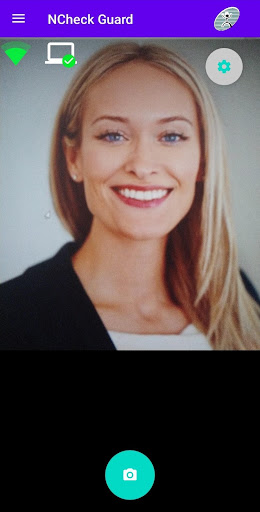
The workflow is straightforward: employees open the app, select a task or job code, and present their face or fingerprint for authentication. NCheck Guard confirms identity, verifies location, and records an entry that managers can review in real time. Offline capture is supported to avoid data loss when connectivity is intermittent, and queued records sync automatically when the device reconnects.
Interface and performance
Designed for rapid interactions, the interface emphasizes large buttons and clear prompts to minimize training time. Biometric scans complete in seconds on modern devices. Background optimizations keep battery impact low while retaining near-instant response for authentication events. The app adapts to different screen sizes and supports basic theming for corporate branding.
Security and privacy considerations
Privacy is handled through local encryption of biometric templates and secure transmission methods for server sync. Administrators can enforce retention policies and role-based access to limit who can view sensitive records. NCheck Guard also provides options for anonymized exports when only attendance metrics are required without personal identifiers.
Deployment options and compatibility
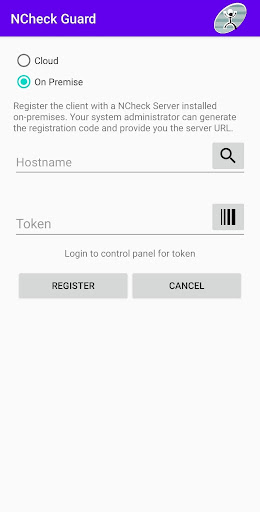
Enterprises can deploy the app on dedicated devices, employee phones, or tablets. It supports a range of Android versions and integrates with common backend systems via APIs. For teams that require centralized oversight, the cloud-hosted management console simplifies onboarding; alternatively, on-premise installations are available for stricter IT environments.
Tips for administrators
- Calibrate biometric thresholds during a pilot period to balance false accepts and false rejects.
- Use geofencing to reduce fraudulent sign-ins from outside permitted locations.
- Schedule periodic audits of logs to detect irregular patterns early.
- Train supervisors on the mobile interface to handle exceptions and manual adjustments.
Best practices for users
Ensure the camera and fingerprint sensor are clean before attempting verification. Keep a stable internet connection when possible to allow immediate syncing. When working in remote areas, enable offline mode and verify that queued entries appear in the app’s sync queue so nothing is missed.
Why organizations choose it
Managers appreciate NCheck Guard for its balance of accuracy and usability. It reduces administrative overhead by automating attendance capture and producing ready-to-use reports. The combination of biometric security with location verification discourages time theft and simplifies compliance documentation for audits.
Getting started
To begin, install the app on chosen devices, enroll users with initial biometric captures, and define geofenced work areas. Configure sync intervals and export formats to match payroll cycles. A short pilot with a representative team helps uncover site-specific adjustments before a full rollout.
Final notes on scalability
NCheck Guard scales from small teams to enterprise deployments by allowing centralized policy control, bulk user imports, and integration hooks for HR and payroll systems. Regular updates expand device compatibility and improve recognition models, keeping the system current as organizational needs evolve.
Show More
Information
Screenshots
Latest Update












Latest News
-
![Revealing the Launch Playlists and Cross-Progression for COD Warzone Mobile News]()
-
![March 2024 Free Redemption Codes for Honkai: Star Rail News]()
-
PUBG Mobile Teams Up with Bentley Motors: Luxury Cars, Exclusive Collectibles, and Beyond 2024-04-18
![PUBG Mobile Teams Up with Bentley Motors: Luxury Cars, Exclusive Collectibles, and Beyond News]()
-
![Monster Never Cry is now accessible on both Android and iOS mobile devices. News]()
-
V2.2 of the Farlight 84 update introduces an overhauled Season structure, fresh in-game currency, an 2024-04-16
![V2.2 of the Farlight 84 update introduces an overhauled Season structure, fresh in-game currency, an News]()
-
![Arrival of Genshin Impact 4.6 Update: 'Embers of Two Realms, Twilight of Crimson' News]()
-
April 2024 Clash of Clans Update: Unveiling a Fresh Companion, Enhanced Levels, Chat Tagging, and Be 2024-04-16
![April 2024 Clash of Clans Update: Unveiling a Fresh Companion, Enhanced Levels, Chat Tagging, and Be News]()






