

Whatsap Status
Version:5.0.9.2
Published:2026-10-13
Introduction
Whatsap Status is a lightweight utility for browsing, creating, and saving short visual updates tailored to messaging platforms. It streamlines status discovery with an intuitive feed, one-tap downloads, and simple editing tools, helping users find trending clips and share polished moments without leaving their chat app.
What the app does
Whatsap Status collects status-style videos, images, and text posts into a clean, scrollable interface. The app focuses on quick actions: preview, save, edit, and share. Rather than trying to replace a full editor or social network, it provides a practical bridge between discovery and expression for people who want fresh status content fast.
Core features at a glance
- Feed of curated content: A rolling selection of popular and themed statuses updated frequently.
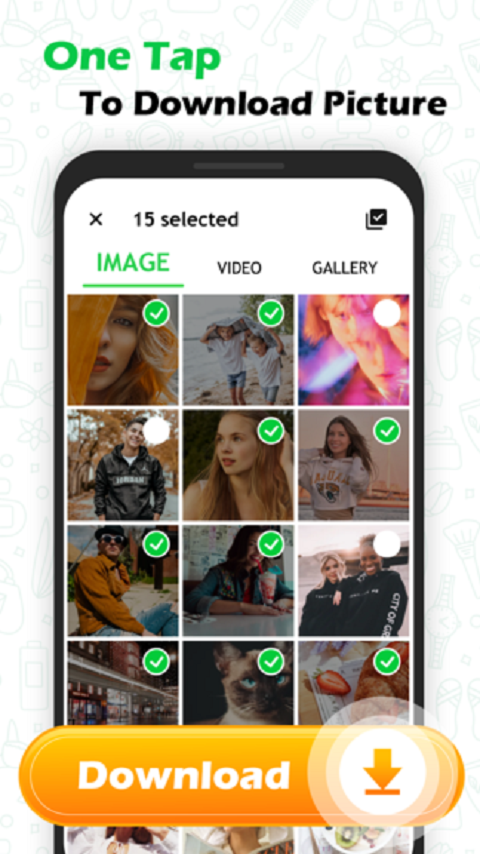
- One-tap downloads: Save media directly to your device with a single tap for offline use.
- Built-in editor: Crop, trim, overlay text, and apply filters without leaving the app.
- Share integration: Send saved items straight to your messaging apps or social networks.
- Favorites and collections: Organize saved statuses into folders for easy retrieval.
User interface and performance
The interface is deliberately minimal. A bottom navigation bar presents the feed, saved items, and editor. Thumbnails load quickly and media previews play inline so you can scan content without long waits. Performance remains smooth on mid-range devices, and memory usage is modest when caching is limited to recent items.
Editing tools and customization
Whatsap Status includes a pared-down set of editing tools geared toward fast tweaks. You can trim clips to the right length, add captions with a few font choices, and layer simple stickers. The app avoids complex timelines or steep learning curves, so edits take seconds instead of minutes. For users wanting lightweight customization before sharing, these options are well chosen.
How it fits into your workflow
For busy users who update statuses frequently, Whatsap Status reduces friction. Browse the feed during a break, save a few promising items, make minor edits, and post without juggling multiple apps. The sharing workflow supports direct posting to common messaging platforms, so creating an engaging status becomes part of a short, repeatable routine.
Safety, permissions, and privacy
Whatsap Status requests basic permissions to access storage for downloads and media playback. The app encourages users to respect copyright and offers clear prompts before saving or reposting content. Privacy-conscious users will appreciate that there are no intrusive trackers in the interface, and options exist to clear cached items and revoke storage access when no longer needed.
Tips for getting the most out of Whatsap Status
- Use collections to build themed batches for holidays, workdays, or special events.
- Preview media with sound muted first to avoid surprises in public spaces.
- Trim clips tightly to match the maximum length supported by your messaging app.
- Save frequently used captions in a notes app so you can paste them quickly when reposting.
Beginners will find Whatsap Status easy to navigate, while regular users will appreciate time savings. The app favors speed and convenience over exhaustive editing capabilities, making it ideal for people who prefer to post authentic, polished-looking updates without investing much time.
Why users choose this tool
People turn to Whatsap Status because it fills a specific need: fast access to shareable, status-sized media. It removes the guesswork of where to find content and how to prepare it for sharing. Combined with reliable saving and straightforward editing, the app becomes a practical extension of daily messaging habits.
Getting started
Installation is simple: download, grant storage permission, and browse. The initial walkthrough highlights the feed and editor so new users can start saving content immediately. If you rely on regular status updates, a few minutes exploring the app will reveal efficient patterns for curation and posting.
Overall, Whatsap Status delivers a focused, efficient experience for anyone who frequently updates their messaging status. It balances discovery, editing, and sharing in a compact package that emphasizes ease of use and speed.
Show More
Information
Screenshots


Latest Update












Latest News
-
![Revealing the Launch Playlists and Cross-Progression for COD Warzone Mobile News]()
-
![March 2024 Free Redemption Codes for Honkai: Star Rail News]()
-
PUBG Mobile Teams Up with Bentley Motors: Luxury Cars, Exclusive Collectibles, and Beyond 2024-04-18
![PUBG Mobile Teams Up with Bentley Motors: Luxury Cars, Exclusive Collectibles, and Beyond News]()
-
![Monster Never Cry is now accessible on both Android and iOS mobile devices. News]()
-
V2.2 of the Farlight 84 update introduces an overhauled Season structure, fresh in-game currency, an 2024-04-16
![V2.2 of the Farlight 84 update introduces an overhauled Season structure, fresh in-game currency, an News]()
-
![Arrival of Genshin Impact 4.6 Update: 'Embers of Two Realms, Twilight of Crimson' News]()
-
April 2024 Clash of Clans Update: Unveiling a Fresh Companion, Enhanced Levels, Chat Tagging, and Be 2024-04-16
![April 2024 Clash of Clans Update: Unveiling a Fresh Companion, Enhanced Levels, Chat Tagging, and Be News]()






