
Peel Universal Smart TV
Version:2.02
Published:2026-10-13
Introduction
Peel Universal Smart TV is a versatile remote control app that turns your Android device into a customizable TV and set-top box controller. It combines an electronic program guide, universal IR/Bluetooth control, and quick device setup to simplify channel surfing, volume adjustments, and smart home interactions from one clean interface.
What this app does
Peel Universal Smart TV offers an integrated way to manage living-room entertainment without juggling multiple remotes. The app supports both infrared (IR) blasters and networked devices, enabling control of TVs, set-top boxes, receivers, and streaming sticks. A built-in program guide and scheduling tool make it easy to discover shows and set reminders.
Main functionality and design
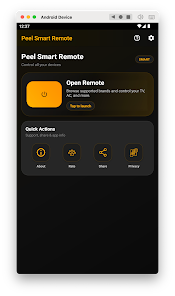
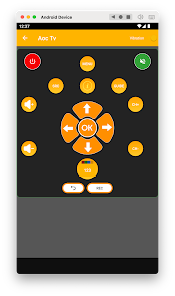
The user interface centers on a minimal remote layout and a recommendations pane. Common controls—power, channel, input, and volume—are presented as large buttons, while less-used features live in expandable menus. The visual hierarchy helps reduce accidental taps and keeps navigation fast, especially during live TV sessions.
Key features at a glance
- Universal control: Works with multiple brands and device types via IR or Wi-Fi.
- Electronic program guide: Browse channels, view show details, and set reminders.
- Customizable remotes: Add, rename, or rearrange devices and buttons.
- Voice commands: Search for channels and programs hands-free (where supported).
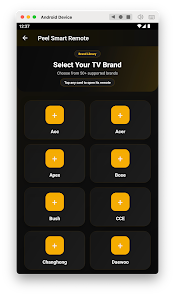
- Quick setup: Auto-detect and simple pairing for common TV models.
Practical usage scenarios
Whether you want to replace a lost remote or streamline a complex AV setup, Peel Universal Smart TV adapts to different households. It’s useful for families who share a living room, for cord-cutters who combine streaming and antenna sources, and for anyone who prefers controlling multiple devices from a single screen.
Customization and personalization
Custom profiles let you tailor remote layouts and hide buttons you never use. The app also suggests shows based on viewing history and offers a favorites list for quicker access. For advanced users, custom macros can execute multiple commands—switch input and launch an app—with one tap.
Performance and responsiveness
Performance varies with network conditions and device hardware. When using an IR blaster, commands are nearly instantaneous. Network control relies on local Wi-Fi reliability; on a stable network, response times are comparable to dedicated remotes. The app minimizes background activity to preserve battery life while remaining responsive when active.
User experience highlights
Peel Universal Smart TV balances simplicity and power. New users benefit from setup wizards and prompts, while power users can exploit customization. The app’s readability and large touch targets reduce frustration when navigating in dim lighting or from a distance.
Compatibility and limitations
The app supports a broad range of consumer electronics, but exact compatibility depends on device make, model, and whether your phone has an IR emitter or the target device supports network control. Some niche or very new models may require manual configuration.
Tips for getting the most out of the app
- Place your phone where the IR path to the TV is unobstructed if using a blaster.
- Keep devices on the same Wi-Fi network for reliable TCP/IP control.
- Create custom device groups (TV + soundbar) to manage volume and input with one tap.
- Use the guide to set reminders in advance and avoid missing live broadcasts.
Peel Universal Smart TV is a solid choice for users seeking a centralized, smart remote solution. Its blend of a program guide, device compatibility, and customization tools makes it practical for daily use. With a few setup adjustments and device-aware tweaks, the app can significantly reduce clutter and simplify media control across the home entertainment setup.
Show More
Information
Screenshots
Latest Update












Hot Tags
Latest News
-
![Revealing the Launch Playlists and Cross-Progression for COD Warzone Mobile News]()
-
![March 2024 Free Redemption Codes for Honkai: Star Rail News]()
-
PUBG Mobile Teams Up with Bentley Motors: Luxury Cars, Exclusive Collectibles, and Beyond 2024-04-18
![PUBG Mobile Teams Up with Bentley Motors: Luxury Cars, Exclusive Collectibles, and Beyond News]()
-
![Monster Never Cry is now accessible on both Android and iOS mobile devices. News]()
-
V2.2 of the Farlight 84 update introduces an overhauled Season structure, fresh in-game currency, an 2024-04-16
![V2.2 of the Farlight 84 update introduces an overhauled Season structure, fresh in-game currency, an News]()
-
![Arrival of Genshin Impact 4.6 Update: 'Embers of Two Realms, Twilight of Crimson' News]()
-
April 2024 Clash of Clans Update: Unveiling a Fresh Companion, Enhanced Levels, Chat Tagging, and Be 2024-04-16
![April 2024 Clash of Clans Update: Unveiling a Fresh Companion, Enhanced Levels, Chat Tagging, and Be News]()






